
Advanced MRP Accounting
| Lines of Code | 3896 |
| Technical name | viin_mrp_account |
| License | OPL-1 |
| Website | https://viindoo.com/apps/modules/18.0/viin_mrp_account |
| Read description for | v 16.0 v 17.0 |
| Required Apps | Manufacturing (mrp) Invoicing (account) Discuss (mail) Inventory (stock) |
| Included Dependencies | Viindoo Manufacturing Viindoo Base Viin Warehouse Web Gantt Viin Warehouse Accounting |
| Extensions | Shop Floor Control Manufacturing Standard Consumption Analysis Subcontracting Report Advanced MRP Landed Cost Vietnam - Subcontracting Management & Accounting Manufacturing WIP Accounting - Vietnam |

From the journal entry back to the production order
Production cost you can follow in the ledger: work in progress posted the Odoo 18 way, a cost report that matches valuation, and every entry linked back to its manufacturing or unbuild order.
Advanced MRP Accounting (technical name viin_mrp_account) is an Odoo 18.0 app for Odoo Community and Viindoo Cloud, built for cost accountant, chief accountant, production manager, auditor.
At a Glance
The facts of Advanced MRP Accounting, version 1.4.2, in one place. Published by Viindoo.
How It Works
Five screens.
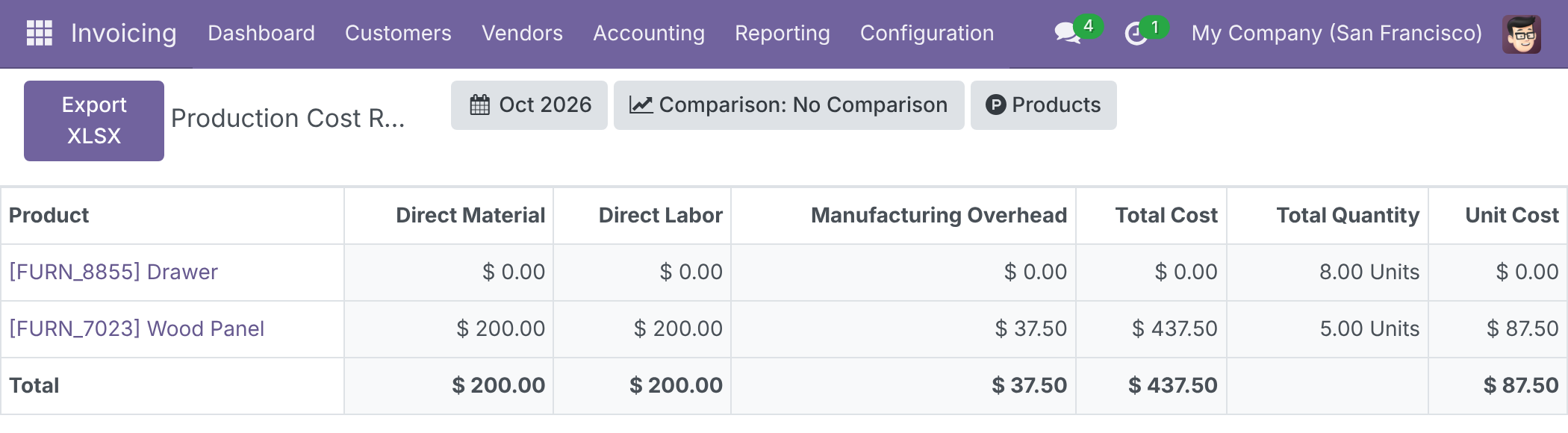
Production Cost Report
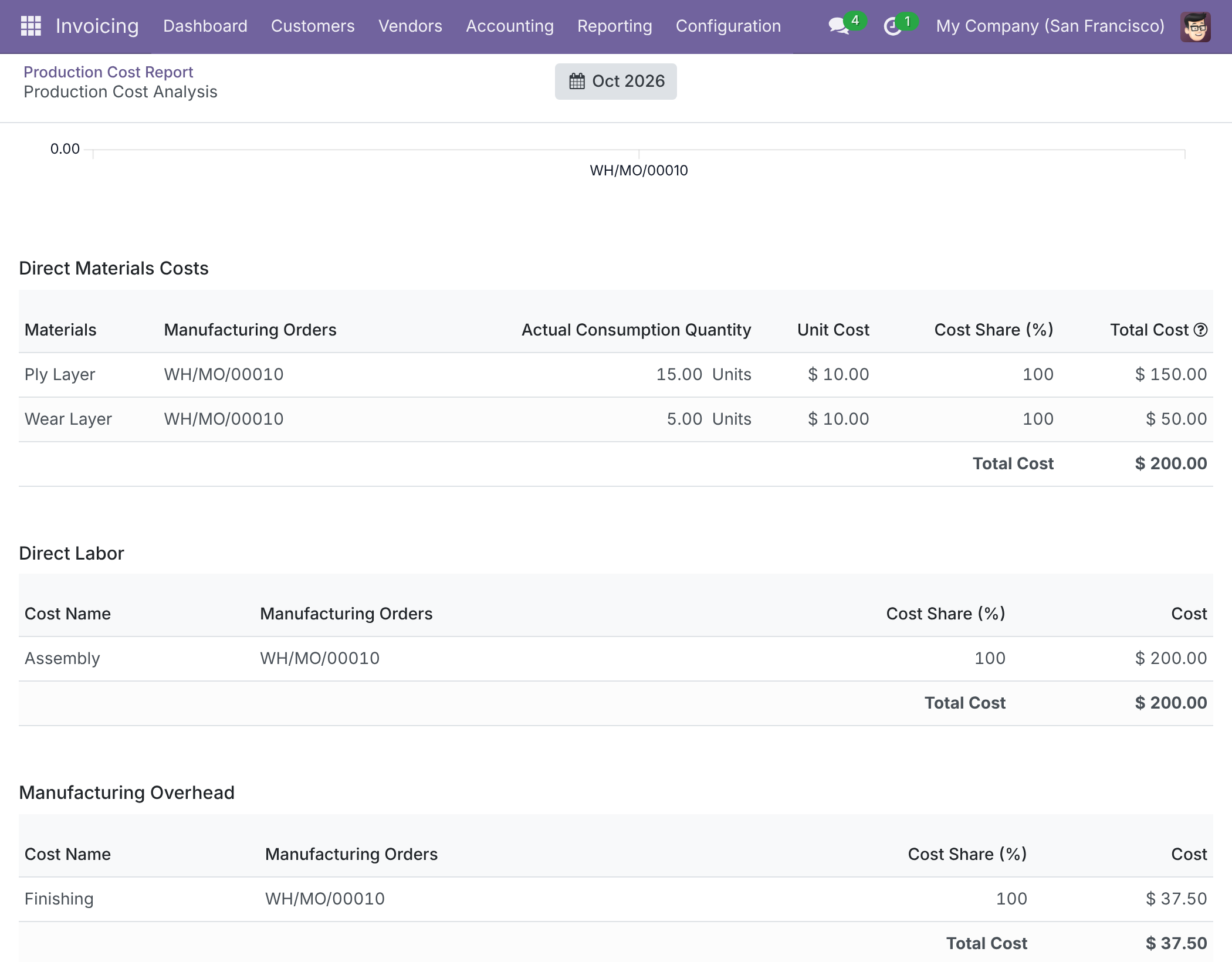
Compare what each finished product cost, period by period: direct material, direct labour and manufacturing overhead side by side, with total cost, quantity and unit cost. Open any product to see its Cost Analysis - the cost tables behind the figure and a unit-cost trend by order. The Total row adds up amounts only, as unit costs and quantities of different products do not add up. Accounting users with the Basic or Read-only accounting access right open the report.
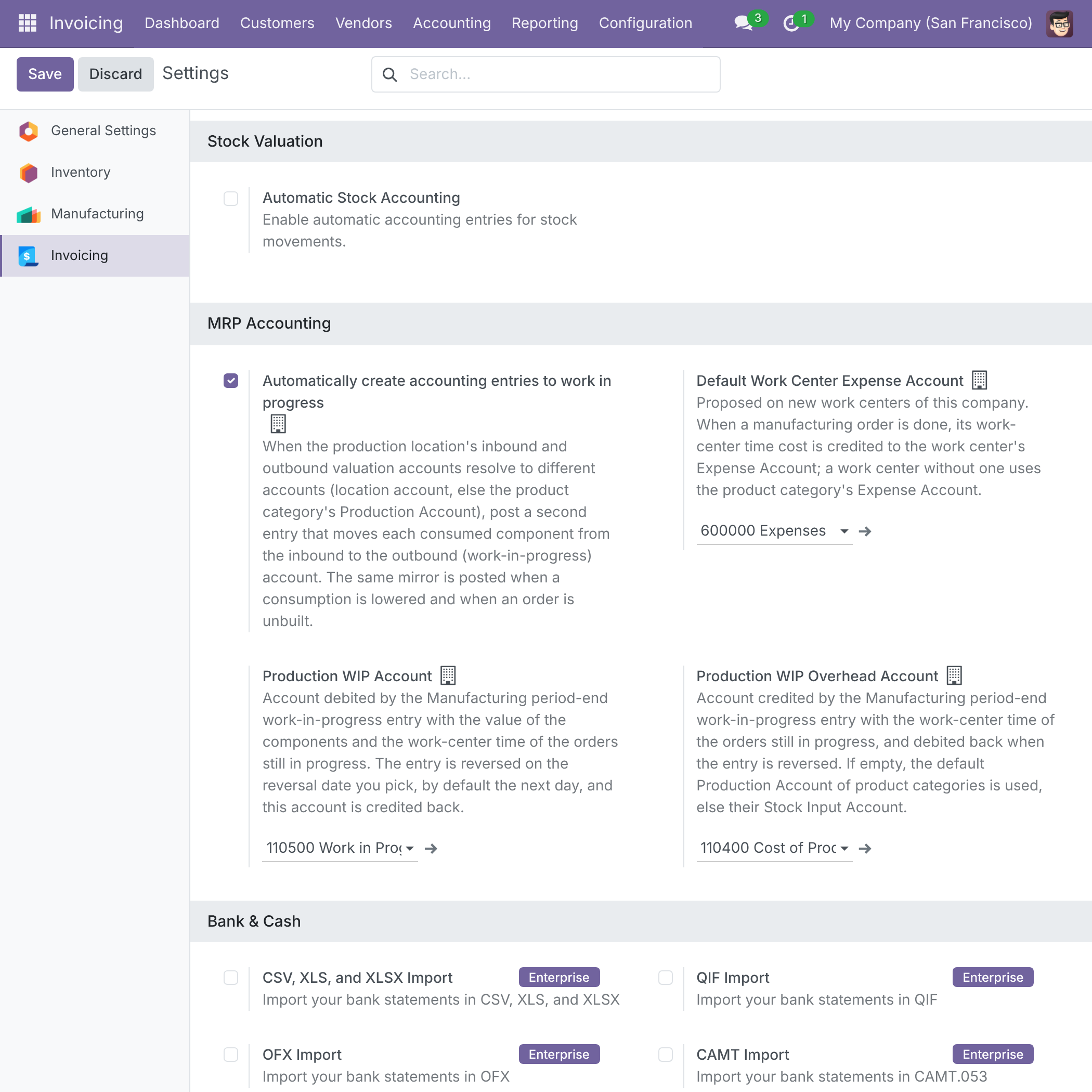
Work in progress, posted the Odoo 18 way
With forwarding on, component consumption moves to the work-in-progress account and the finished goods relieve it; a correction posts exactly one reversal. If a done order's consumption changes later, the difference is reallocated to its finished goods - revalued while in stock, or posted to the output or expense account once delivered - so work in progress returns to zero. Set the Default Work Center Expense Account once for new work centers. The Production WIP Account and the Production WIP Overhead Account that the period-end work-in-progress entry posts to are set in the same MRP Accounting block of Settings > Invoicing.
Entries that name their order
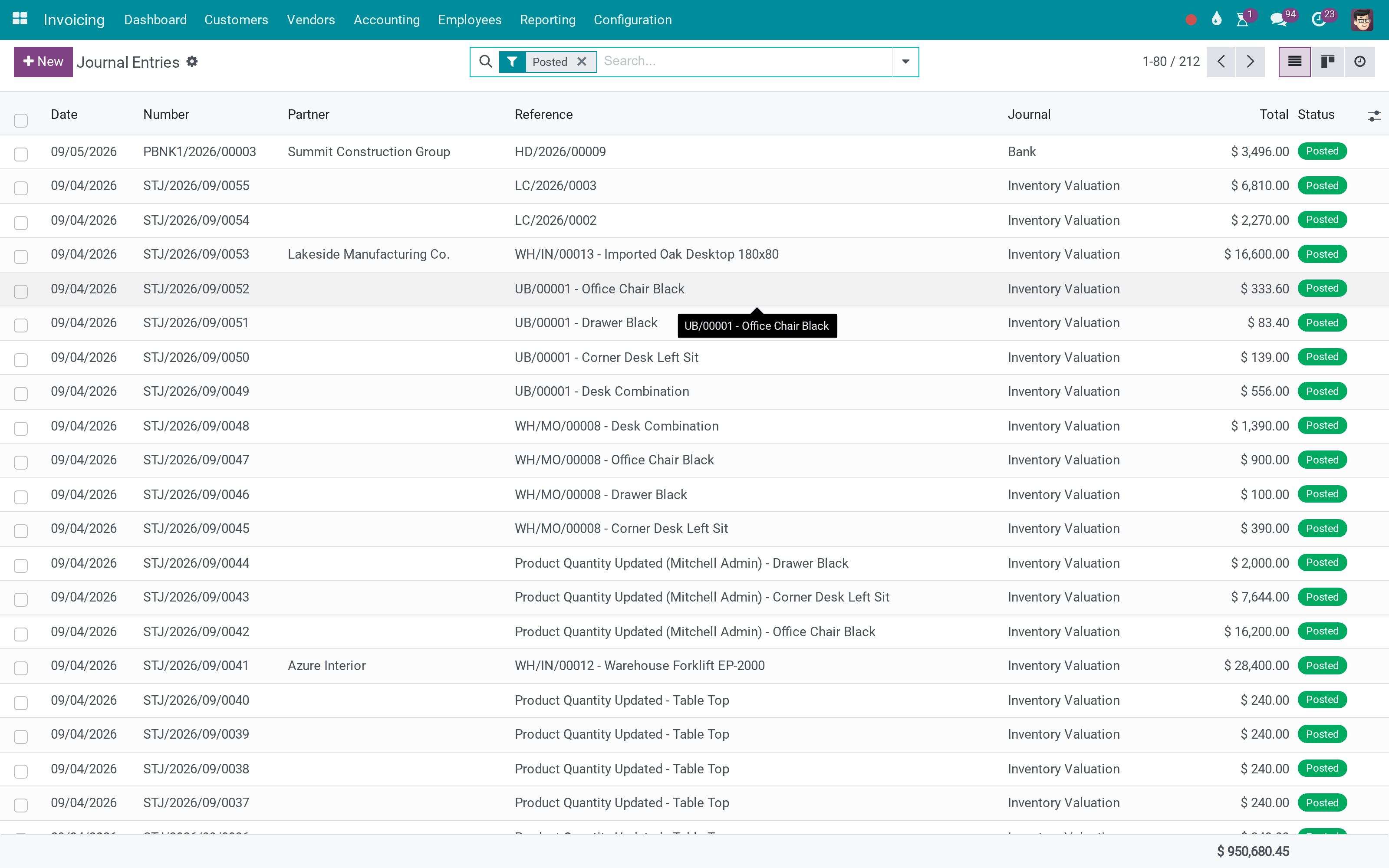
Every journal entry and journal item shows the manufacturing or unbuild order behind it, so you can search and group the ledger by order.
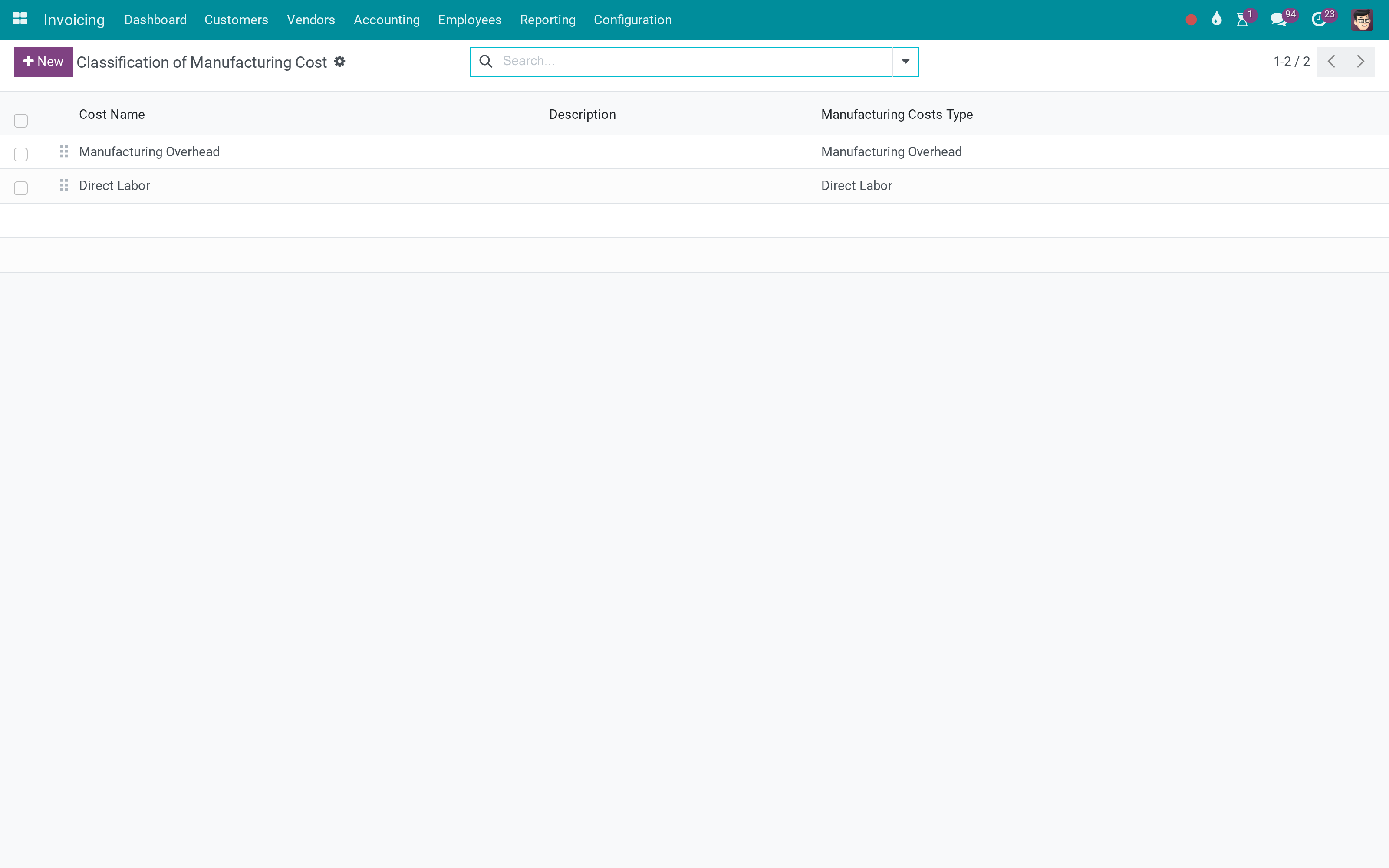
Cost, classified
Direct labour and manufacturing overhead are the two cost classes that become columns of the cost report; each work center is assigned to one.
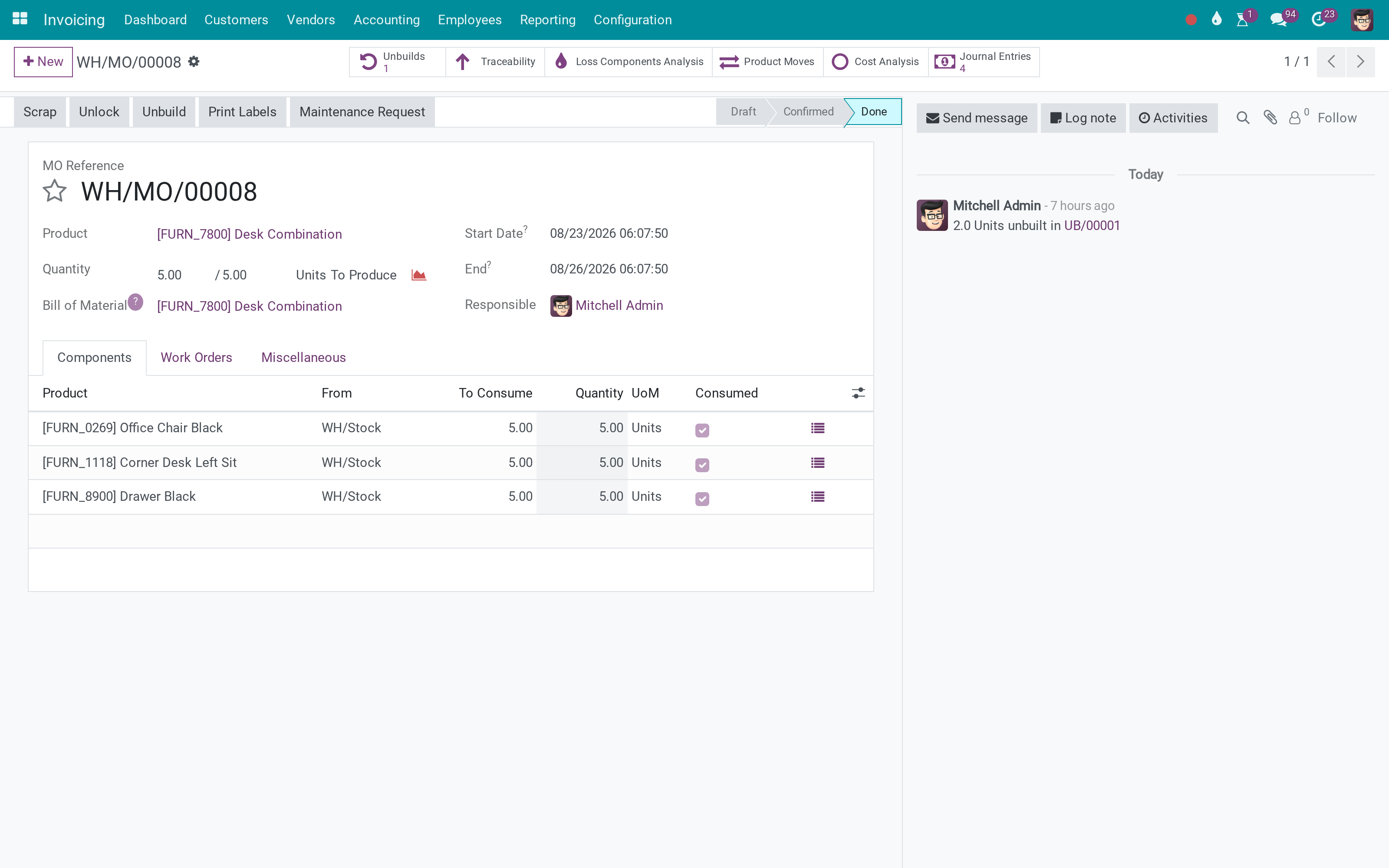
The order itself
A done manufacturing order carries a Cost Analysis button and a Journal Entries button for accounting users, so its cost and every entry it caused are one click away. The Overview button of Odoo is shown on the order as well.
What You Get
A Production Cost Report and Cost Analysis that match finished-goods valuation
Work-in-progress entries posted the Odoo 18 way, with exactly one reversal on a correction
Late consumption on a done order reallocated to its finished goods, so work in progress returns to zero
A default Work Center Expense Account proposed on every new work center
The accounts of the period-end work-in-progress entry (Production WIP Account and Production WIP Overhead Account) set per company in the MRP Accounting settings
Manufacturing and unbuild orders on journal entries and journal items, so every entry traces back to its order
A manufacturing-cost classification: direct labour and manufacturing overhead
More Screens
Everything below was taken on a database seeded with real business data, on this series - not a mock-up and not a screenshot from an older version.
A manufacturing order
What This App Does Not Do
Read this before you buy. Everything below is something the app deliberately leaves to another app or to you.
Costing method stays your configuration.
An order appears in the Production Cost Report once it is done.
Which cost is which is an accounting decision, made once.
Without automatic stock accounting no work-in-progress entries are posted.
Works Well With
Apps from the same stack, built to fit this one:
Unbuild Stock Value
Valuing components when a product is taken apart.
BoM Component Cost Percentage - UnbuildWho Should Use Advanced MRP Accounting?
Cost accountant
Reads production cost from the ledger, by order.
Chief accountant
Explains a manufacturing month without asking production.
Production manager
Reads the order with its Overview, and the cost accountant explains what it cost in the accounts.
Auditor
Follows an entry back to the order that caused it.
Frequently Asked Questions
What does Advanced MRP Accounting do?
Production cost you can follow in the ledger: work in progress posted the Odoo 18 way, a cost report that matches valuation, and every entry linked back to its manufacturing or unbuild order.
What does Advanced MRP Accounting not do?
It does not compute standard cost. Costing method stays your configuration. It reports finished orders only. An order appears in the Production Cost Report once it is done. Classification is data. Which cost is which is an accounting decision, made once. It needs automated (real-time) valuation for the work-in-progress entries. Without automatic stock accounting no work-in-progress entries are posted.
Who is Advanced MRP Accounting for?
Cost accountant: Reads production cost from the ledger, by order. Chief accountant: Explains a manufacturing month without asking production. Production manager: Reads the order with its Overview, and the cost accountant explains what it cost in the accounts. Auditor: Follows an entry back to the order that caused it.
Which Odoo version and editions does it support?
Odoo 18.0 - Odoo Community, Viindoo Cloud. Upgrades to a newer Odoo series are a separate purchase for that series.
What does it depend on?
It installs on top of: mrp_account, viin_mrp, viin_stock_account. Odoo installs them with it.
How do I set it up?
Five screens.
What works well with it?
Unbuild Stock Value (to_mrp_bom_stock_value): Valuing components when a product is taken apart. Stock & Journal Links (to_stock_account_moves_link): The same trail for transfers. Accounting Reports (to_account_reports): Where production cost is finally read.
Can I try it before buying?
Yes - the Live Preview button at the top of this page opens the module's own screen on a working database.
How do I get support?
Write to apps.support@viindoo.com with your Odoo version and the technical name viin_mrp_account; pre-sales questions go to sales@viindoo.com.
See Advanced MRP Accounting in Action
or use the Live Preview button at the top of this page
Need help with Advanced MRP Accounting?
For questions, implementation support or a custom feature, contact Viindoo.
Pre-Sales & Partnership
sales@viindoo.comUpgrades to a newer Odoo series are a separate purchase for that series.
All Viindoo apps: Viindoo Apps
Technical Requirement
Changes log
1.4.2 - Latest on the 18.0 line
- Split out of viin_stock.
- Moved JavaScript code to be compatible with Owl/Odoo 18.
- Spread selection descriptor, not class, in fields registry.
- Avoid access errors.
This software and associated files (the "Software") may only be used (executed, modified, executed after modifications) if you have purchased a valid license from the authors, typically via Odoo Apps, or if you have received a written agreement from the authors of the Software (see the COPYRIGHT file).
You may develop Odoo modules that use the Software as a library (typically by depending on it, importing it and using its resources), but without copying any source code or material from the Software. You may distribute those modules under the license of your choice, provided that this license is compatible with the terms of the Odoo Proprietary License (For example: LGPL, MIT, or proprietary licenses similar to this one).
It is forbidden to publish, distribute, sublicense, or sell copies of the Software or modified copies of the Software.
The above copyright notice and this permission notice must be included in all copies or substantial portions of the Software.
THE SOFTWARE IS PROVIDED "AS IS", WITHOUT WARRANTY OF ANY KIND, EXPRESS OR IMPLIED, INCLUDING BUT NOT LIMITED TO THE WARRANTIES OF MERCHANTABILITY, FITNESS FOR A PARTICULAR PURPOSE AND NONINFRINGEMENT. IN NO EVENT SHALL THE AUTHORS OR COPYRIGHT HOLDERS BE LIABLE FOR ANY CLAIM, DAMAGES OR OTHER LIABILITY, WHETHER IN AN ACTION OF CONTRACT, TORT OR OTHERWISE, ARISING FROM, OUT OF OR IN CONNECTION WITH THE SOFTWARE OR THE USE OR OTHER DEALINGS IN THE SOFTWARE.