
POS Receipt Misa meInvoice Information
| Lines of Code | 536 |
| Technical name | l10n_vn_viin_accounting_meinvoice_pos |
| License | OPL-1 |
| Website | https://viindoo.com/apps/modules/18.0/l10n_vn_viin_accounting_meinvoice_pos |
| Read description for | v 16.0 v 17.0 |
| Required Apps | Invoicing (account) Discuss (mail) Inventory (stock) |
| Included Dependencies | Vietnamese E-Invoice Integration E-Invoice - Misa meInvoice Integrator Show EInvoice Information on POS Receipt Pos Refund Advance Partner Budget Code Partner Identity Information Viindoo Base Accounting Foundation Legal Invoice Number API Request Logger |

POS Receipt - MISA meInvoice Information
Show MISA meInvoice e-invoice information - tax-authority code, secret code and lookup URL - directly on the printed POS receipt, in full compliance with Vietnam's e-invoice regulations
Odoo 18.0 · Community and Enterprise · OPL-1
Extends Show EInvoice Information on POS Receipt with the MISA meInvoice values and retry.
At a Glance
POS Receipt - MISA meInvoice Information at a glance, published by Viindoo.
Key Features
Built natively on Odoo/Viindoo to streamline real business operations:
Decree 254/2026/ND-CP Legal Disclosure on the Receipt
Automatically prints the tax-authority code (CQT), secret/lookup code, lookup URL and the cash-register legal note for every POS order invoiced through MISA meInvoice.
Automatic Retry While MISA Is Still Processing
MISA issues e-invoices asynchronously. If the tax-authority code is not back yet at checkout, the POS retries a bounded number of times before printing best-effort - checkout never waits on MISA.
Same Receipt Layout as Every Other Provider
The disclosure block is identical whether the invoice is issued through MISA meInvoice, Viettel S-Invoice or VNInvoice - cashiers and customers always see one predictable layout.
Zero Extra Configuration
Builds directly on your existing Vietnam E-Invoicing settings and MISA meInvoice connection - nothing new to configure in the point of sale.
Benefits
Meets the Decree No. 254/2026/ND-CP requirements for e-invoices generated from a cash register.
Buyers look up their e-invoice with the lookup code and URL printed on the receipt in their hand.
The built-in retry keeps the receipt accurate even when MISA's scheduled issuance job takes a little longer than the checkout itself.
Reuses your MISA meInvoice integration and the shared POS e-invoice receipt - no duplicate settings, no separate receipt template to maintain.
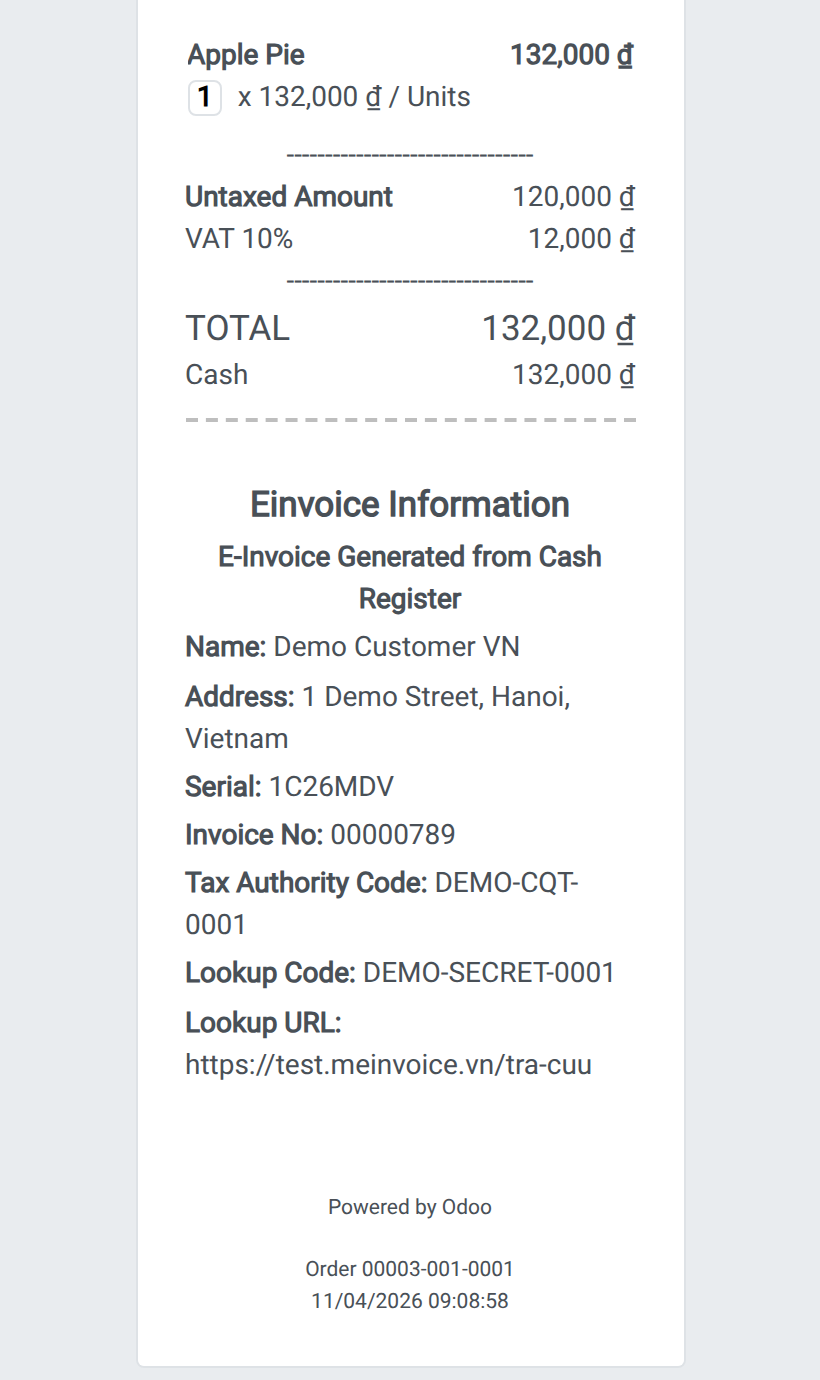
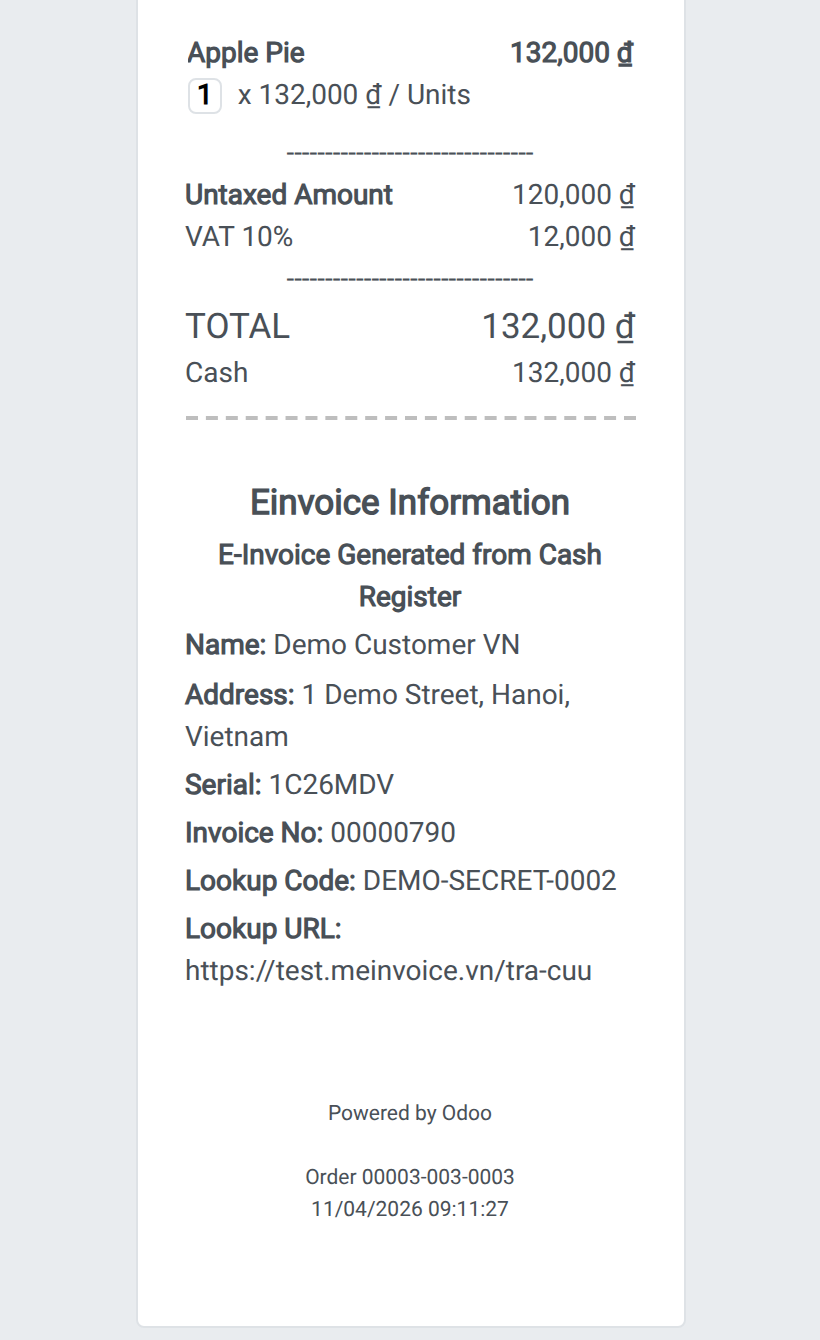
Decree 254/2026/ND-CP disclosure on the POS receipt
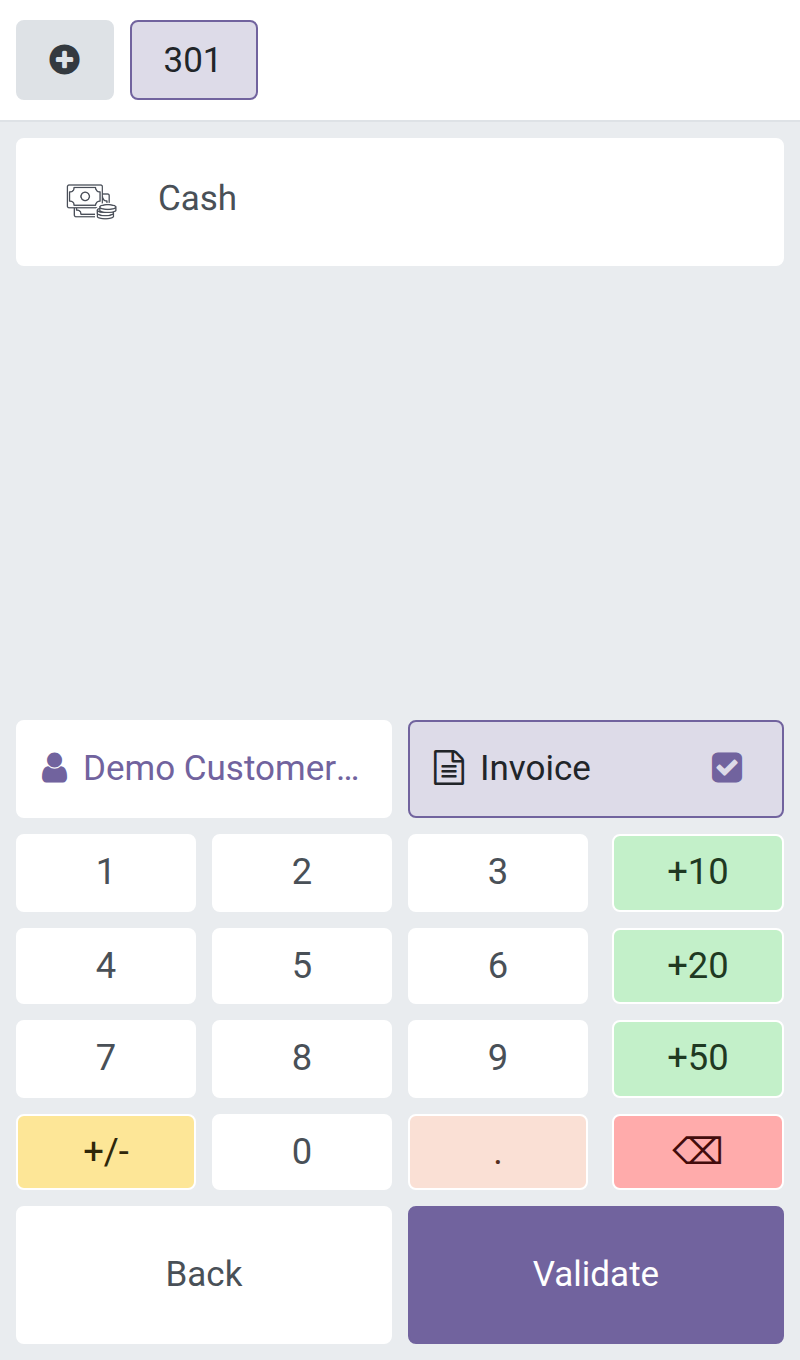
Invoice a POS order through MISA meInvoice
Automatic retry keeps the receipt accurate
See POS Receipt - MISA meInvoice Information in Action
See how this module solves real business problems in a working Viindoo environment.
Need help with POS Receipt - MISA meInvoice Information?
For questions, implementation support, or consulting services, contact Viindoo.
Pre-Sales & Partnership
When contacting us, please include:
- Odoo/Viindoo version (CE/EE).
- Number of users and business scope.
- Other modules currently in use.
Technical Support
For faster troubleshooting, please provide:
- Order number or app reference.
- Odoo/Viindoo version & edition.
- Steps to reproduce the issue.
- Screenshots/logs if available.
Technical Requirement
Works Great With These Modules
Extend POS Receipt - MISA meInvoice Information with complementary Viindoo apps:
Vietnamese E-Invoice Integration
The provider-agnostic backbone that configures, issues, tracks, adjusts, replaces and cancels every e-invoice provider from one unified interface.
Module l10n_vn_viin_ediE-Invoice - Misa meInvoice Integrator
Issues legal e-invoices through MISA meInvoice from customer invoices - the provider connection this module's POS receipt reads from.
Module l10n_vn_viin_accounting_meinvoiceShow EInvoice Information on POS Receipt
Owns the shared, provider-agnostic POS receipt disclosure block that this module feeds with MISA meInvoice values.
Module l10n_vn_viin_edi_posE-Invoice - Viettel S-Invoice Integrator
Issue Vietnamese e-invoices through Viettel S-Invoice as well, so a store using multiple providers still gets the same POS receipt experience.
Module l10n_vn_viin_accounting_sinvoiceWho Should Use This Module?
Built for teams that need this capability fully integrated into their Odoo/Viindoo stack.
Retail & F&B Cashiers
Shopping centers, supermarkets, restaurants, hotels and pharmacies that issue MISA meInvoice e-invoices directly from the cash register.
Accounting & Compliance Teams
Need every POS-issued e-invoice to carry the Decree 254/2026/ND-CP legal disclosure without a manual, error-prone step.
Implementers & Odoo Partners
Looking for a production-ready MISA meInvoice POS companion to deliver Vietnamese e-invoice projects faster and at lower risk.
Installation
- Navigate to Apps.
- Search with keyword l10n_vn_viin_accounting_meinvoice_pos.
- Press Activate.
Instruction
Instruction video: POS Receipt - MISA meInvoice Information
This module is a thin MISA meInvoice companion for the point of sale. It does not draw its own receipt: it maps MISA's own e-invoice identifiers into the provider-agnostic POS receipt disclosure block that l10n_vn_viin_edi_pos already renders for every e-invoice provider, and it decides when the POS should retry printing that disclosure because MISA has not returned the codes yet. Once a POS order is invoiced through MISA meInvoice, the printed receipt shows the same Decree 254/2026/ND-CP legal disclosure as any other provider - no separate MeInvoice-only layout.
1. Install this module together with its two prerequisites.
- Go to Apps and make sure l10n_vn_viin_accounting_meinvoice (the MISA meInvoice integrator) and l10n_vn_viin_edi_pos (the shared POS e-invoice receipt) are installed - this module depends on both and only adds the MISA-specific mapping and retry logic on top of them.
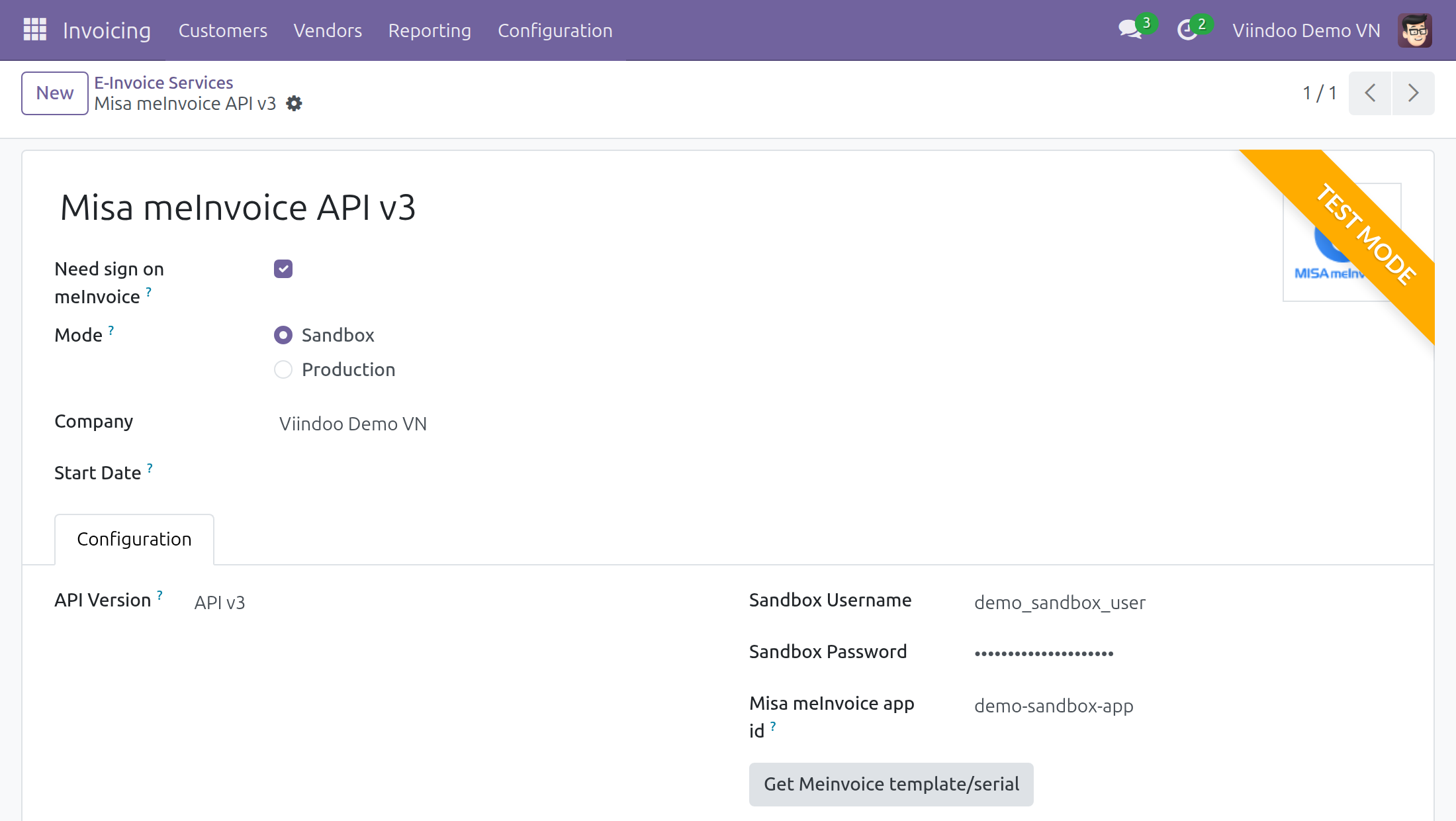
2. Connect MISA meInvoice and make it the company's e-invoice provider.
- Go to Invoicing > Configuration > E-Invoice > E-Invoice Services (the app is called Accounting in the Enterprise edition) and open the Misa meInvoice service. Choose its Mode - Sandbox while you are testing (the form then carries a Test Mode ribbon) or Production for live invoices - and fill in the connection information as described in the E-Invoice - Misa meInvoice Integrator user guide.
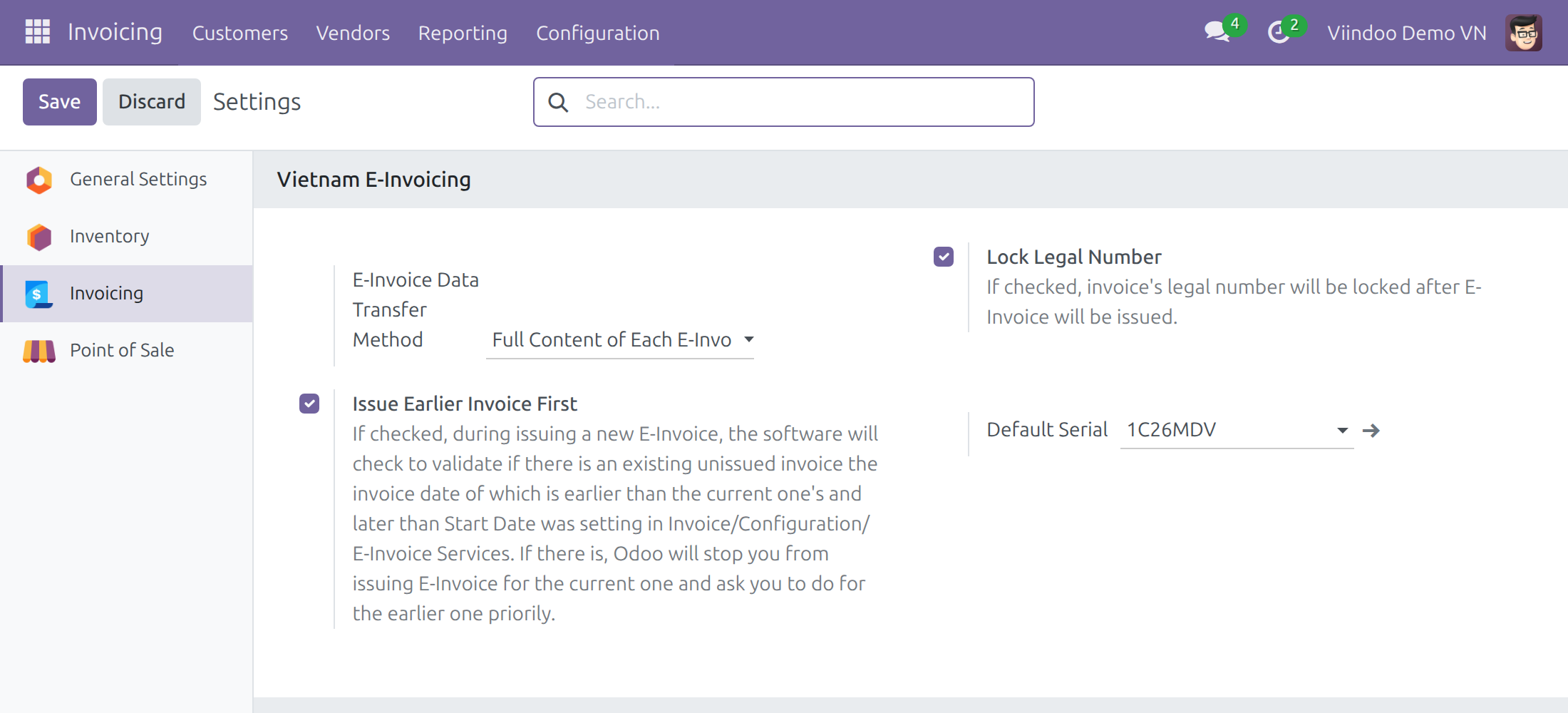
- Go to Invoicing > Configuration > Settings, open the Vietnam E-Invoicing section and set Default Serial to a serial of the MISA meInvoice service. Customers without a serial of their own, such as the buyers of POS orders, are then invoiced through MISA meInvoice.
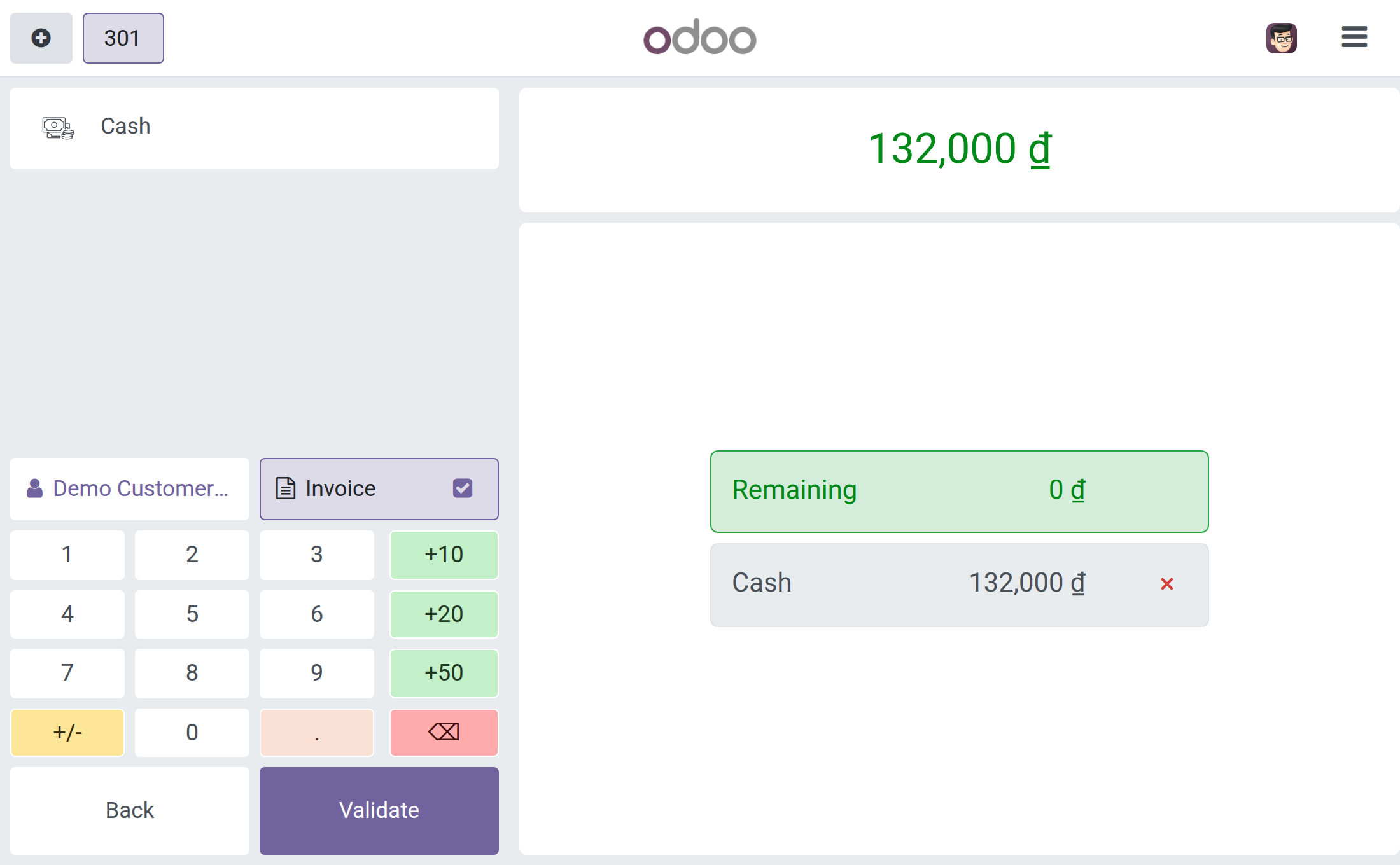
3. Invoice a POS order through MISA meInvoice.
- At the POS payment screen, turn on the invoice option before validating the payment - exactly as with any other e-invoice provider. When the order's invoice is issued through MISA meInvoice, the printed receipt automatically shows the Decree 254/2026/ND-CP legal disclosure.
4. Read the Decree 254/2026/ND-CP disclosure on the printed receipt.
- The receipt shows the tax-authority code (CQT), the secret/lookup code, the lookup URL, and the cash-register legal note - drawn from MISA's response - in the exact same layout used for every other e-invoice provider (Viettel S-Invoice, VNInvoice). Nothing on this screen is MeInvoice-specific: this module only feeds the shared skeleton the right values.
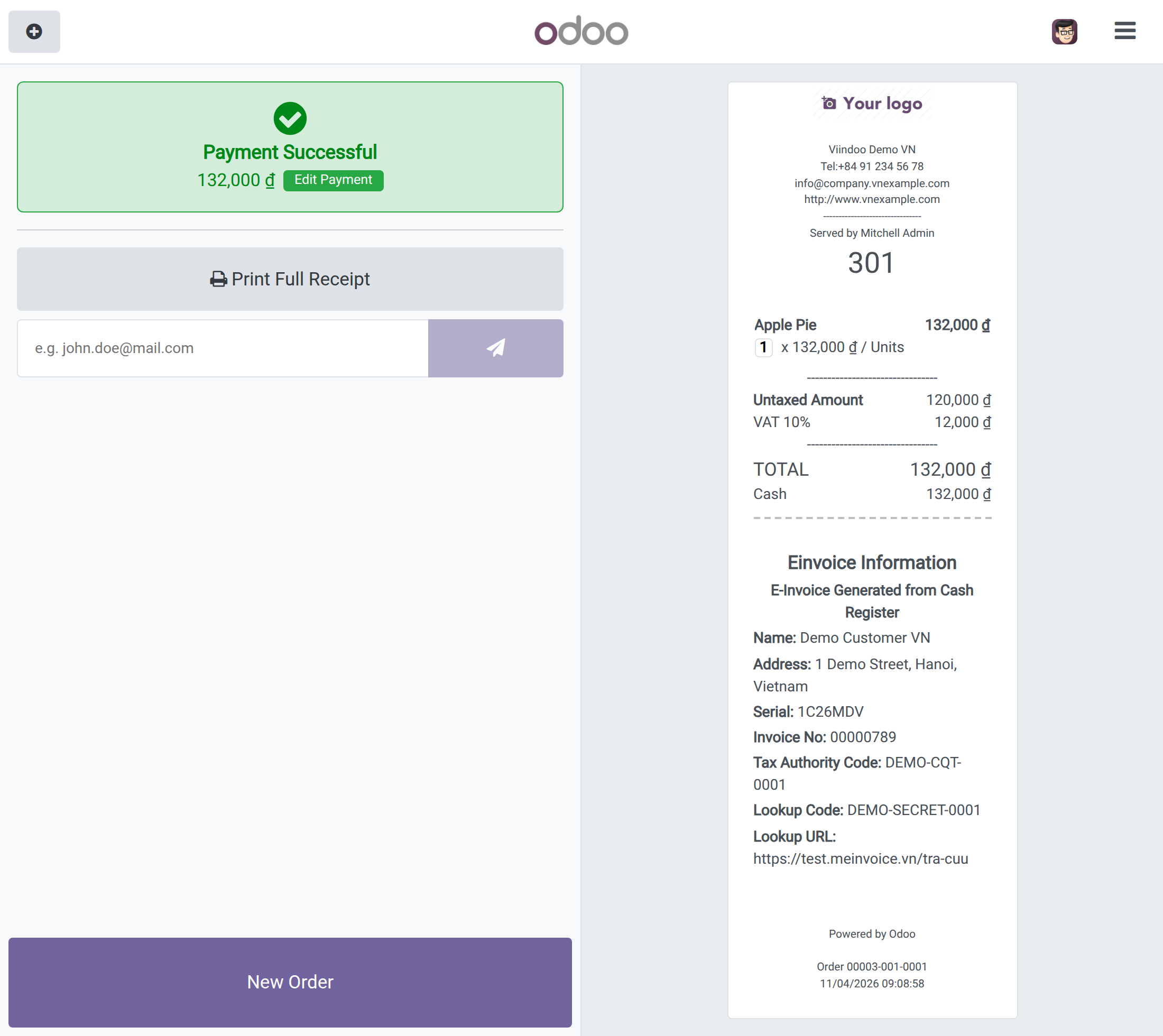
5. Automatic retry when MISA has not returned the codes yet.
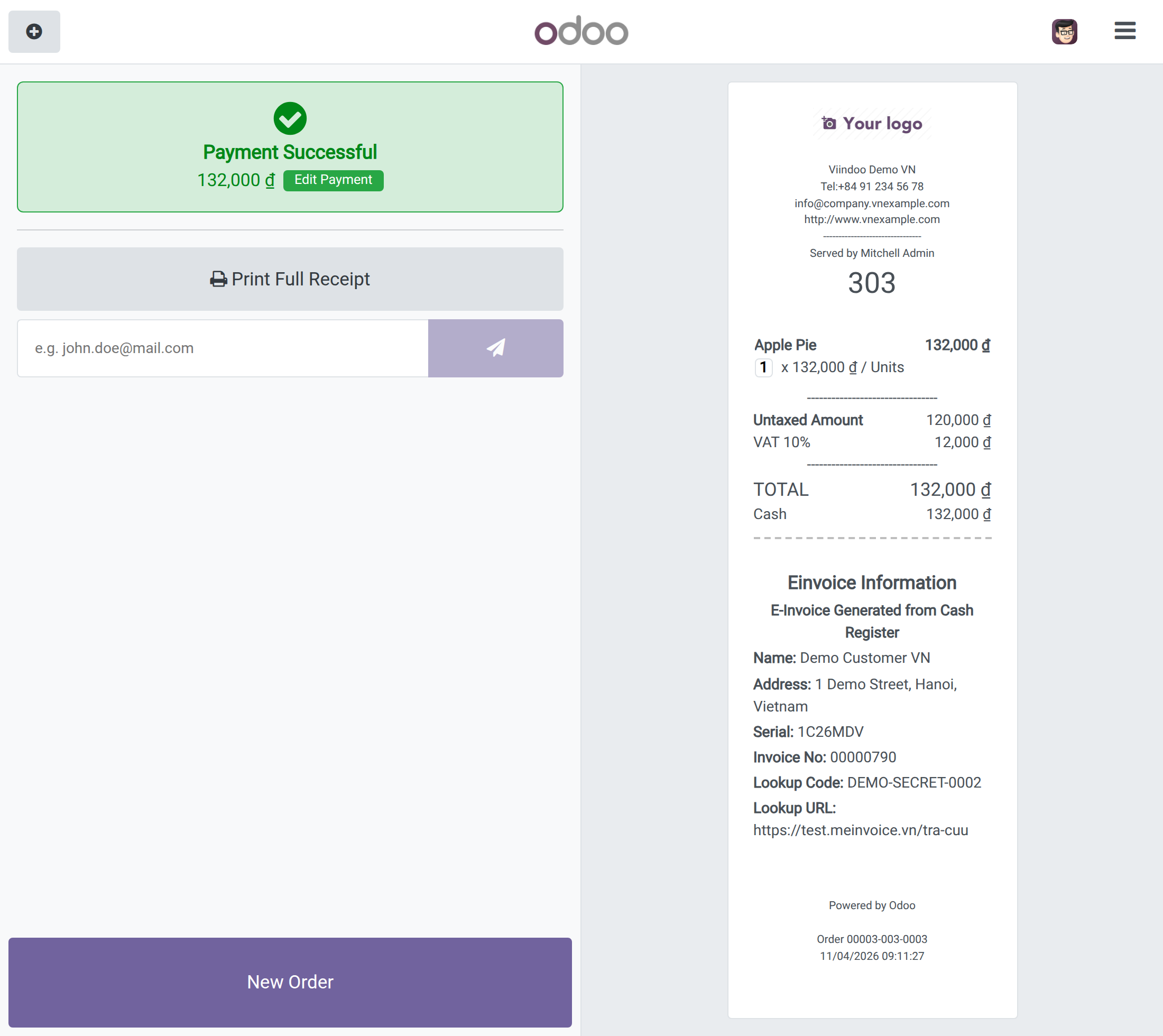
- MISA issues e-invoices asynchronously (through a scheduled job), so the tax-authority code or the legal number may not be back yet the instant the order is paid. In that case, the POS automatically retries a bounded number of times before printing whatever information is already available, so checkout is never blocked waiting on MISA.
- When the retries are over, the receipt prints with what MISA has returned so far. The example below shows a receipt whose invoice number and lookup code are known but whose tax-authority code is still missing.
This software and associated files (the "Software") may only be used (executed, modified, executed after modifications) if you have purchased a valid license from the authors, typically via Odoo Apps, or if you have received a written agreement from the authors of the Software (see the COPYRIGHT file).
You may develop Odoo modules that use the Software as a library (typically by depending on it, importing it and using its resources), but without copying any source code or material from the Software. You may distribute those modules under the license of your choice, provided that this license is compatible with the terms of the Odoo Proprietary License (For example: LGPL, MIT, or proprietary licenses similar to this one).
It is forbidden to publish, distribute, sublicense, or sell copies of the Software or modified copies of the Software.
The above copyright notice and this permission notice must be included in all copies or substantial portions of the Software.
THE SOFTWARE IS PROVIDED "AS IS", WITHOUT WARRANTY OF ANY KIND, EXPRESS OR IMPLIED, INCLUDING BUT NOT LIMITED TO THE WARRANTIES OF MERCHANTABILITY, FITNESS FOR A PARTICULAR PURPOSE AND NONINFRINGEMENT. IN NO EVENT SHALL THE AUTHORS OR COPYRIGHT HOLDERS BE LIABLE FOR ANY CLAIM, DAMAGES OR OTHER LIABILITY, WHETHER IN AN ACTION OF CONTRACT, TORT OR OTHERWISE, ARISING FROM, OUT OF OR IN CONNECTION WITH THE SOFTWARE OR THE USE OR OTHER DEALINGS IN THE SOFTWARE.