

Vietnam Chart of Accounts - Circular 99 and 133
by Viindoo
| Lines of Code | 5641 |
| Technical name | l10n_vn_viin |
| License | OPL-1 |
| Website | https://viindoo.com/apps/modules/18.0/l10n_vn_viin |
| Read description for | v 15.0 v 16.0 v 17.0 v 19.0 |
| Required Apps | Invoicing (account) Discuss (mail) |
| Included Dependencies | Viindoo Base Accounting Foundation |
| Extensions | Vietnam Legal Stock Reports Vietnam - Account Asset Vietnam Account Auto Transfer Manufacturing Accounting - Vietnam Purchase Accounting - Vietnam Vietnam Receipt/Delivery Order Templates Vietnam - Point of Sale - Accounting Optimization Accounting Reports - Vietnam Accounting Vietnam - Subcontracting Management & Accounting Vietnam - HR Accounting Loan Management - Vietnam Accounting Manufacturing WIP Accounting - Vietnam Vietnam - Freight Project Localization Vietnam - Foreign Trade |

Vietnam Chart of Accounts - Circular 99 and 133
Vietnam Chart of Accounts according to Circular #99/2025/TT-BTC and #133/2016/TT-BTC by the Ministry of Finance
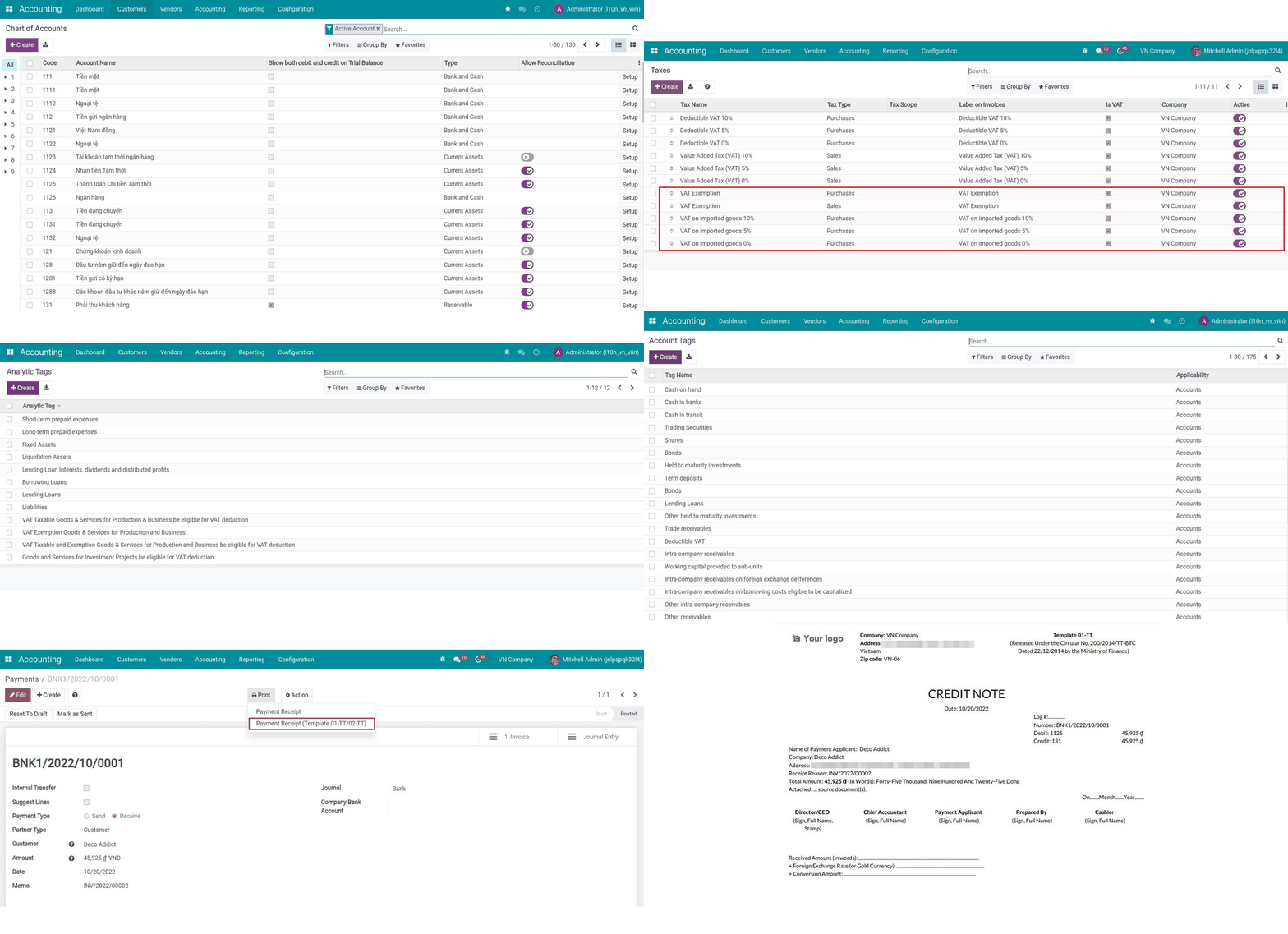
Key Features
Built natively on Odoo/Viindoo to streamline real business operations:
Two Complete Charts of Accounts, Ready to Use
Circular 99 (TT99/2025): Full COA for large enterprises.
- Circular 133 (TT133/2016): Full COA for small and medium enterprises.
- Account Groups are pre-configured for structured financial reporting.
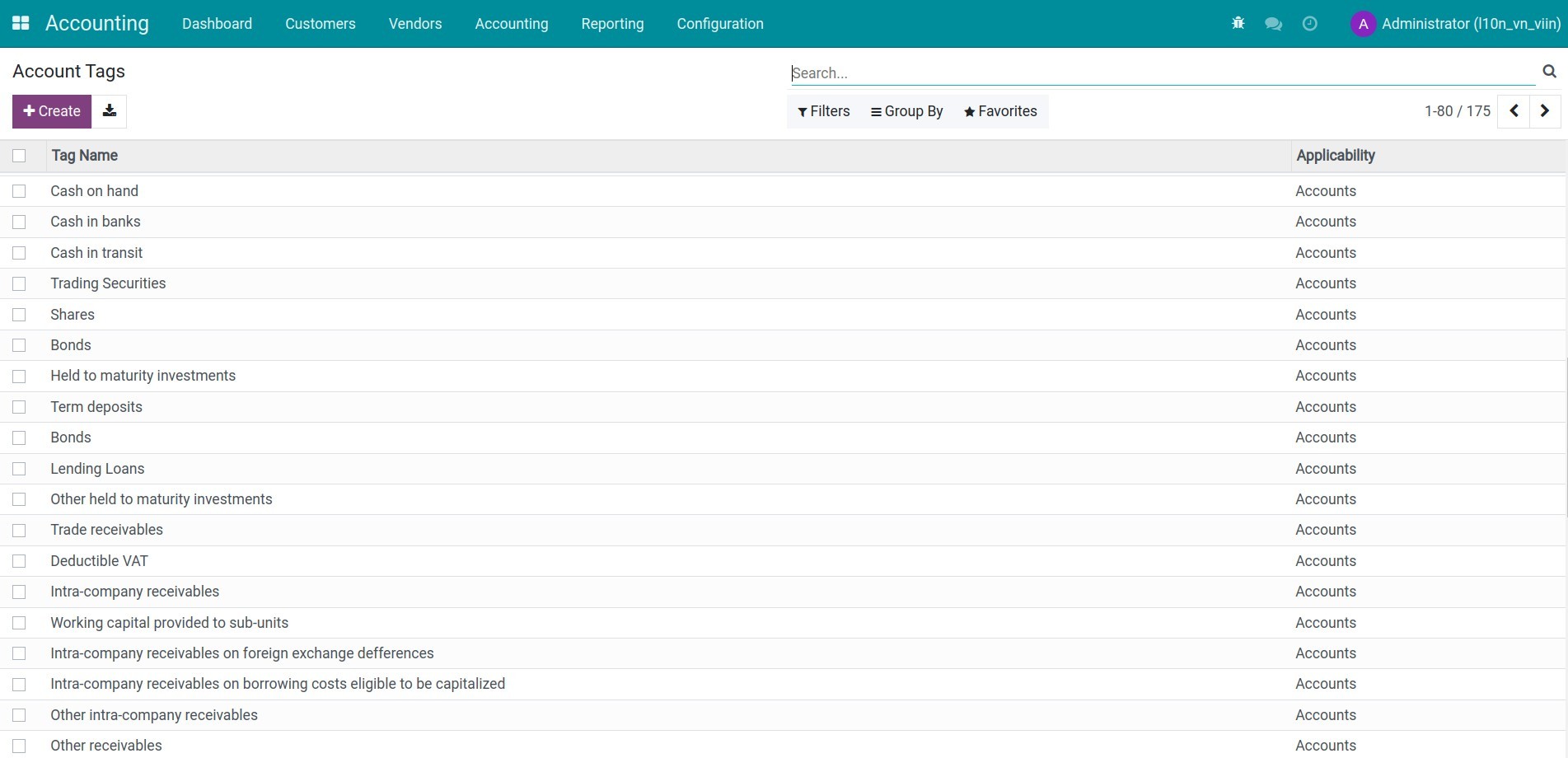
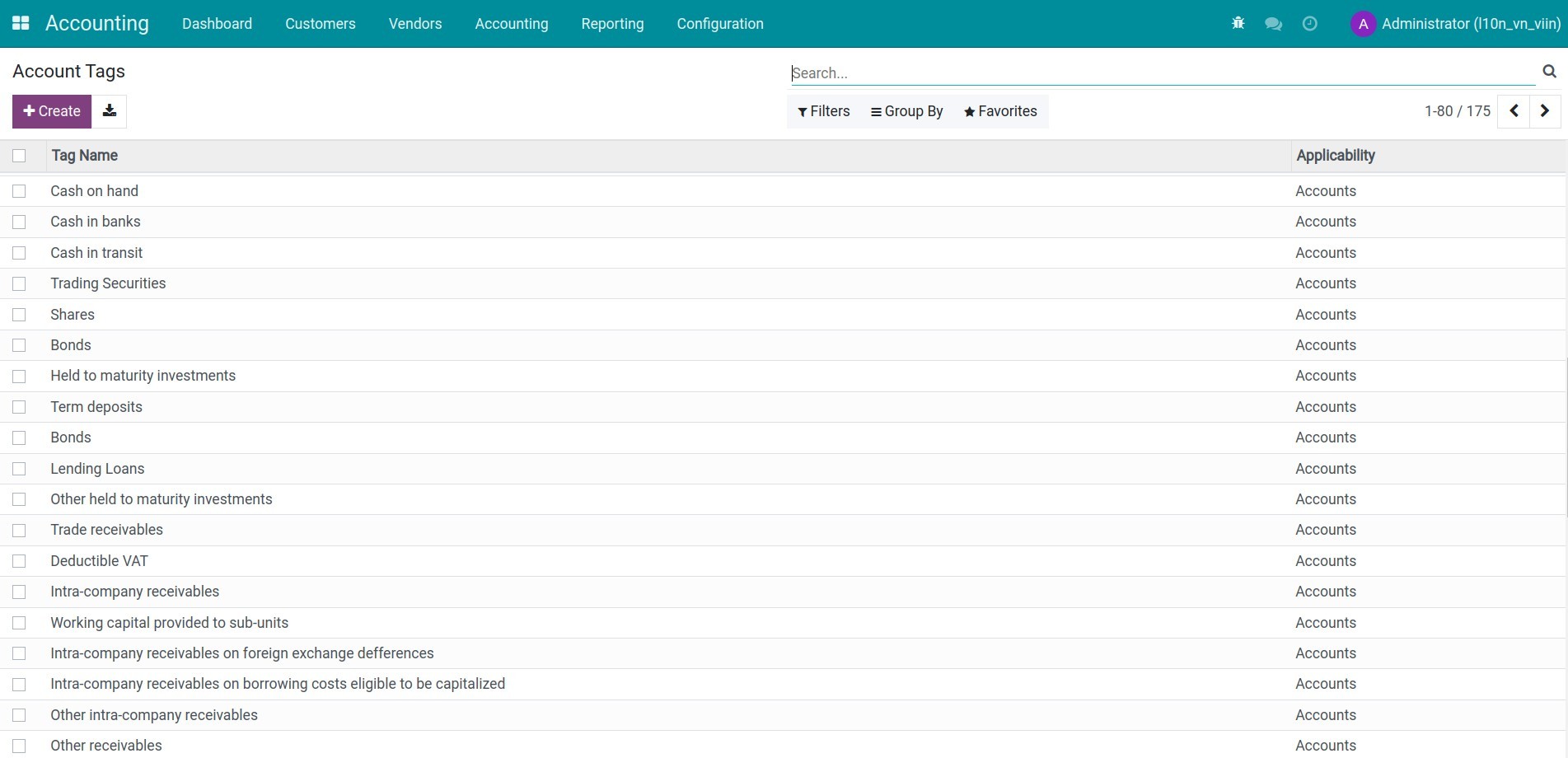
- Accounts are auto-tagged with Account Tags matching Vietnamese reporting standards — new.
accounts you create are auto-tagged too.
Vietnamese Tax Configuration Out of the Box
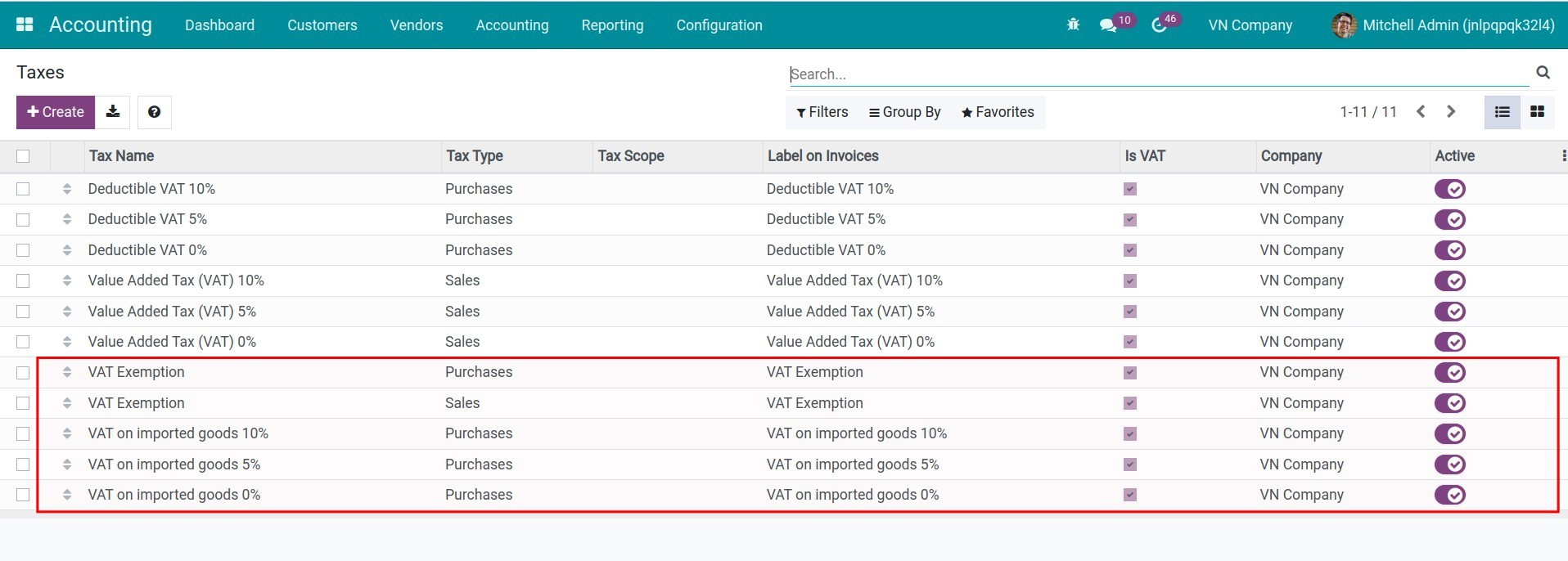
Pre-configured tax types: VAT 0%, 5%, 8%, 10%, VAT on imported goods, export tax.
and VAT-exempt transactions.
- Tax Groups are correctly classified (VAT vs. non-VAT) for accurate tax reporting.
- Tax Report Lines for the Vietnamese VAT declaration are included.
Print-Ready Vietnamese Accounting Documents
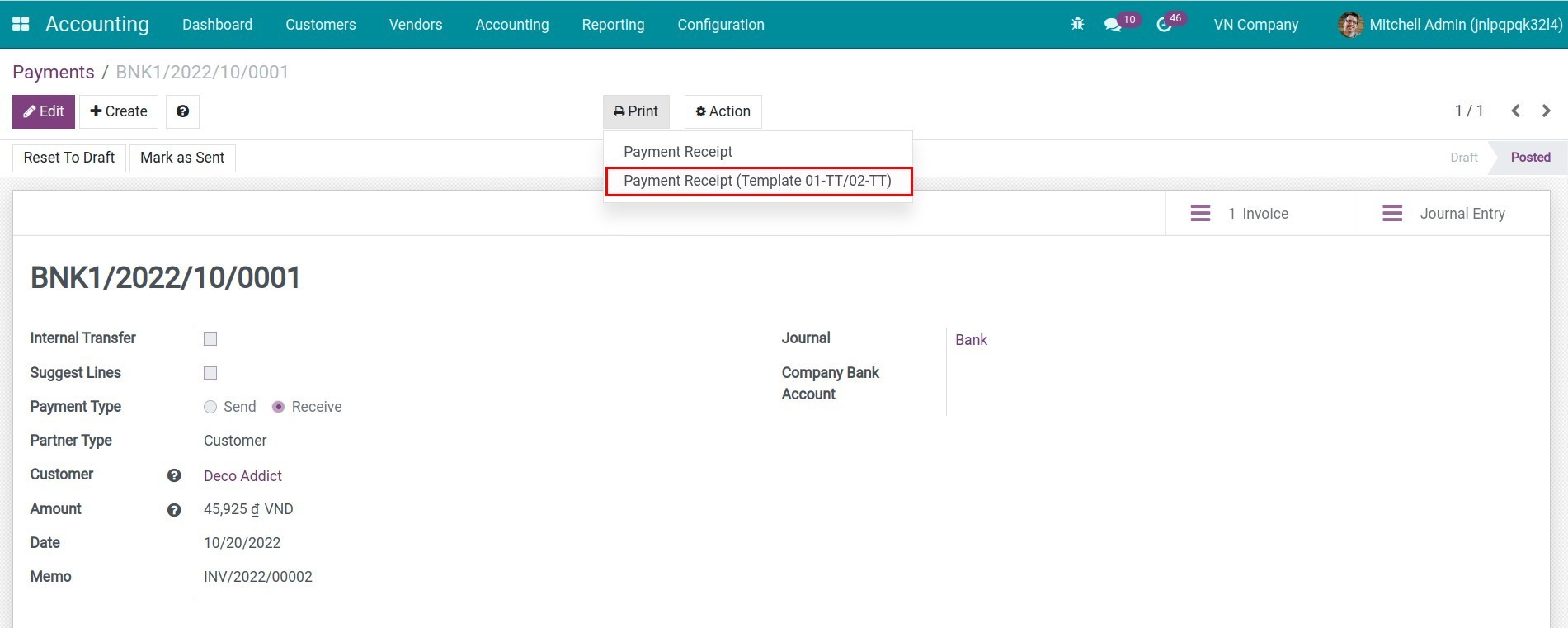
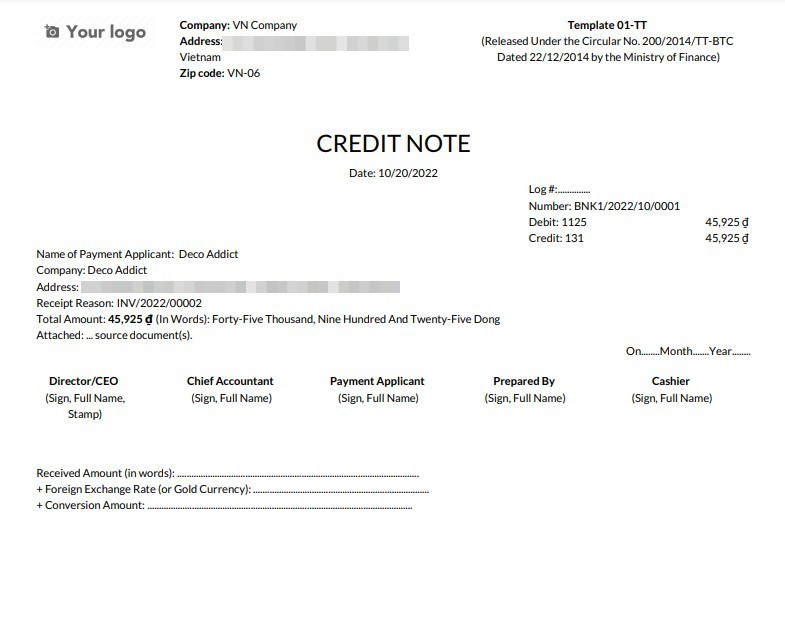
Receipt voucher (Phiếu thu - Mẫu 01-TT) and Payment voucher (Phiếu chi - Mẫu 02-TT).
printed directly from Payments or Journal Entries.
- Journal Entry report in standard Vietnamese PDF format.
- Customizable fields: recipient/payer name, origin document number.
- Reports use a dedicated Vietnamese accounting layout with legal name support on every report.
Smart Default Account Mapping
Property accounts (income, expense, receivable, payable, stock valuation, etc.) are.
pre-mapped to the correct Vietnamese accounts upon installation.
Company-level defaults for currency exchange, cash differences, early payment discounts.
VAT payable, employee payable, advance, borrowing, lending, deferred revenue, and prepaid expense accounts are all set automatically.
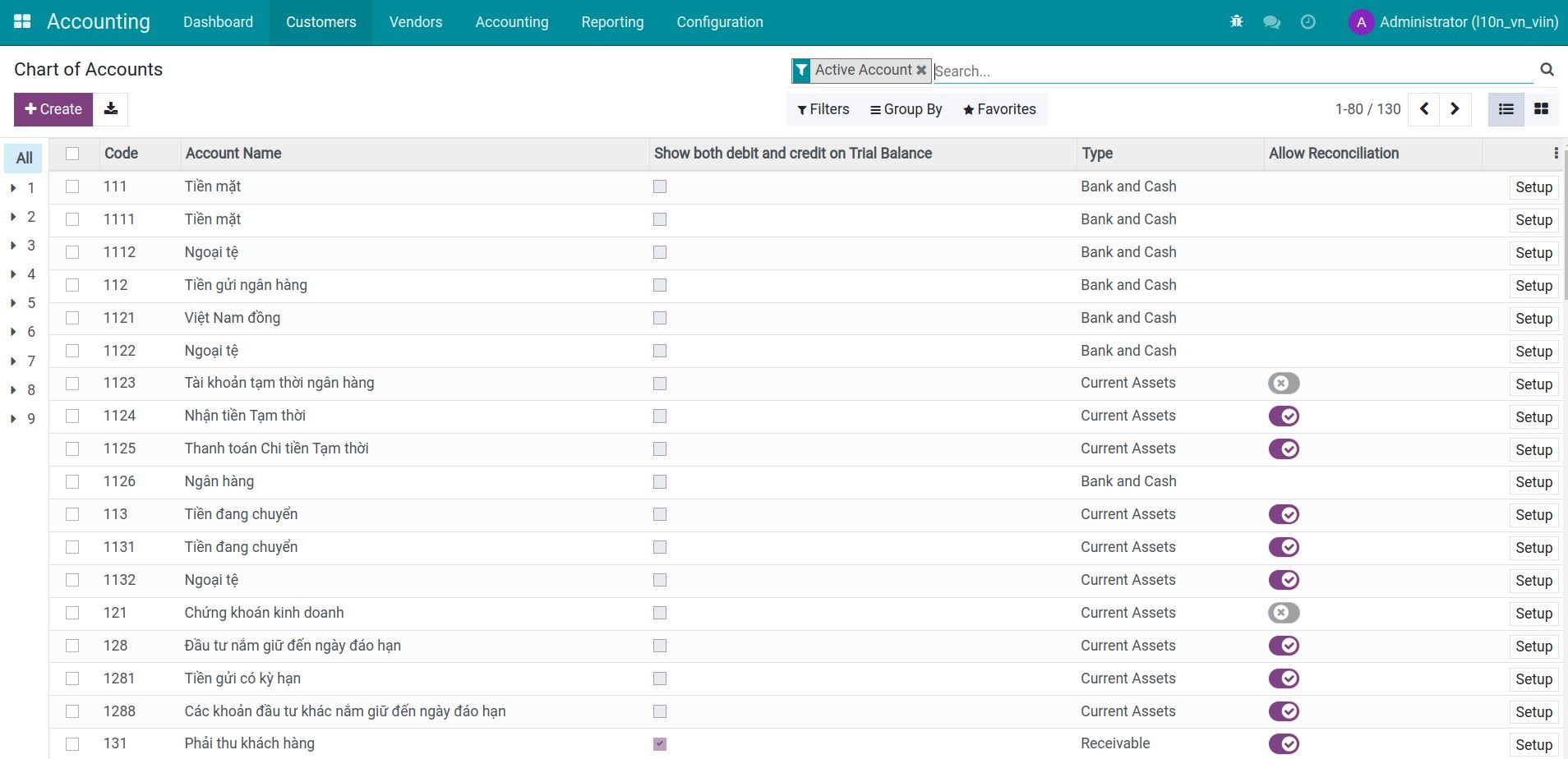
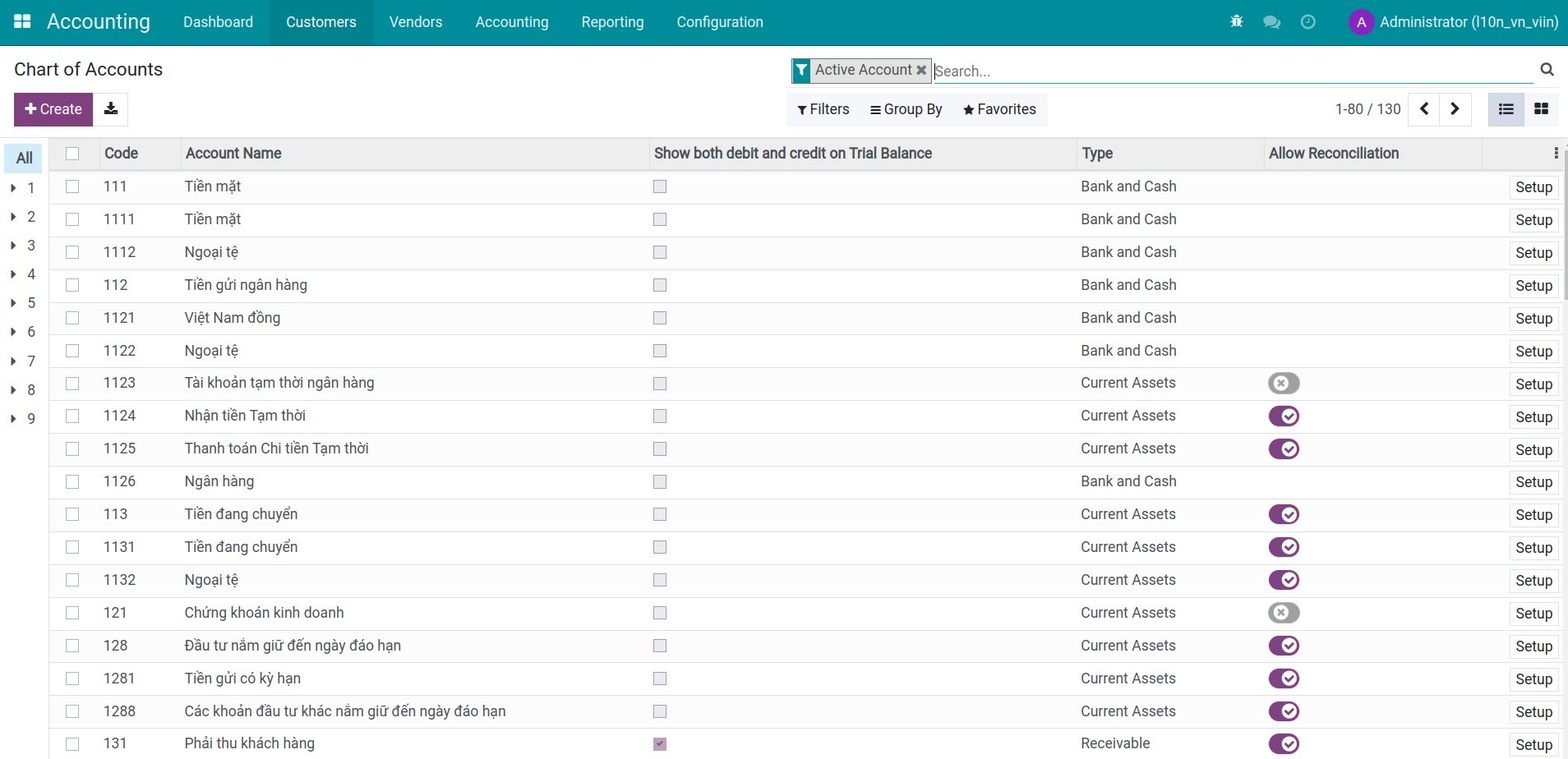
The Chart of Accounts
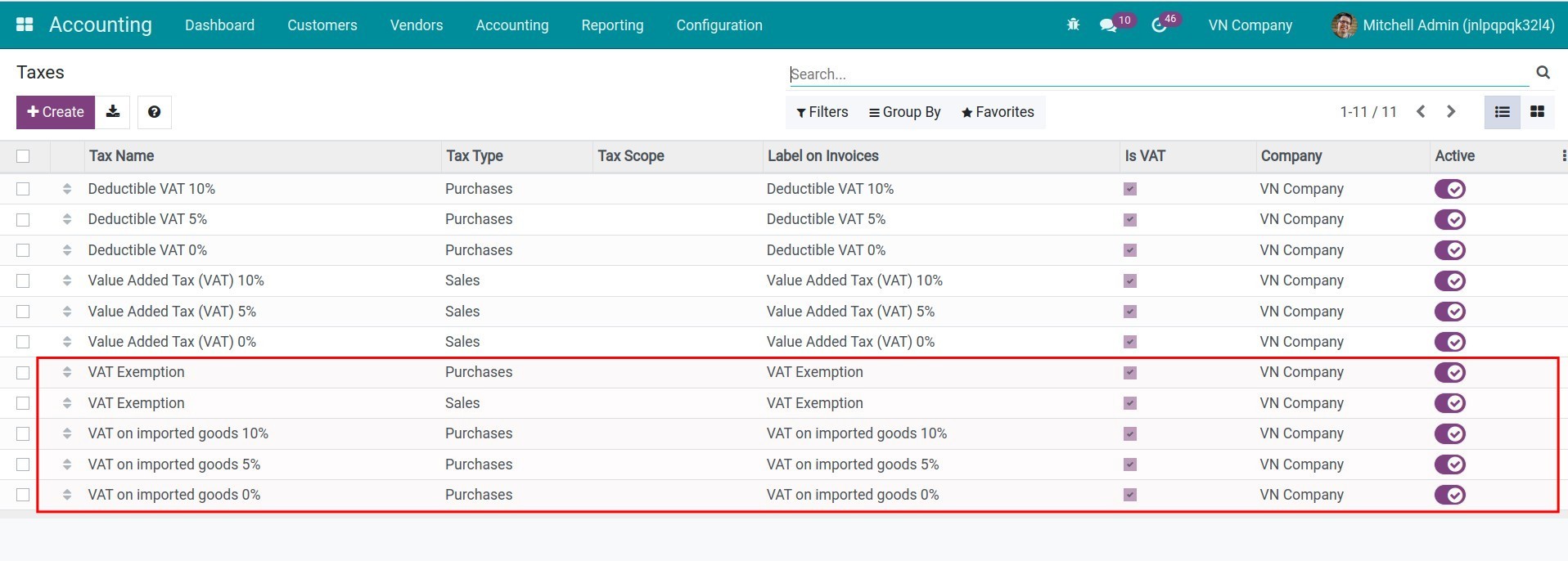
Add common taxs
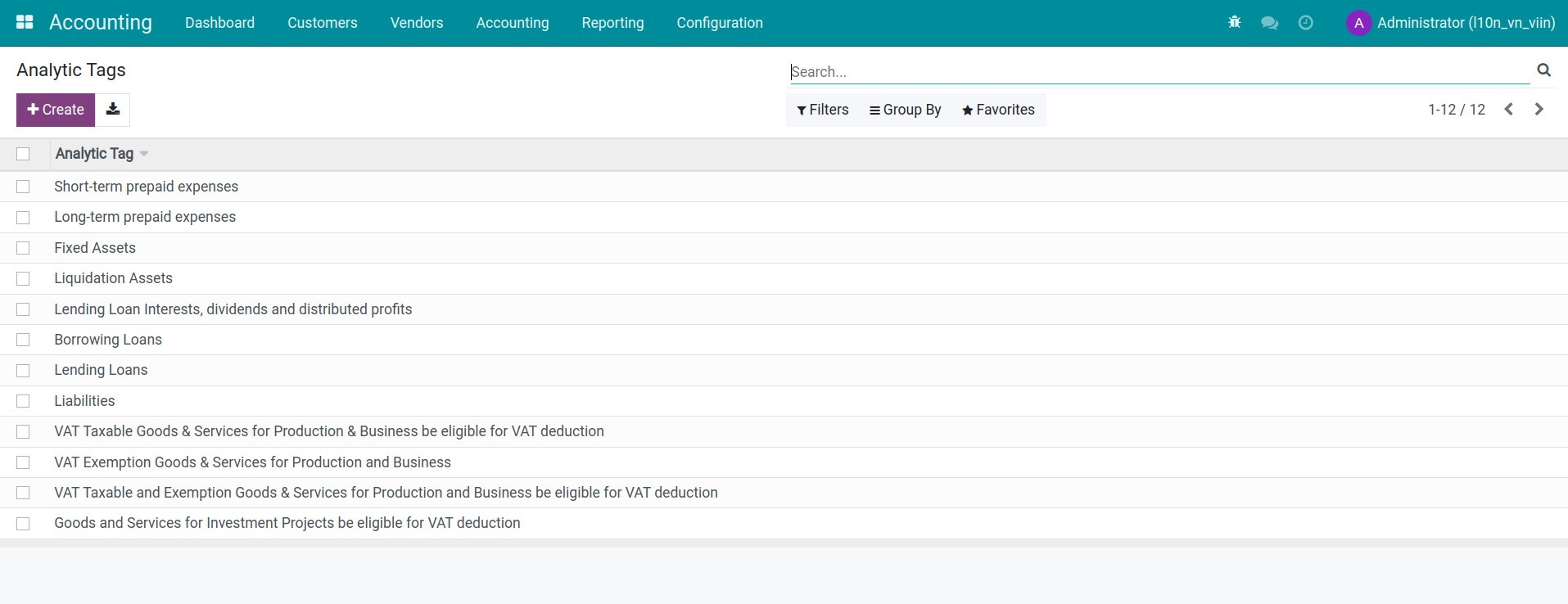
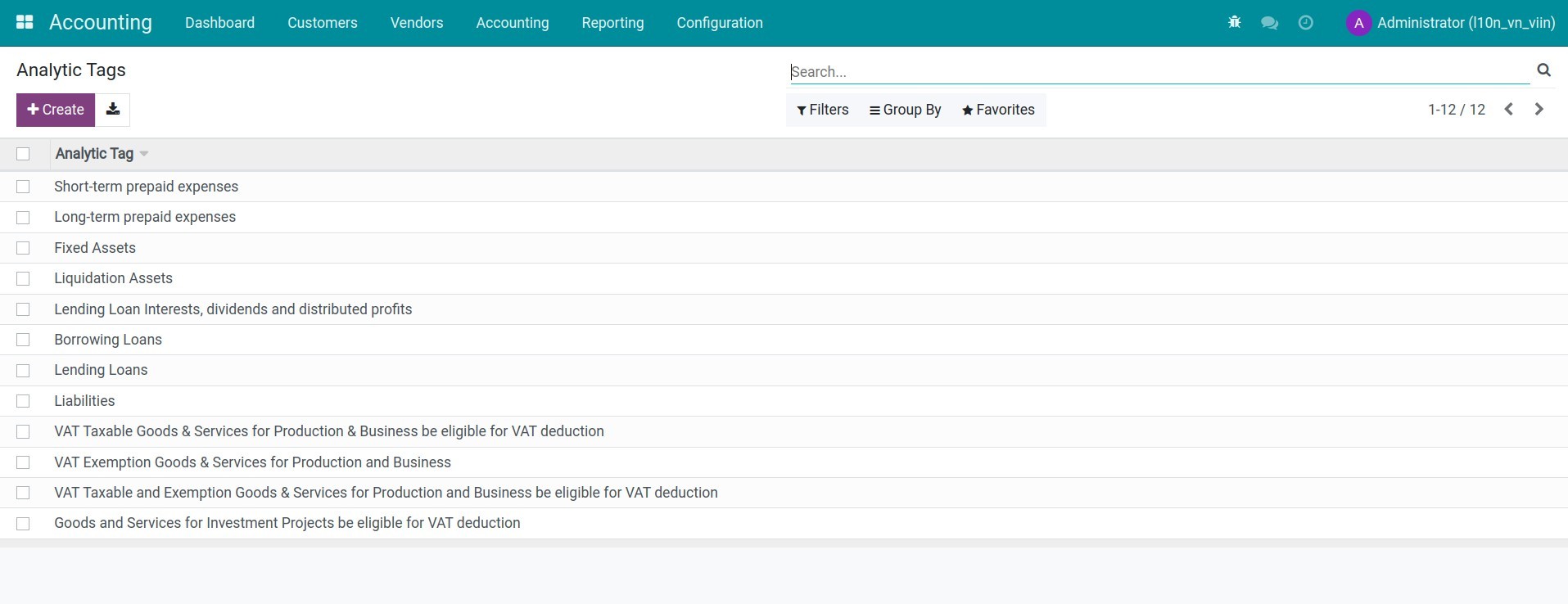
Analytic tags
Account tags
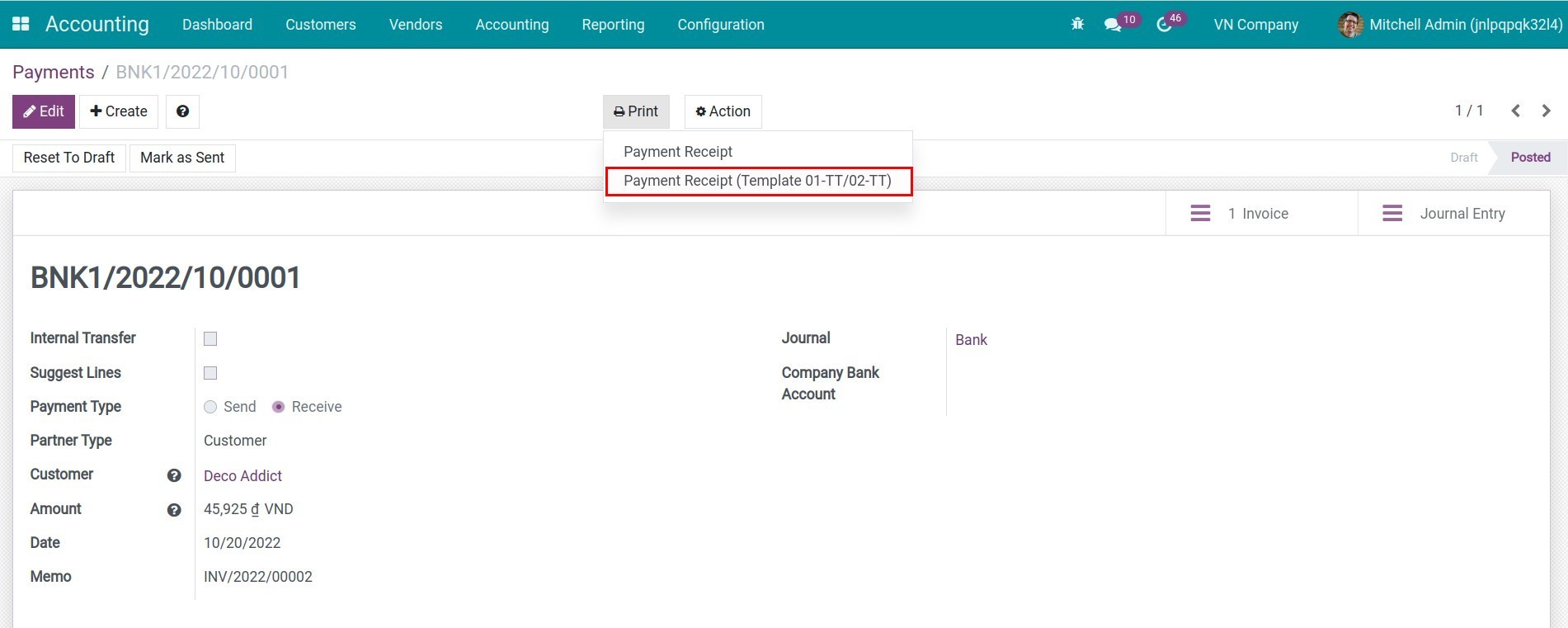
Print Payment Receipts in PDF
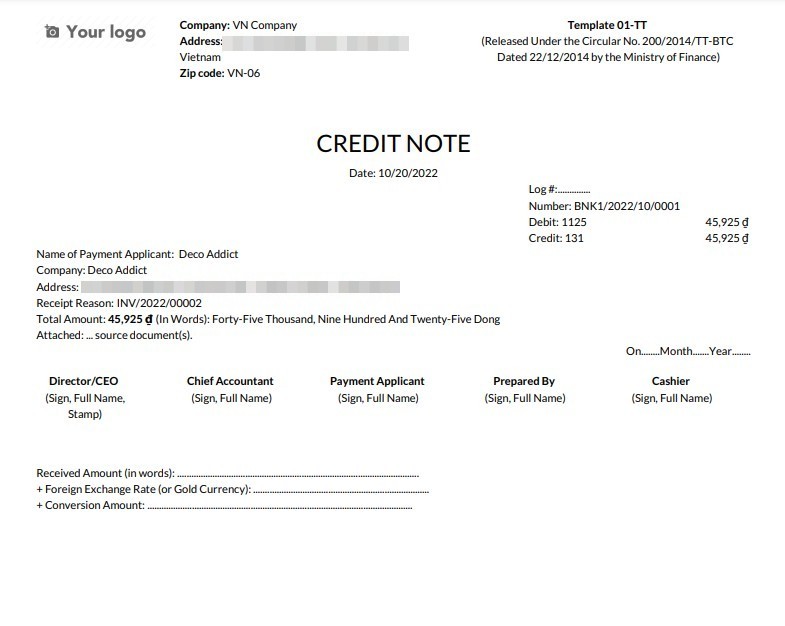
Payment Receipts
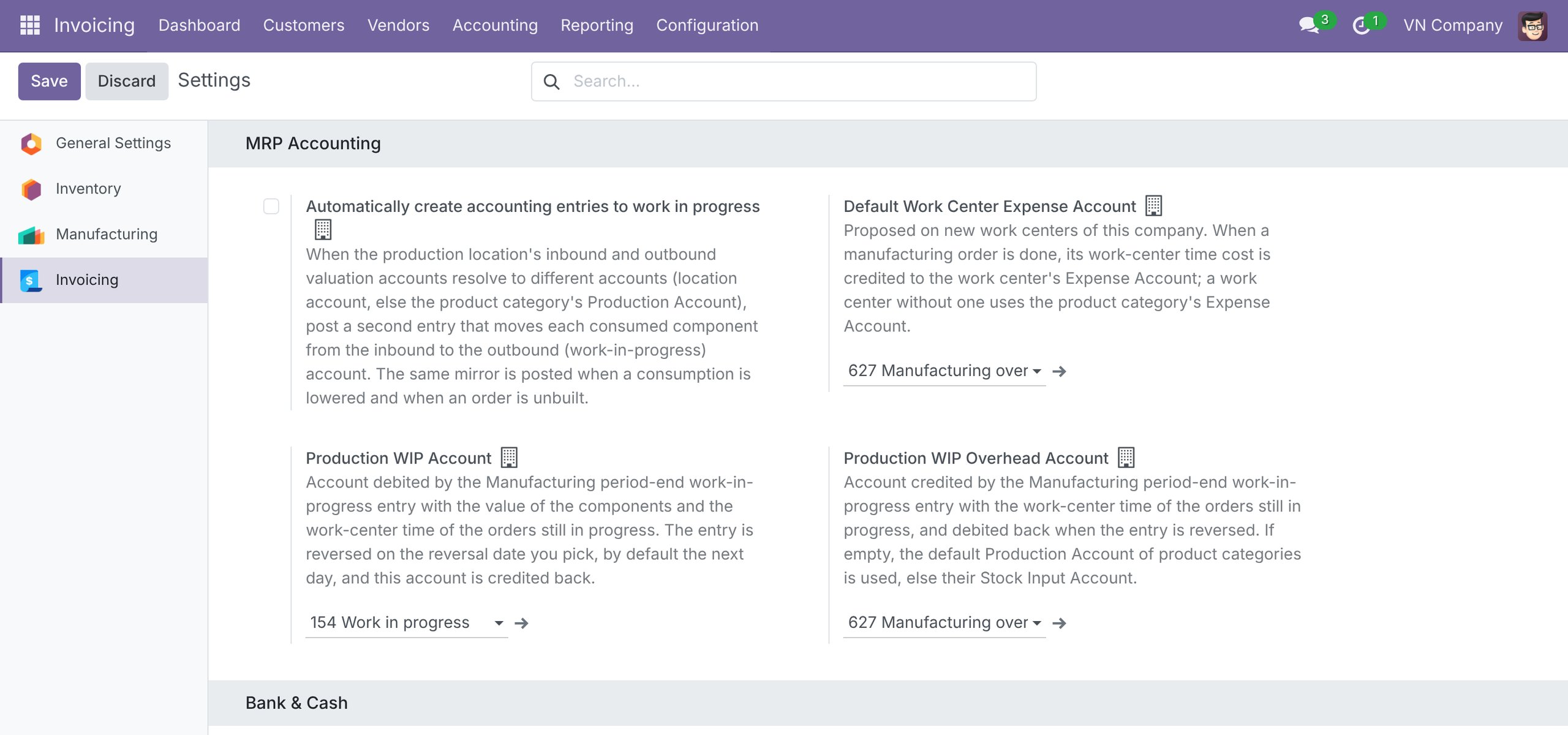
Manufacturing accounts ready out of the box
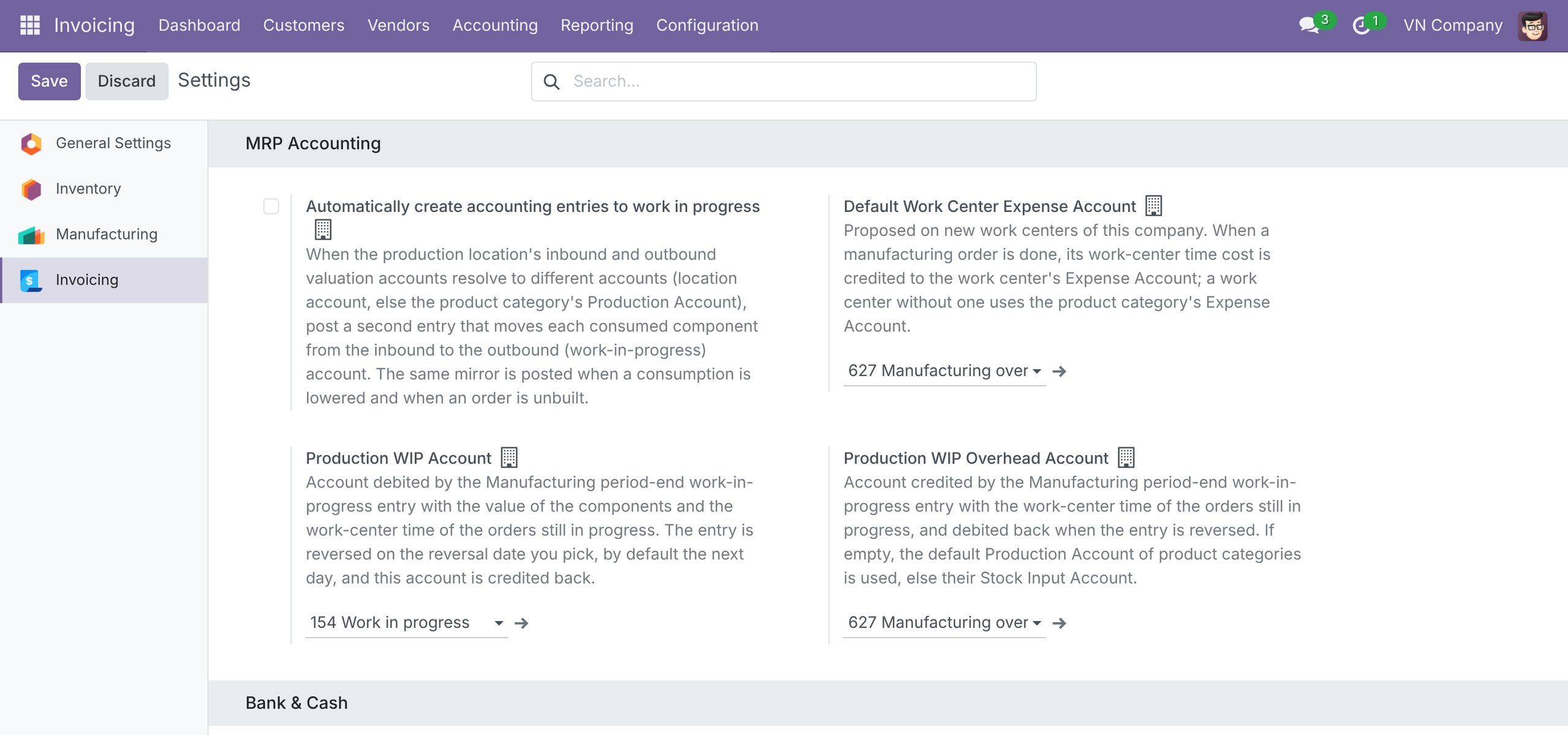
A new company on the Circular 99 chart starts with Production WIP account 154 and WIP Overhead account 627; on Circular 133 it starts with WIP account 154, and, as on Circular 99, vendor bills clear account 151 and cost of goods sold is posted at delivery. Every account stays editable in Settings, and reloading the chart never overwrites what your accountant set.
See Vietnam Chart of Accounts - Circular 99 and 133 in Action
See how this module solves real business problems in a working Viindoo environment.
Need help with Vietnam Chart of Accounts - Circular 99 and 133?
For questions, implementation support, or consulting services, contact Viindoo.
Pre-Sales & Partnership
sales@viindoo.comWhen contacting us, please include:
- Odoo/Viindoo version (CE/EE).
- Number of users and business scope.
- Other modules currently in use.
Technical Support
apps.support@viindoo.comFor faster troubleshooting, please provide:
- Order number or app reference.
- Odoo/Viindoo version & edition.
- Steps to reproduce the issue.
- Screenshots/logs if available.
Technical Requirement
Changes log
We continuously improve this module. Recent updates from the official Viindoo repository:
- 2026-08-14 Fixed Skip loading taxes and accounts when reloading the chart template for branch companies, which share the root company's records.
- 2026-08-14 Fixed Do not resolve property defaults when reloading the chart template for companies missing the stock valuation journal external id.
- 2026-03-19 Fixed Use template as source of truth for company account mapping and add migration.
- 2026-02-27 Improved Switch VN CoA template to Circular 99 (C99).
- 2026-03-03 Improved Complete account_type and reconcile in overridden CoA for clarity.
- 2026-03-01 Fixed Format quoted text as text for template CSVs.
- 2025-11-18 Improved Translation account tax data csv.
- 2025-11-18 Fixed Number to work with out currency label.
Works Great With These Modules
Extend Vietnam Chart of Accounts - Circular 99 and 133 with complementary Viindoo apps:
Vietnam Account Auto Transfer
Add transfer rules in compliance with VAS
Module l10n_vn_viin_account_auto_transferVietnam - Foreign Trade
Extending Foreign Trade & Logistics module providing Vietnam Standards
Module l10n_vn_viin_foreign_tradeVietnam - HR Accounting
Extending Human Resource Accounting according to Vietnam Accounting Standards
Module l10n_vn_viin_hr_accountLoan Management - Vietnam Accounting
Default Loan Order Template receivable & payable accounts for Vietnam
Module l10n_vn_viin_loan_managementVietnam Receipt/Delivery Order Templates
Print Goods Receipts and Delivery Orders according to the Circular 99/2025/TT-BTC and 133/2016/TT-BTC forms.
Module l10n_vn_viin_picking_operationVietnam - Point of Sale - Accounting Optimization
Streamline POS accounting in Vietnam by enabling flexible invoice creation and eliminating redundant journal entries
Module l10n_vn_viin_posWho Should Use This Module?
Built for teams that need this capability fully integrated into their Odoo/Viindoo stack.
Executives & Business Owners
Need clear visibility into operations and a stack that scales without bespoke development.
Operations / Department Leaders
Want to streamline daily workflows, remove manual handoffs, and keep data consistent across teams.
Implementers & Odoo Partners
Looking for production-ready Viindoo modules to deliver projects faster and at lower risk.
Installation
- Navigate to Apps.
- Search with keyword l10n_vn_viin.
- Press Install.
Instruction
Instruction video: Vietnam Chart of Accounts - Circular 99 and 133
1. A Full Chart of Accounts.
- Provide a full Chart of Accounts according to Circular No. 99 and Circular No. 133 based on the specified circular of your company.
2. Add common taxes.
3. Add analytic tags.
- Go to Accounting > Configuration > Analytic tags.
4. Add account tags.
- Go to Accounting > Configuration > Account tags.
5. Provide Payment Receipts in PDF according to Circular No. 99/2014/TT-BTC and Circular No. 133/2016/TT-BTC.
- Template 01-TT: for receiving payments.
- Template 02-TT: for sending payments.
6. Manufacturing accounts ready out of the box.
When the WMS Accounting app is installed, a new company starts with the accounts it needs to post manufacturing work in progress, so you do not have to look them up yourself.
- A company on the Circular No. 99 chart starts with Production WIP Account set to 154 and Production WIP Overhead Account set to 627. Product categories use 632 as the Expense Account and 154 as the Production Account.
- A company on the Circular No. 133 chart starts with Production WIP Account set to 154 and Production WIP Overhead Account left empty. Choose the account yourself; 154 is a sensible choice under Circular No. 133. Product categories use 632 as the Expense Account. As on Circular No. 99, cost of goods sold is posted at delivery and a vendor bill for a stocked product is posted to the stock input account 151, which clears the credit made at receipt.
- Every value stays editable. The two WIP accounts are set on the company. With the Advanced MRP Accounting app installed, change them in Invoicing ‣ Configuration ‣ Settings, on the Invoicing tab, in the MRP Accounting section. Without that app they stay as the chart set them. To change the accounts of a product category, go to Inventory ‣ Configuration ‣ Products ‣ Product Categories.
- Reloading or upgrading the chart of accounts only fills fields that are still empty. It never overwrites an account that your accountant has already set.
7. Purchased goods: interim account, price differences and cost of goods sold.
This applies to products with Automated inventory valuation, bought with the Purchase app and stored with the Inventory app.
- The interim account of a purchase is the Stock Input Account of the product category (151 by default). The accountant chooses it for each category according to how the goods are handed over. In Vietnam the vendor invoice usually arrives before or with the goods, so 151 is the common choice.
- With 151, the vendor bill posts Dr 151 / Cr 331 and the receipt posts Dr 156 / Cr 151. When both are posted, 151 nets to zero. Goods received before the vendor bill leave a credit balance on 151 until the bill is posted.
- A payable-type account (for example 3388 as shipped, which is of type Payable) cannot be the Stock Input Account: Odoo rejects the product lines of a vendor bill on a payable account. If you want a separate interim account, use an account that is not of type Payable.
- Price differences between the vendor bill and the receipt:
- First In First Out (FIFO) and Average Cost (AVCO): Odoo splits the difference between the stock (156) and the cost of goods sold (632) by itself.
- Standard Price: the difference is posted to the Price Difference Account of the product category. It is 632 by default when the Purchase Accounting - Vietnam module (l10n_vn_viin_purchase_stock) is installed; without it, the difference stays on 151.
- On Circular No. 133, goods for resale (156) should use FIFO or AVCO. Standard price is meant for manufactured goods.
- The cost of goods sold is recognised at delivery: Dr 632 / Cr 156.
- Every account stays editable. To change the accounts of a product category, go to Inventory ‣ Configuration ‣ Products ‣ Product Categories. The Price Difference Account can also be set on each product, in the Accounting tab.
This software and associated files (the "Software") may only be used (executed, modified, executed after modifications) if you have purchased a valid license from the authors, typically via Odoo Apps, or if you have received a written agreement from the authors of the Software (see the COPYRIGHT file).
You may develop Odoo modules that use the Software as a library (typically by depending on it, importing it and using its resources), but without copying any source code or material from the Software. You may distribute those modules under the license of your choice, provided that this license is compatible with the terms of the Odoo Proprietary License (For example: LGPL, MIT, or proprietary licenses similar to this one).
It is forbidden to publish, distribute, sublicense, or sell copies of the Software or modified copies of the Software.
The above copyright notice and this permission notice must be included in all copies or substantial portions of the Software.
THE SOFTWARE IS PROVIDED "AS IS", WITHOUT WARRANTY OF ANY KIND, EXPRESS OR IMPLIED, INCLUDING BUT NOT LIMITED TO THE WARRANTIES OF MERCHANTABILITY, FITNESS FOR A PARTICULAR PURPOSE AND NONINFRINGEMENT. IN NO EVENT SHALL THE AUTHORS OR COPYRIGHT HOLDERS BE LIABLE FOR ANY CLAIM, DAMAGES OR OTHER LIABILITY, WHETHER IN AN ACTION OF CONTRACT, TORT OR OTHERWISE, ARISING FROM, OUT OF OR IN CONNECTION WITH THE SOFTWARE OR THE USE OR OTHER DEALINGS IN THE SOFTWARE.