
Equipment Working Frequency - Backdate
| Lines of Code | 338 |
| Technical name | to_equipment_woking_frequency_backdate |
| License | OPL-1 |
| Website | https://viindoo.com/apps/modules/19.0/to_equipment_woking_frequency_backdate?force_show=1 |
| Read description for | v 17.0 v 18.0 |
| Required Apps | Discuss (mail) Employees (hr) Inventory (stock) Maintenance (maintenance) |
| Included Dependencies | Viindoo Base Inventory Backdate Stock Equipment Product Maintenance Schedule Backdate Operations Stock Equipment Maintenance Schedule Equipment Working Frequency Product Milestone |

Each machine starts its history on the day it arrived
For companies that receive serial-numbered machines and follow their maintenance in Odoo
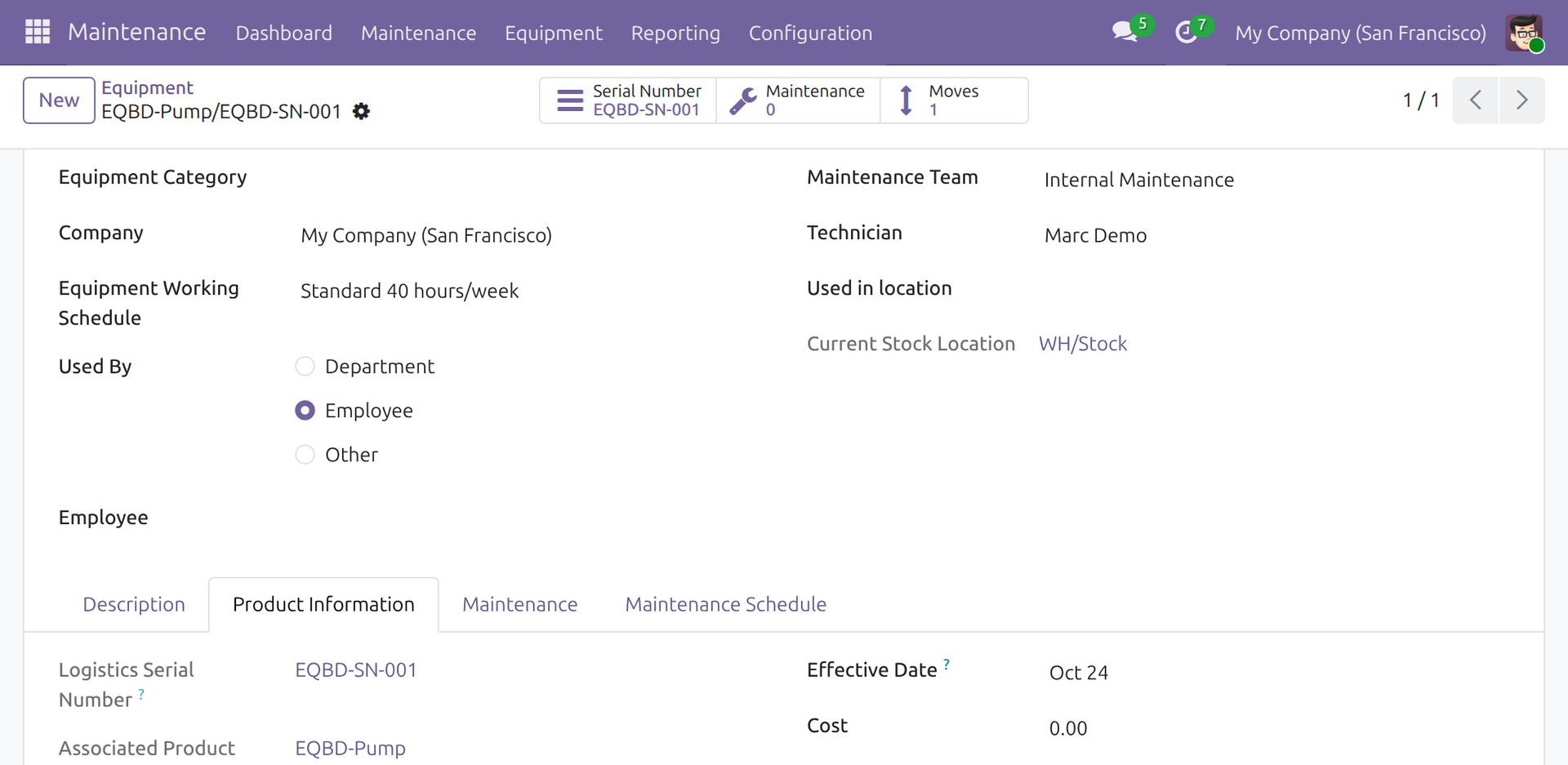
Equipment created from a receipt validated on a past date takes that date as its effective date
Odoo 19.0 · Odoo Community · Odoo Enterprise · OPL-1
Extends Inventory Backdate, which validates a receipt at the date and time the goods actually arrived.
What changes for your team
Machines received late keep their arrival day
Today: the receipt is validated when the paperwork reaches the office, days after the machines arrived, and each equipment takes the day of validation.
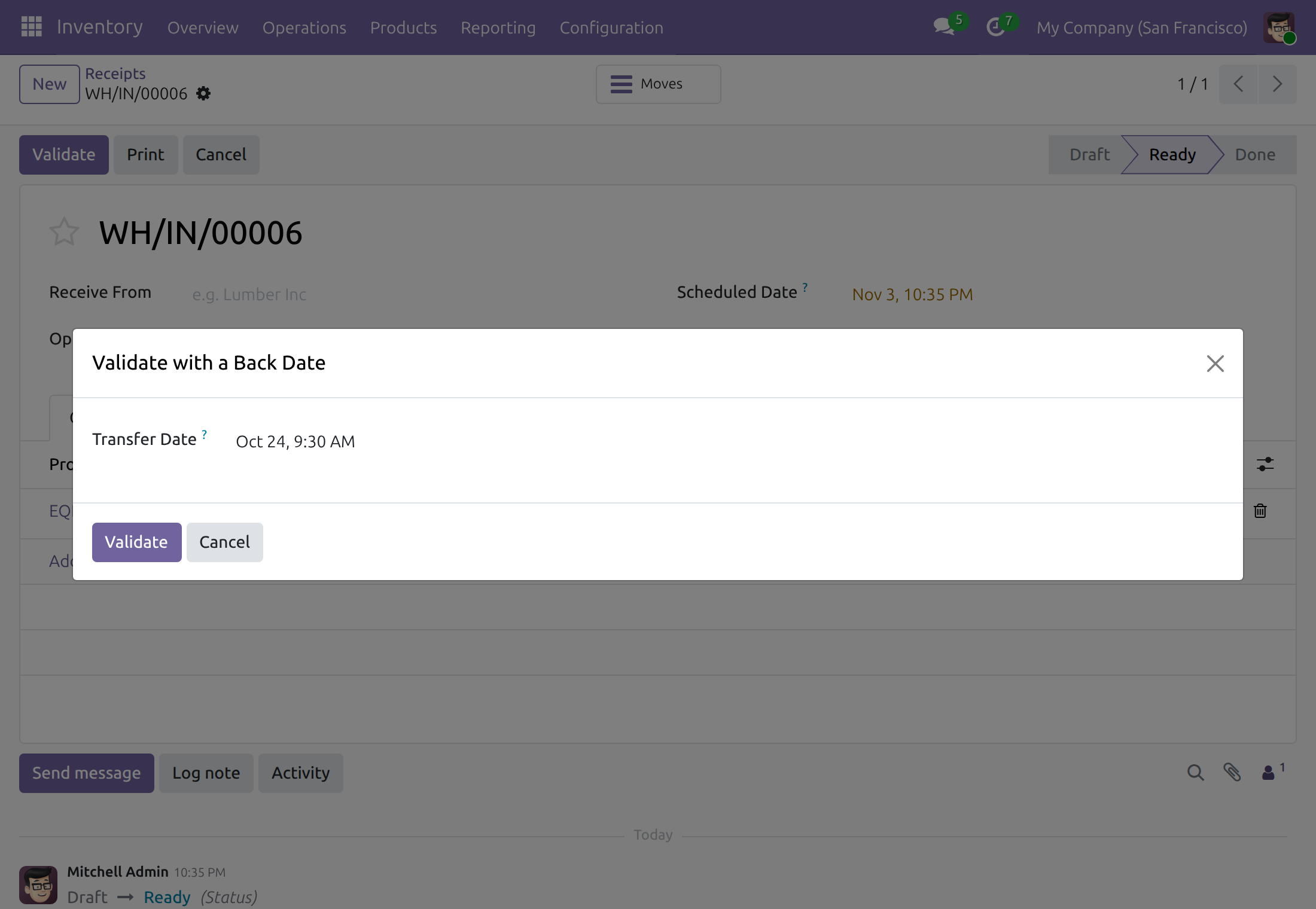
→ The person validating the receipt enters the date and time the machines arrived. Each equipment created from the serial numbers of the receipt takes that day as its Effective Date.
Working hours count from the real start
Today: the maintenance figures of a new machine start on the day its receipt was entered, so it looks younger than it is.
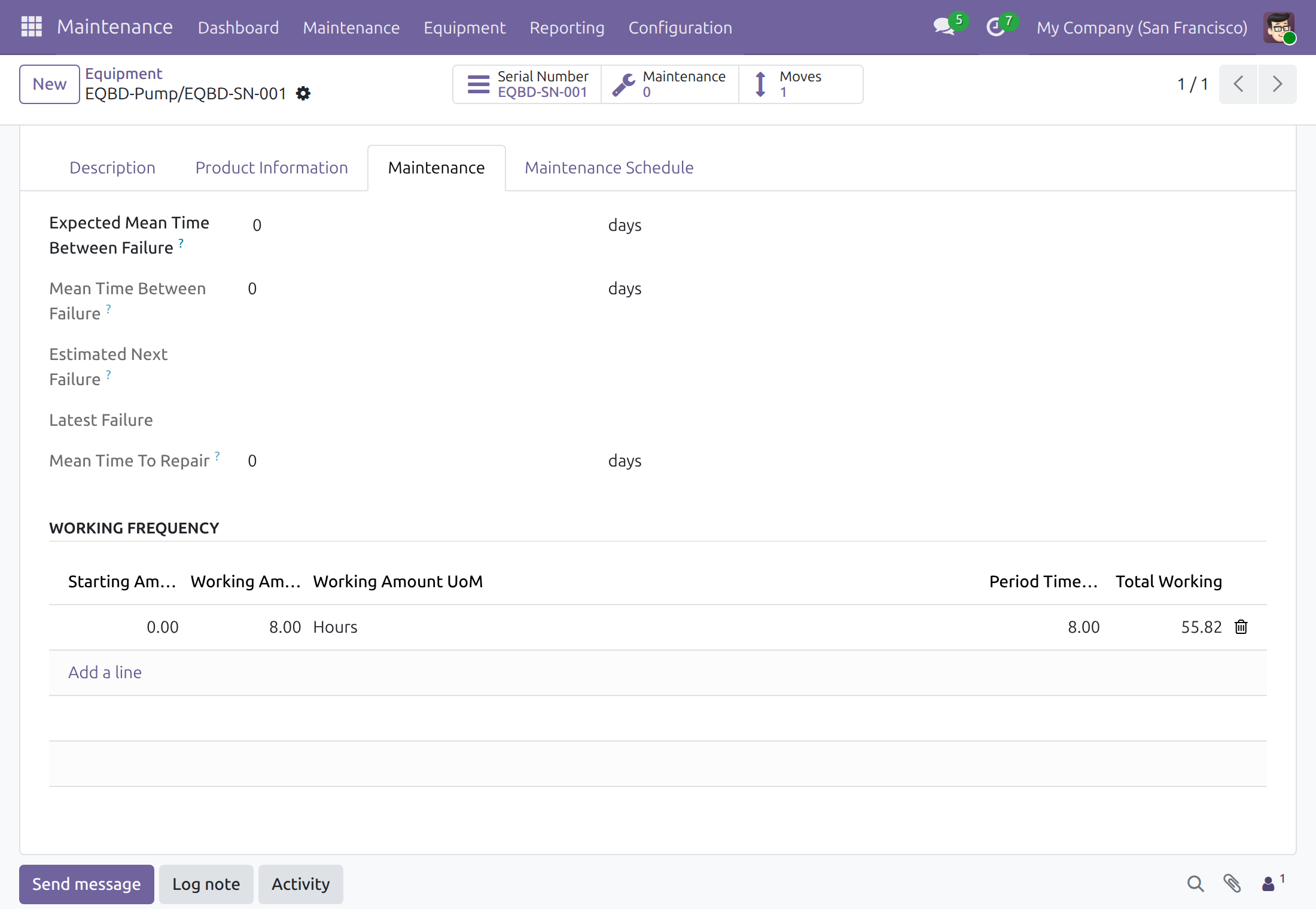
→ Mean Time Between Failure counts from the arrival day, and so does the Total Working of each working frequency, along the machine's working schedule.
One record per machine, even when registered early
Today: some machines are registered as equipment before delivery, with whatever date was at hand.
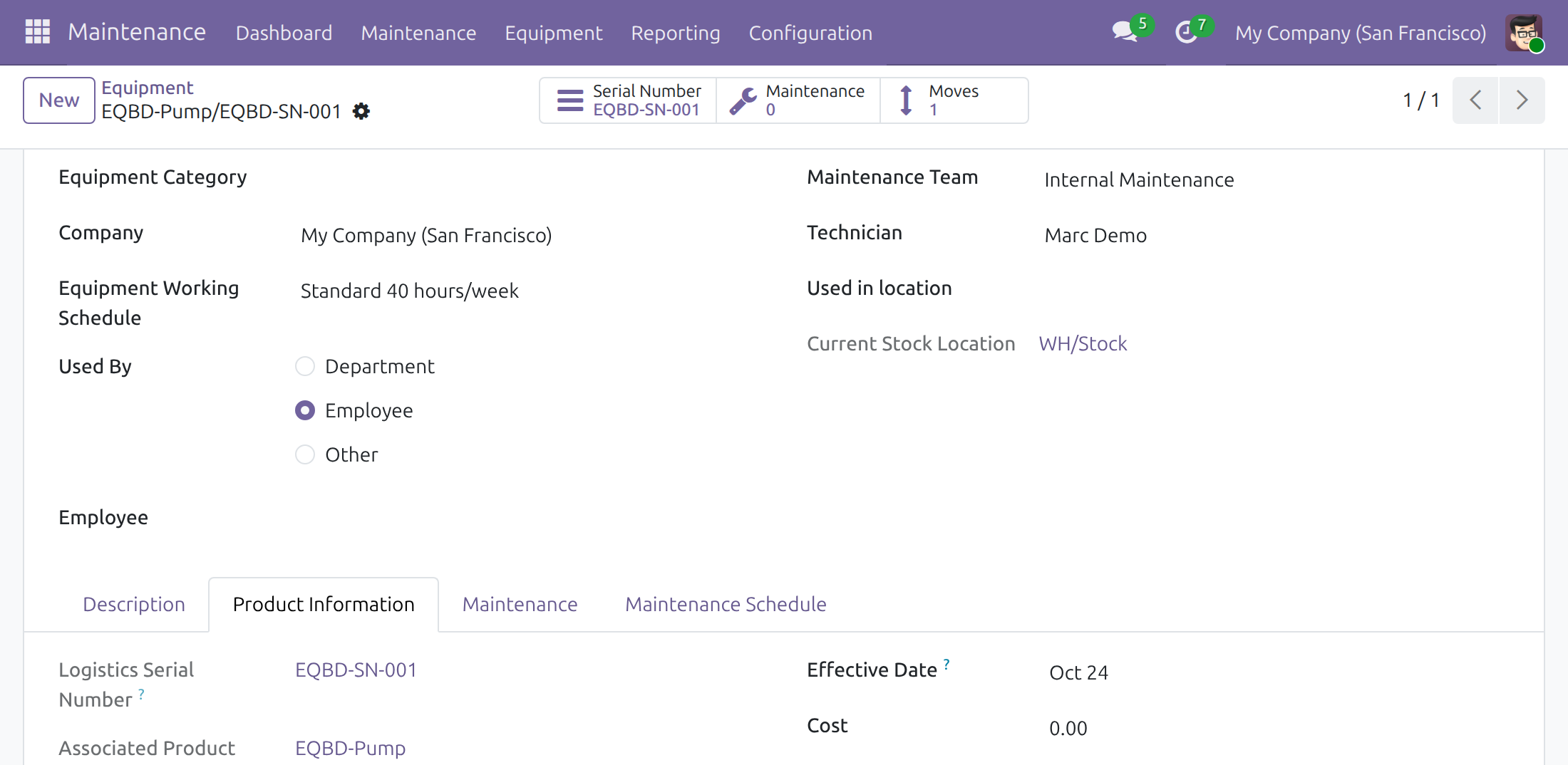
→ Each serial number on the receipt gets its equipment. A serial number that already has one keeps it, with no second record, and that equipment takes the arrival day too.
Ready on day one
Installs by itself
Odoo adds it once Equipment Working Frequency and Inventory Backdate are both installed. A checkbox in Settings, Backdate Operations, switches it off.
A product that creates equipment
Track the product by unique serial number and set Create on Purchase to Equipment. Receipt operation types are ready to create equipment.
Working frequencies on the product
Working frequencies set on the product are copied to each machine the receipt creates, so Total Working counts from the arrival day with no further entry.
You choose who enters a past date
The administrator grants the Inventory Backdate right on the user form to the people who receive machines.
What is included
On its own, the module gives the equipment of a back-dated receipt the receipt's day as its effective date. Validating a receipt at a past date comes with Inventory Backdate; the equipment, its working schedule and its working frequencies come with Equipment Working Frequency.
Before you decide
Who can give a machine a past date?
Only holders of the Inventory Backdate right are asked for a date when they validate a receipt, and a date after the current time is refused. Receipts validated by anyone else are recorded at the current time, and their equipment takes the day of validation.
What happens to machines already in the system?
Nothing changes at installation. An equipment takes its date when its serial number is received; equipment whose serial number arrives on a back-dated receipt takes the arrival day.
Does it get around a locked accounting period?
No. Odoo refuses a receipt dated in a locked accounting period.
Which languages and time zones does it handle?
It ships in English and Vietnamese. The arrival day is the calendar day of the chosen date and time in the user's own time zone, whatever the server clock says.
What does it take to run it?
Equipment Working Frequency and Inventory Backdate. The module has no screen, menu or access right of its own.
Try it, then ask us
The Documentation tab walks through preparing the product, granting the back-date right, validating a receipt at the arrival date and checking the equipment.
Pre-sales & partnership
viindoo.com/contactusTechnical support
viindoo.com/ticketTechnical requirements
- Odoo version: 19.0
- Editions: Odoo Community, Odoo Enterprise
- Required modules: Equipment Working Frequency, Inventory Backdate
- License: OPL-1
- Languages: English, Vietnamese
Equipment Working Frequency - Backdate
Note
This guide is for administrators, who switch the module on and prepare the equipment product, for warehouse operators who receive machines after they arrived, and for maintenance managers who follow each machine from the day it came in.
Note
Extends Inventory Backdate - see the Inventory Backdate documentation for the dialog Validate with a Back Date, the Inventory Backdate right and the rule that a back-date is never in the future.
A machine is often booked into Odoo some days after it reached the warehouse. Equipment Working Frequency - Backdate gives the equipment created from that receipt the day the machine really arrived as its Effective Date, instead of the day somebody validated the receipt. The maintenance figures that count from the effective date then start on the right day.
Overview
When a receipt of a serial-numbered product that creates equipment is validated, Odoo creates one equipment per serial number and stamps it with an Effective Date. That date is the starting point of two figures:
- the Mean Time Between Failure of the equipment, and
- Total Working of each line of its Working Frequency, which counts the working hours from the effective date up to today. Both are in the tab Maintenance of the equipment.
With this module, a receipt validated through the dialog Validate with a Back Date stamps the equipment with the day chosen in that dialog:
- the equipment created from the serial numbers of the receipt takes that day;
- equipment that already belongs to a received serial number is not duplicated and takes that day too;
- a receipt validated without a back-date, for example by a user who does not hold the back-date right, stamps the day of validation.
The day is the calendar day of the chosen date and time in your own time zone: a receipt validated at 03:00 on 24 October in your time zone gives 24 October, whatever the time at the server.
Who does what:
| Role | What they do | Access right to assign |
|---|---|---|
| Administrator | Switches the module on, prepares the equipment product and gives each person their access right. | Role: Administrator |
| Warehouse operator with the back-date right | Validates a receipt of equipment at the date and time the machines arrived. | Inventory Backdate: Stock Backdate Operations (it includes Inventory: User) |
| Maintenance manager | Follows each machine and checks its effective date. | Maintenance: Maintenance Manager |
Setup (for the Administrator)
Installation
- Open Settings ‣ Backdate Operations.
- In the Inventory block, tick Equipment Working Frequency - Backdate and click Save.
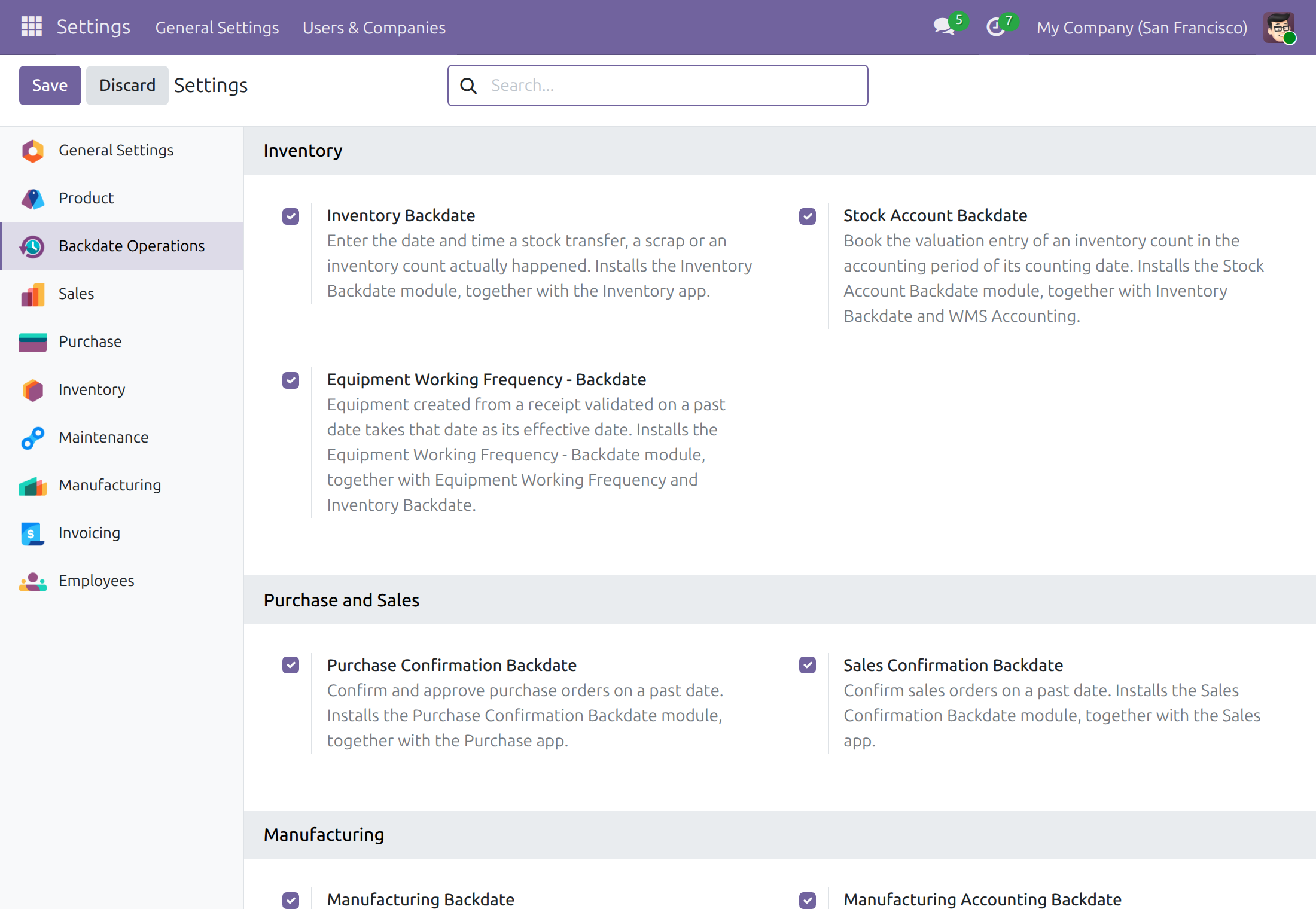
Odoo installs the module together with Equipment Working Frequency and Inventory Backdate. The module is installed by itself whenever both of those are installed; untick the box to switch it off, and the equipment is stamped with the day of validation again.
Prepare the product that creates equipment
A receipt creates equipment only for a product set up for it.
- Open Inventory ‣ Products ‣ Products and click New.
- Enter the name of the product. The type stays Goods.
- In Track Inventory, choose By Unique Serial Number.
- In Create on Purchase, choose Equipment.
- Click Save.
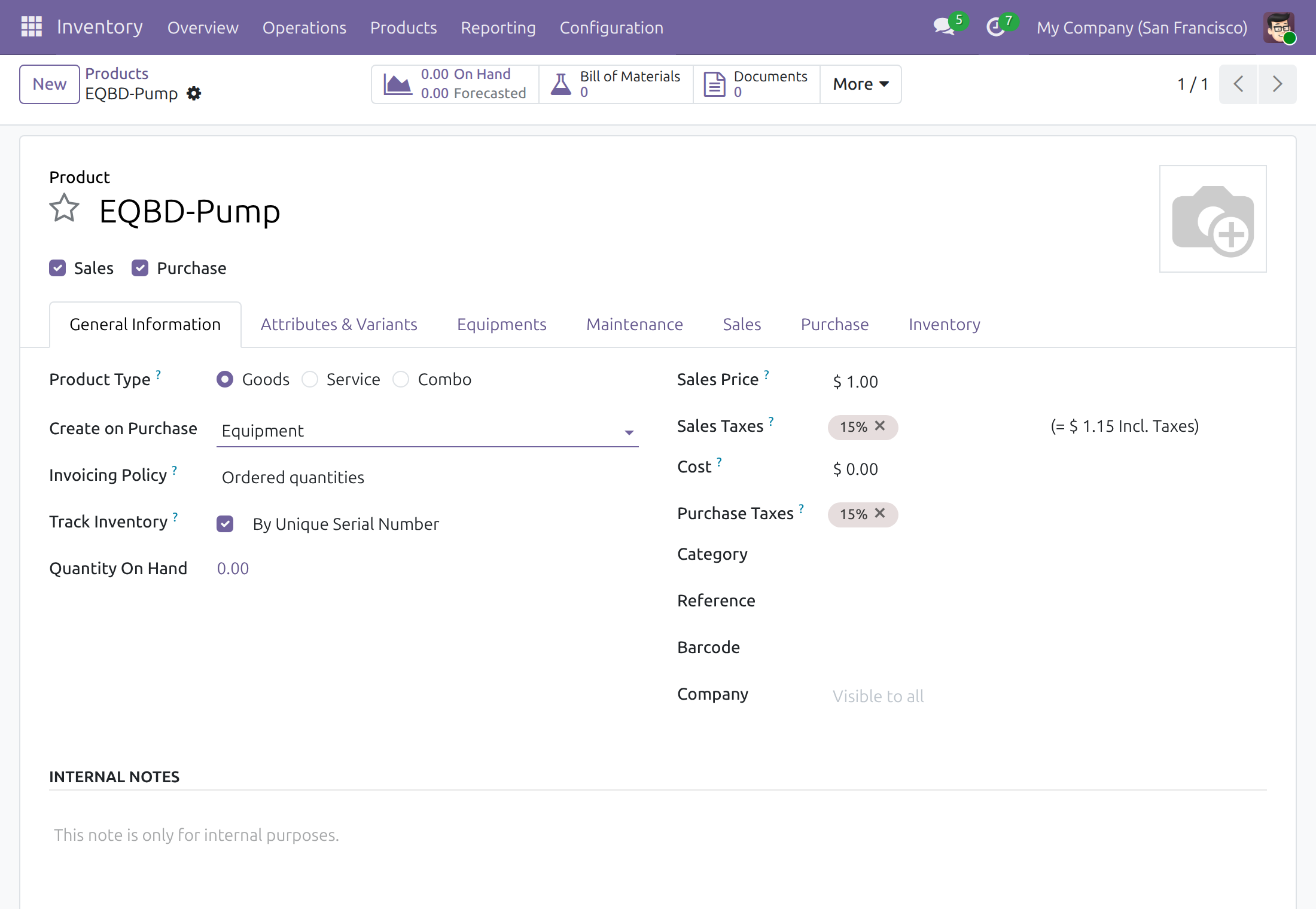
The product shows an Equipments tab where the maintenance manager chooses the equipment category, the maintenance team and the technician given to the equipment that is created.
The receipt operation types have Can create equipment ticked. To check it, open Inventory ‣ Configuration ‣ Warehouse Management ‣ Operations Types, open the receipt operation type and look at the Equipment group.
Give people the back-date right
Open Settings ‣ Users & Companies ‣ Users, open the user and choose Stock Backdate Operations in the row Inventory Backdate of the tab Access Rights. The right is described in the guide of Inventory Backdate. Give the maintenance manager Maintenance Manager in the row Maintenance of the same tab.
Warehouse operator with the back-date right: receive the machines on the day they arrived
For the people who hold Inventory Backdate: Stock Backdate Operations.
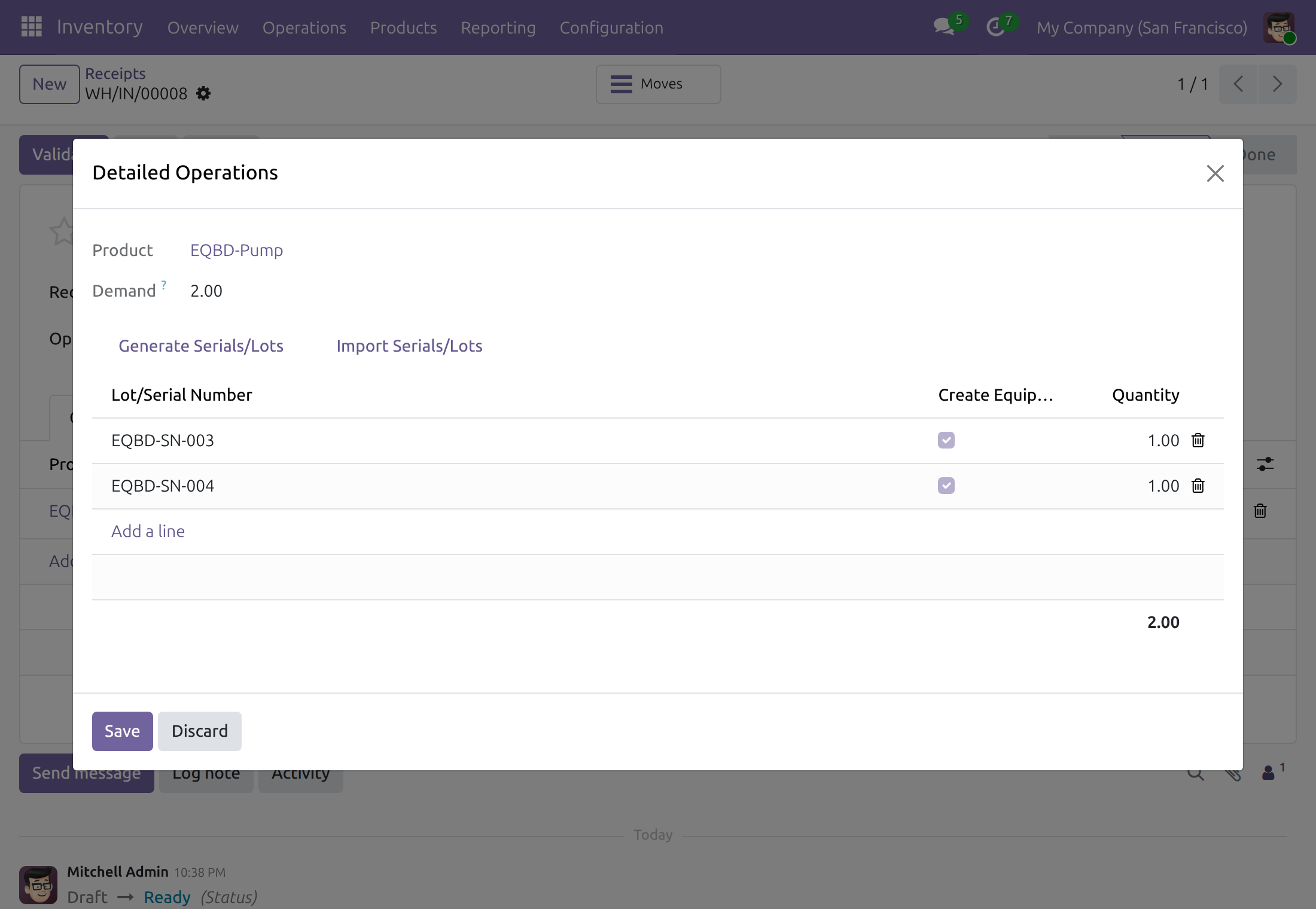
Check that equipment will be created
- Open the receipt from Inventory ‣ Operations ‣ Transfers ‣ Receipts.
- On the line of the product, click Details.
- Enter the serial number of each machine. Create Equipment is ticked for every serial number of a product that creates equipment.
Click Save to close the dialog.
Validate the receipt at the arrival date
- On the receipt, click Validate. The dialog Validate with a Back Date opens and proposes the current time.
- In Transfer Date, enter the date and time the machines really arrived, in your own time zone.
- Click Validate.
The receipt is done at that date. One equipment is created for each serial number, and its Effective Date is the arrival day. A serial number that already belongs to an equipment, for example one you created by hand before the receipt, keeps that equipment and its effective date becomes the arrival day.
Leave the proposed time unchanged to record the receipt now: the equipment then takes the day of validation.
Maintenance manager: follow the equipment from the day it arrived
For the people who hold Maintenance: Maintenance Manager.
Check the effective date of an equipment
- Open Maintenance ‣ Equipment and open the equipment. Its name is the product name followed by the serial number.
- Open the tab Product Information. Effective Date shows the day the machine arrived.
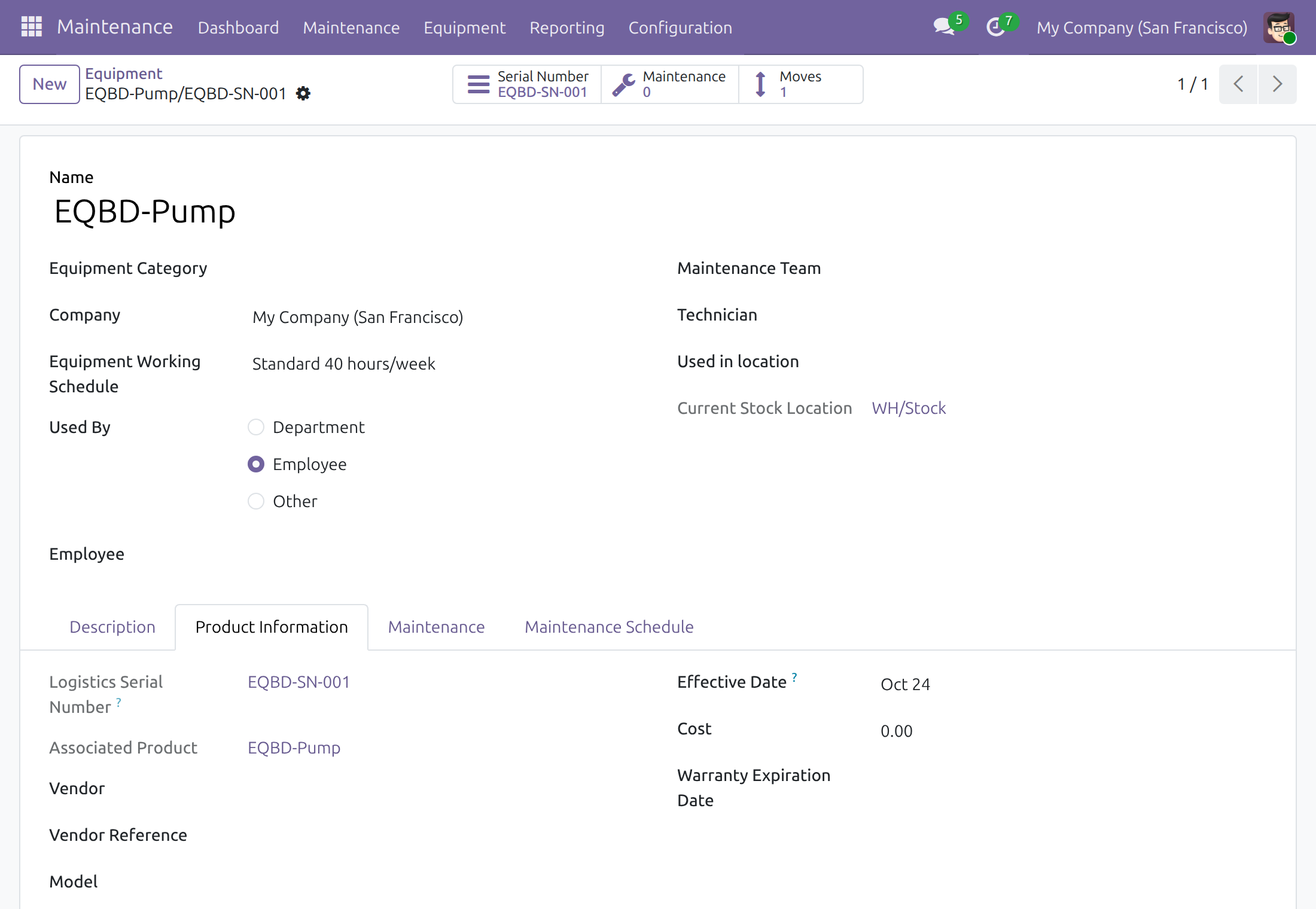
The Serial Number button of the equipment leads to its serial number and the Moves button to its stock movements. The Mean Time Between Failure and the Total Working of the working frequencies, in the tab Maintenance, count from this date.
Troubleshooting
- No dialog opens when I validate a receipt.
- You do not hold the Inventory Backdate right, so the receipt is recorded now and the equipment takes the day of validation. Ask your administrator for Stock Backdate Operations in the tab Access Rights of your user.
- The equipment shows the day I validated the receipt, not the arrival day.
- Either the box Equipment Working Frequency - Backdate in Settings ‣ Backdate Operations is not ticked, or the dialog was validated with the proposed current time. The date of an equipment is stamped when its serial number is received: validate the next receipt with the arrival date.
- No equipment was created.
- Check that the product has Equipment in Create on Purchase and is tracked by unique serial number, that Create Equipment is ticked on the serial numbers of the receipt, and that the operation type of the receipt has Can create equipment ticked.
- The receipt is refused when I enter a past date.
- The date falls in a locked accounting period. Choose a date after the lock date, or ask the person who closes the books.
- The date is refused as being in the future.
- Choose a date and time up to the current time.
FAQ
- Which day does the equipment get when I enter a late evening time?
- The calendar day of your own time zone. 23:30 on 24 October in your time zone gives 24 October.
- Does the module change the date of equipment that was created before it was switched on?
- No. The date of an equipment is stamped when its serial number is received.
- Is a second equipment created when I receive a serial number that already has one?
- No. A serial number belongs to one equipment only; that equipment keeps its place and takes the arrival day.
- Can I back-date to a time that has not come yet?
- No. Every back-date dialog refuses a date after the current time.
This software and associated files (the "Software") may only be used (executed, modified, executed after modifications) if you have purchased a valid license from the authors, typically via Odoo Apps, or if you have received a written agreement from the authors of the Software (see the COPYRIGHT file).
You may develop Odoo modules that use the Software as a library (typically by depending on it, importing it and using its resources), but without copying any source code or material from the Software. You may distribute those modules under the license of your choice, provided that this license is compatible with the terms of the Odoo Proprietary License (For example: LGPL, MIT, or proprietary licenses similar to this one).
It is forbidden to publish, distribute, sublicense, or sell copies of the Software or modified copies of the Software.
The above copyright notice and this permission notice must be included in all copies or substantial portions of the Software.
THE SOFTWARE IS PROVIDED "AS IS", WITHOUT WARRANTY OF ANY KIND, EXPRESS OR IMPLIED, INCLUDING BUT NOT LIMITED TO THE WARRANTIES OF MERCHANTABILITY, FITNESS FOR A PARTICULAR PURPOSE AND NONINFRINGEMENT. IN NO EVENT SHALL THE AUTHORS OR COPYRIGHT HOLDERS BE LIABLE FOR ANY CLAIM, DAMAGES OR OTHER LIABILITY, WHETHER IN AN ACTION OF CONTRACT, TORT OR OTHERWISE, ARISING FROM, OUT OF OR IN CONNECTION WITH THE SOFTWARE OR THE USE OR OTHER DEALINGS IN THE SOFTWARE.