
Vietnam - Payroll
| Lines of Code | 1741 |
| Technical name | l10n_vn_viin_hr_payroll |
| License | OPL-1 |
| Website | https://viindoo.com/apps/modules/19.0/l10n_vn_viin_hr_payroll |
| Read description for | v 15.0 v 16.0 v 17.0 v 18.0 |
| Required Apps | Time Off (hr_holidays) Discuss (mail) Calendar (calendar) Employees (hr) |
| Included Dependencies | Payroll Employee Relatives Viindoo Base Advanced HR Management HR Contracts (Viindoo) Work Entry Viin Time-Off Work Entry - Contract Viin - Holiday Work Entry Base Addendum Viindoo Holiday & WorkDay Manager Safe IR Metadata Proxies |
| Extensions | Vietnam Payroll - Accounting Integration Vietnam Payroll by Administrative Regions Vietnam - Payroll Meal Localization |
Vietnamese payroll that keeps up with the law as it changes
For Vietnamese companies: HR and payroll teams, finance managers and business owners
Localized salary rules, tax compliance and contribution rates for Vietnam.
Extends Payroll - the Vietnamese rates, tax rules and statutory amounts live on top of it.
Works with the leave records of Viin Time-Off in the same payroll.
Is this you?
Every time a contribution rate changes, someone edits the rate employee by employee and hopes none is missed.
You cannot say with certainty which tax rule and which maximum insurance base applied to a payslip of an earlier month.
Non-resident staff, short-term workers and payments after a contract ends each need their own tax treatment, and mistakes surface at year-end finalisation.
Your accountant asks for the month's tax, insurance and union fund totals, and you rebuild them from payslip exports.
A software update that quietly changes rates in a company that is already running is a risk you cannot accept.
What changes
Every time a contribution rate changes, someone edits the rate employee by employee and hopes none is missed.
→ One action applies a new contribution rate to every employee from the date you choose, and lists the exceptions it left alone.
You cannot say with certainty which tax rule and which maximum insurance base applied to a payslip of an earlier month.
→ Every rate, bracket and maximum amount carries a start and end date, so each payslip uses the values in force for its month.
Non-resident staff, short-term workers and payments after a contract ends each need their own tax treatment, and mistakes surface at year-end finalisation.
→ Ready-made contract types and tax rules for non-resident individuals, short-term workers and detached payments.
Your accountant asks for the month's tax, insurance and union fund totals, and you rebuild them from payslip exports.
→ The month's tax, insurance and union fund totals and filing dates are on the Payroll dashboard, ready for your accountant.
A software update that quietly changes rates in a company that is already running is a risk you cannot accept.
→ Updates never change the rates of a company that is running: what you enter is kept.
How it works
Set up
Payroll Administrator installs the module, checks the shipped rates, tax rules and statutory amounts against your own policy, and assigns access rights.
Keep current
Payroll Administrator enters a new value with its start date when the law changes (personal tax rules, and statutory amounts under Payroll ‣ Payroll Contribution ‣ Statutory Amounts), or applies a new contribution rate to all employees with Mass Change Rates.
Run payroll
Payroll Officer runs payslips and batches, and changes the rates of a single contribution register with Change Rates; each payslip uses the values in force for its month.
Follow compliance
Payroll Officer reads tax, insurance and union fund totals and filing dates on the dashboard.
Key Features
Contribution types and Mass Change Rates
Social, health and unemployment insurance and the union fee with employee and company rates, and one action for the Payroll Administrator to apply a changed rate to every employee.
Vietnam personal tax rules
Progressive table, flat rates and detached payments with dated brackets and per-payment thresholds, attached to new contracts of Vietnamese employees. The Payroll Administrator updates them when the law changes.
Statutory amounts with dates
Maximum contribution bases and maximum union fee with start and end dates, so old months keep their old amounts. The Payroll Administrator updates them when the law changes.
Contract types for special cases
Non-resident and short-term / no-labour-contract types linked to their flat-rate tax rule, with a warning when a running contract is moved.
Personal tax base rule
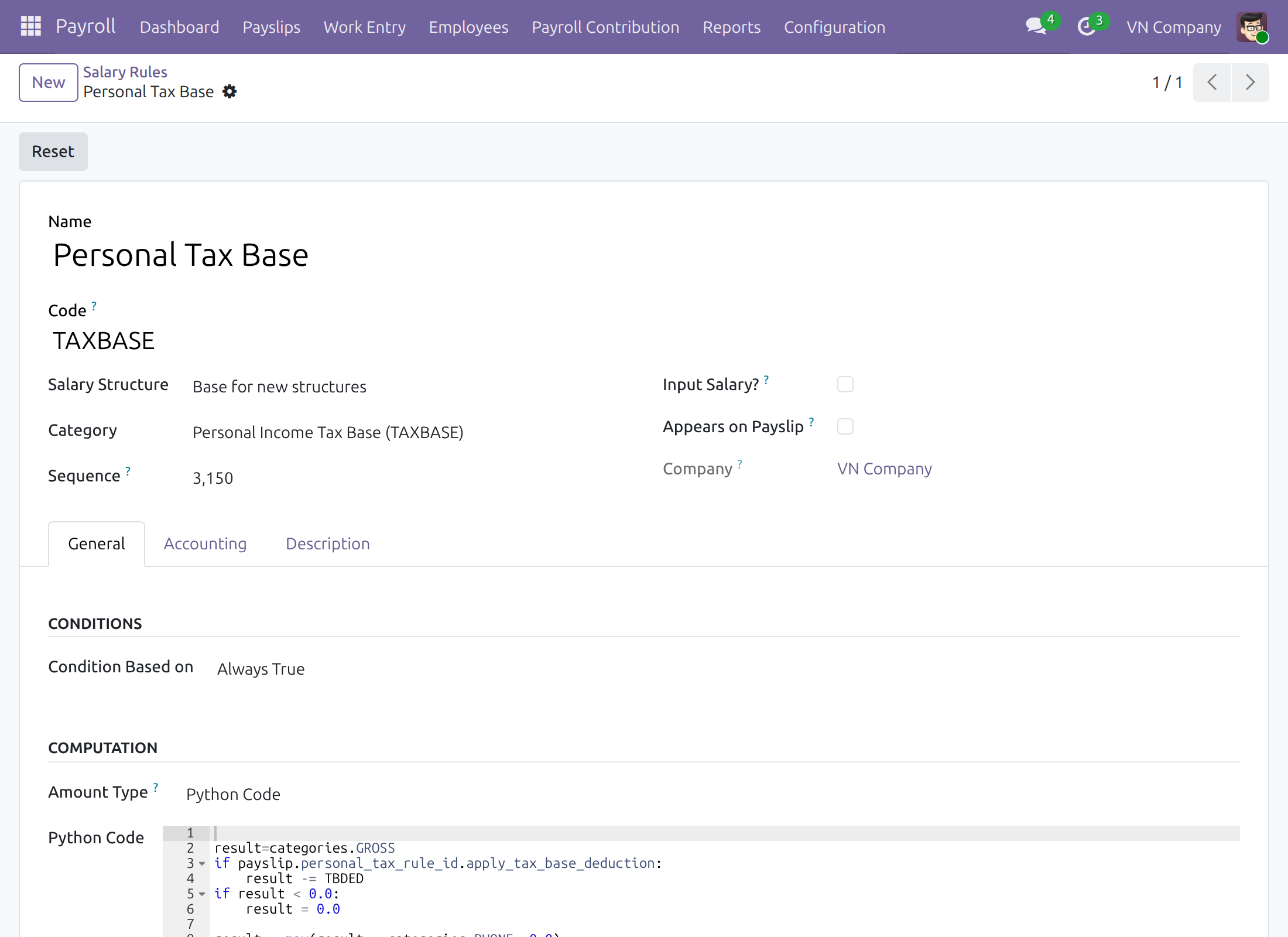
Salary rule that builds the taxable income and applies the deductions the tax rule asks for, adjusted to Vietnamese practice.
Compliance dashboard
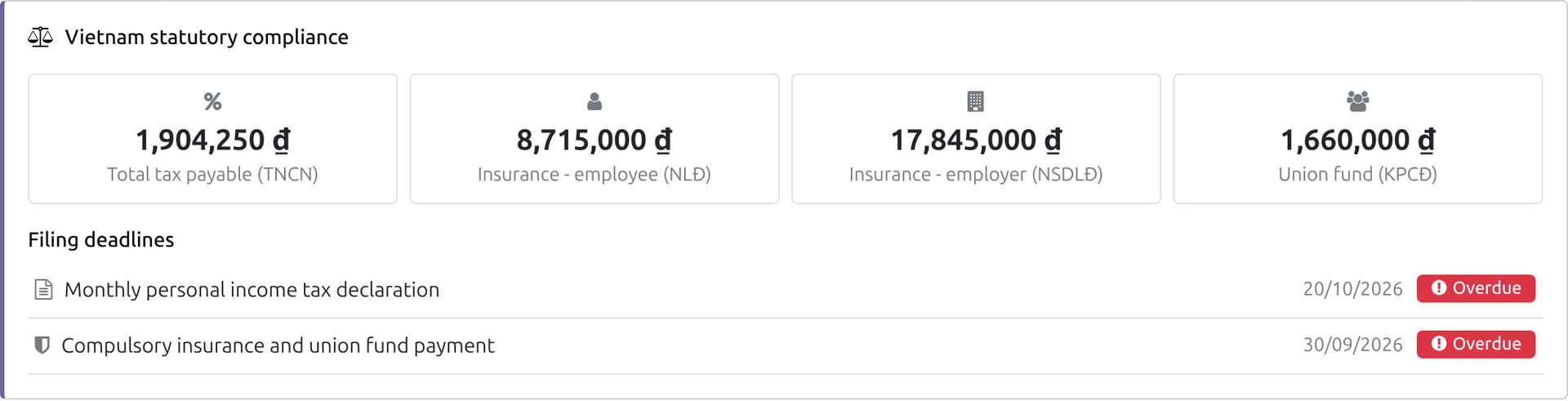
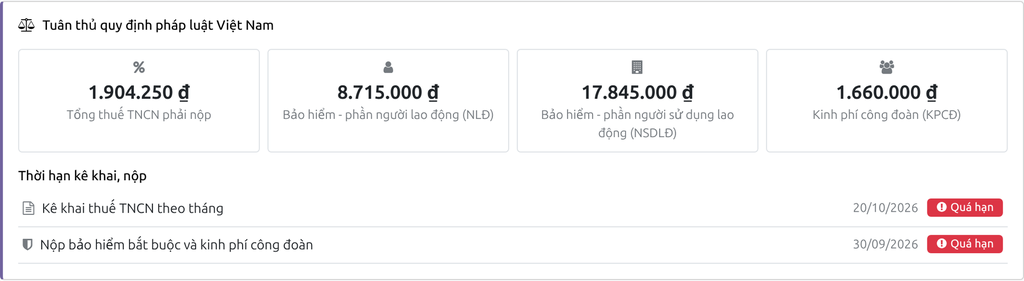
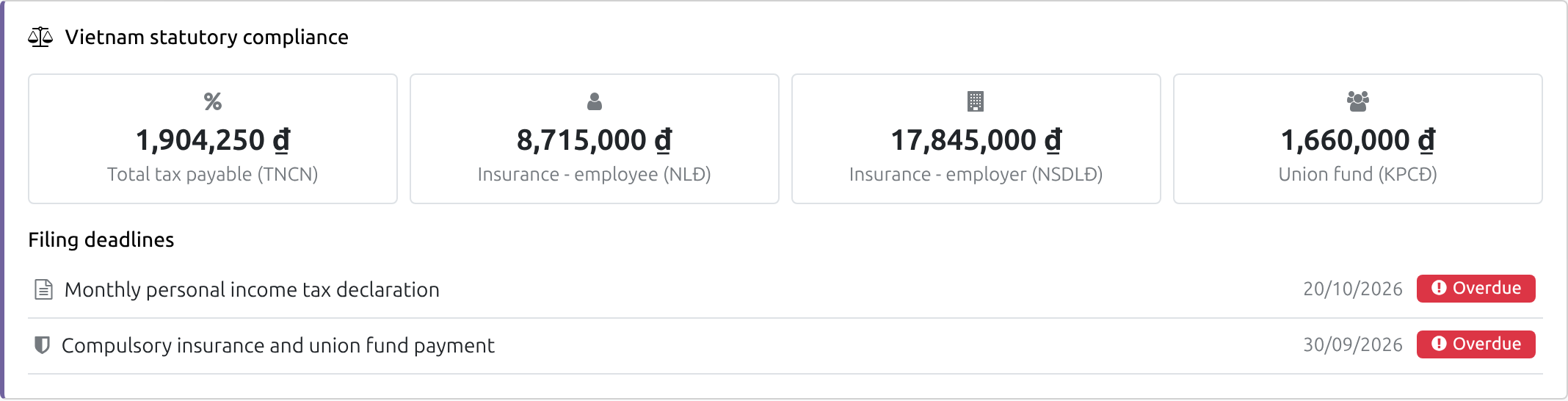
Tax payable, employee and employer insurance, union fund and filing deadlines for the Payroll Officer.
Who it is for
Payroll Administrator
Keeps the legal values up to date and wants one safe action for a rate change, with exceptions listed.
Payroll Officer
Runs payslips every month and wants the compliance figures without exports.
Finance manager / chief accountant
Needs tax, insurance and union fund totals and dates that match the payslips.
Business owner
Wants payroll that follows Vietnamese rules without waiting for a software release.
Best for: Vietnamese companies of any size that run their payroll in Odoo/Viindoo.
Check the contribution rates of your company
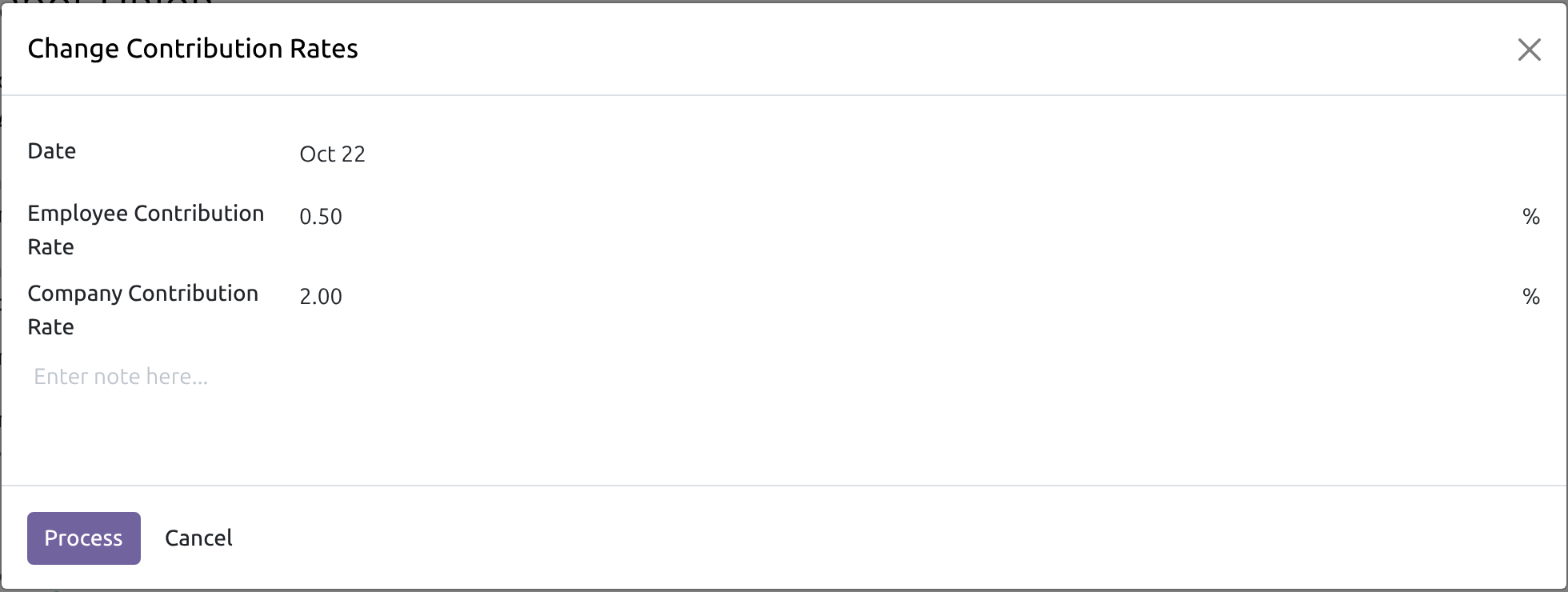
Apply a changed rate to every employee at once
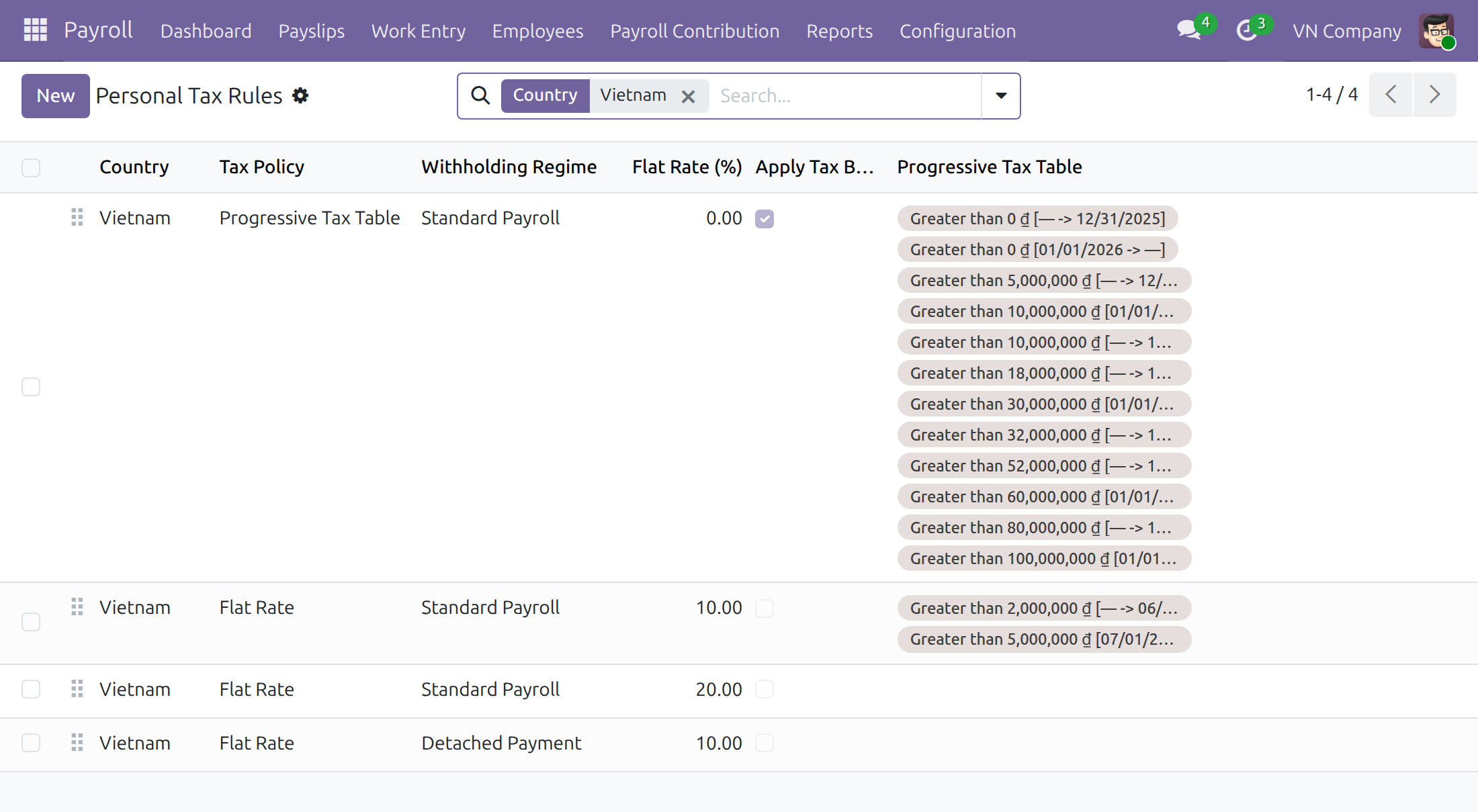
Keep personal tax rules with their dates
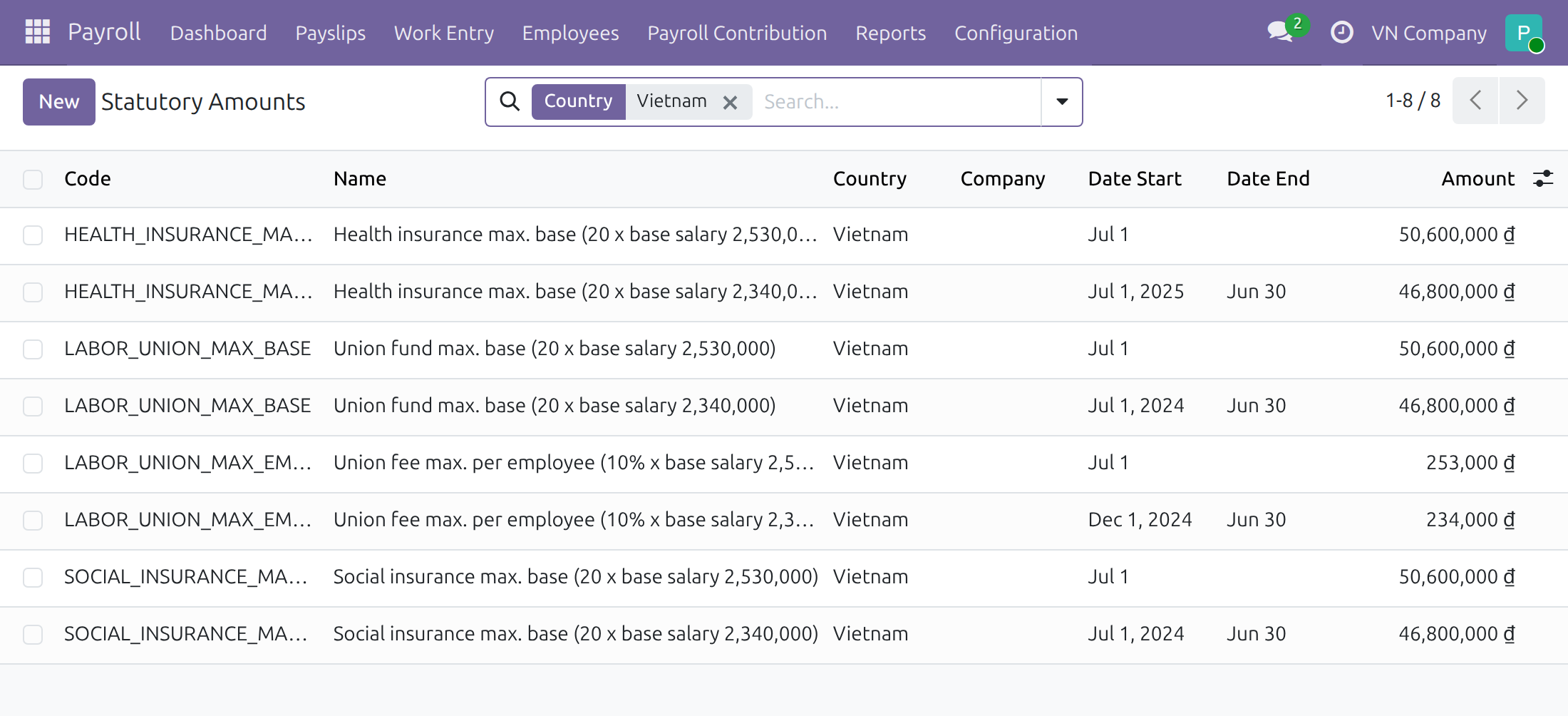
Maintain maximum bases and amounts with start and end dates
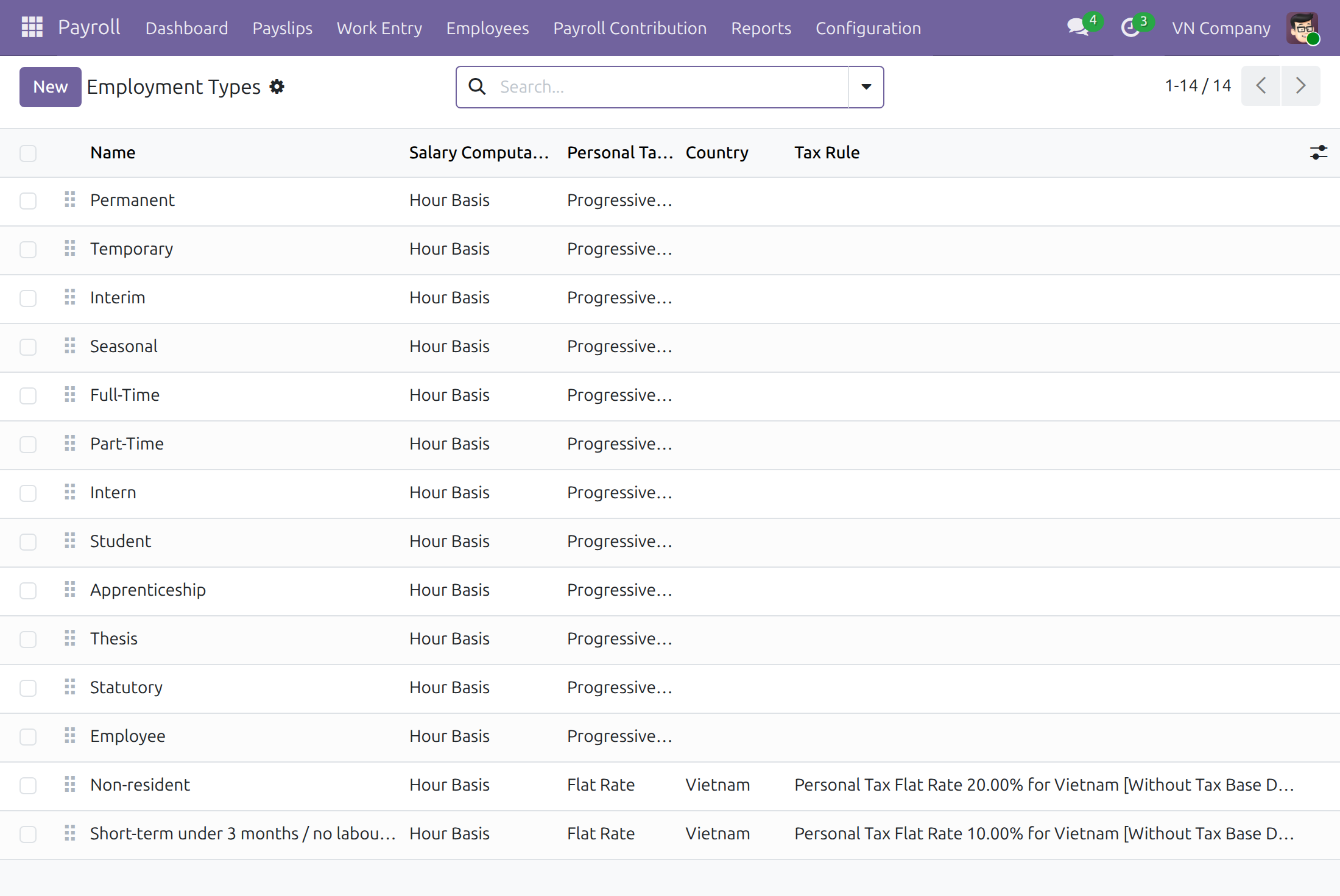
Use ready-made types for non-resident and short-term workers
See how the taxable income is built
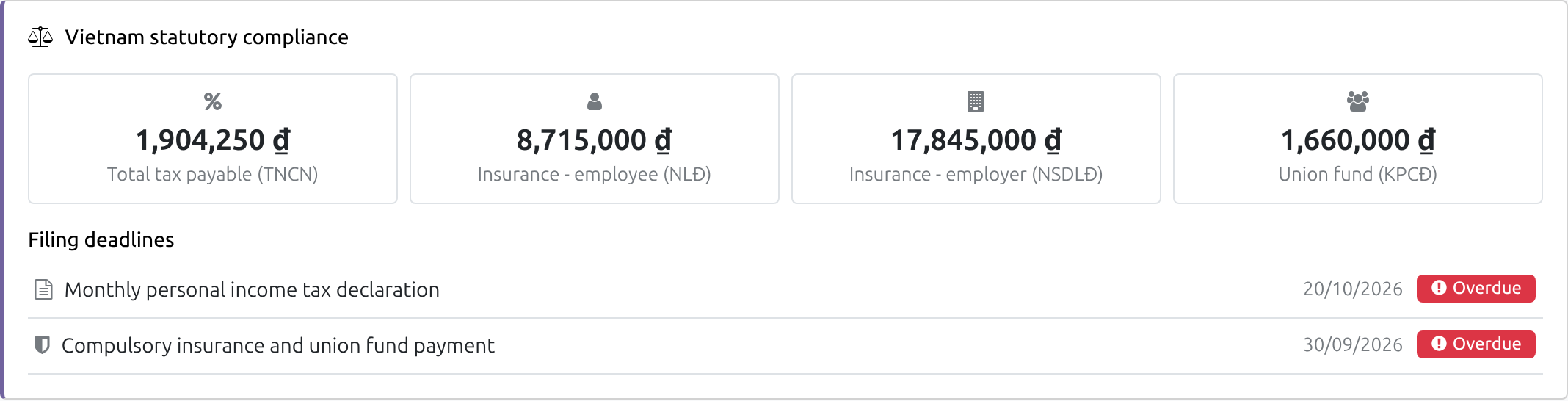
Follow tax, insurance and union fund on the dashboard
See Vietnam - Payroll in Action
Watch the module in a working Viindoo environment.
Vietnam - Payroll
v19demo-int.viindoo.com
Frequently Asked Questions
Does the software decide which rates and decrees apply?
No. Rates, thresholds and dates are data that your Payroll Administrator maintains. The module ships a starting point and keeps whatever you enter.
Will an update change the rates of my running company?
No. Installing or updating never changes rates that are in use. A changed rate is applied by your Payroll Administrator with Mass Change Rates, from the date chosen.
What about an employee who has a different rate?
Registers with their own rates are left out of a mass change and listed. The Payroll Officer changes each of them with Change Rates on the register, from the date of the change.
Can I use it with accounting?
Yes. It pairs with HR Payroll Accounting and Vietnam Payroll - Accounting Integration.
Need help with Vietnam - Payroll?
For questions, implementation support or consulting, contact Viindoo.
Pre-Sales & Partnership
viindoo.com/contactusTechnical Support
viindoo.com/ticketTechnical Requirement
- Odoo/Viindoo version: 19.0
- Editions: Community Edition
- Required modules: to_hr_payroll
- License: OPL-1
Vietnam - Payroll
Who this guide is for: the Payroll Administrator, who keeps the Vietnamese legal values up to date (contribution rates, personal income tax rules, statutory amounts), and the Payroll Officer, who runs the payslips and follows the Vietnamese compliance figures on the dashboard. Business owners and finance managers can read the Overview to see what the module settles for a Vietnamese company.
Note
Extends Payroll - see its documentation.
Overview
Vietnamese payroll depends on rules that change over time: social, health and unemployment insurance, the union fee, personal income tax and the maximum amounts those contributions are calculated on. This module gives a Vietnamese company a ready starting point for all of them and keeps every legal value as data that your own payroll team maintains. When the law changes, nobody waits for a software release: the Payroll Administrator changes the value, with the date it starts, and every payslip uses the value in force for its month.
What the module provides:
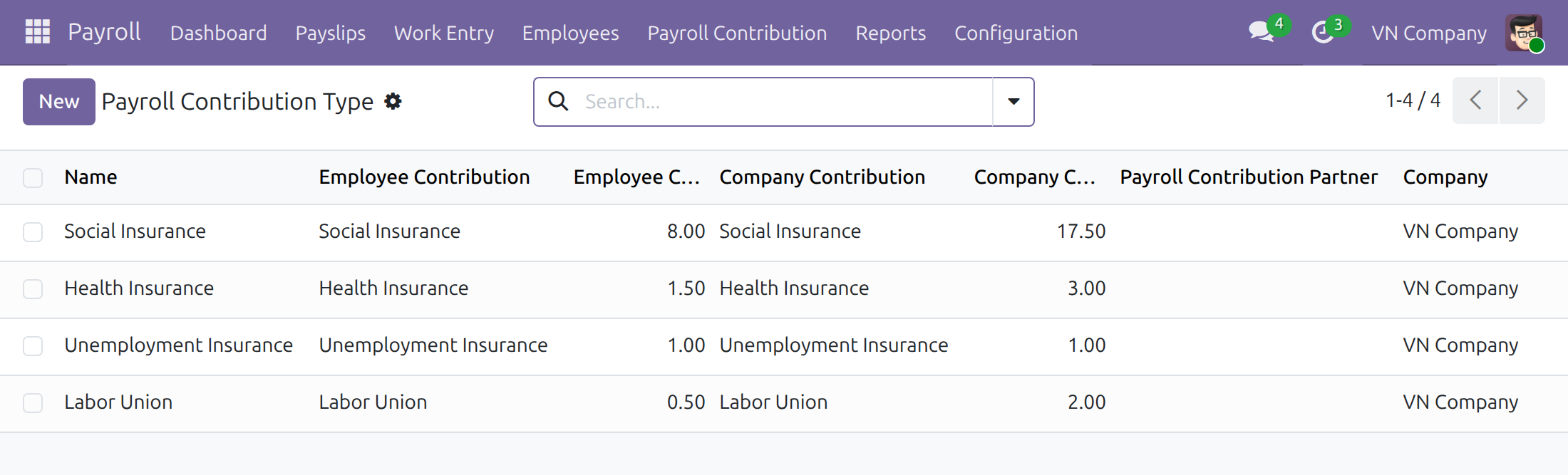
- default contribution types for Social Insurance, Health Insurance, Unemployment Insurance and Labor Union, with their employee and company rates;
- personal tax rules for Vietnam (progressive tax table, flat rates, detached payments);
- statutory amounts (maximum contribution bases, maximum union fee per employee) with their validity dates;
- contract types for non-resident individuals and for short-term or no-labour-contract workers, each linked to its flat-rate personal tax rule;
- adjusted salary rules for the personal income tax base;
- a Vietnam statutory compliance section on the Payroll dashboard.
| Role | What they do | Access right to assign |
|---|---|---|
| Payroll Administrator | Maintains contribution rates, personal tax rules and statutory amounts; applies a change of the law to all running registers at once with Mass Change Rates. | Payroll: Administrator |
| Payroll Officer | Runs payslips and batches, reads the configuration, changes the rates of a single contribution register with Change Rates, follows the compliance dashboard. | Payroll: Officer |
Setup (for the Payroll Administrator)
Installation
- Go to Apps.
- Remove the default filter, search for Vietnam - Payroll.
- Press Install. The Payroll application is installed with it if it is not there yet.
The company must be set in Vietnam (company country) before you use the module: the Vietnamese values below are given only to Vietnamese companies. A company that is switched to Vietnam later gets them at that moment. Values that somebody already entered are never replaced.
Assign the access rights
- Go to Settings ‣ Users & Companies ‣ Users and open the user.
- In the Payroll line of the access rights, choose Administrator or Officer.
- Save.
Payroll Administrator: keep the legal values up to date
Contribution types and rates
Go to Payroll ‣ Payroll Contribution ‣ Payroll Contribution Type. A Vietnamese company has one type per contribution, each with the employee rate and the company rate as a percentage.
The rates come from the shipped template and are only a starting point. Check them against the regulation that applies to your company.
Open a type to see its details: the rates, how unpaid days are limited, and the number of registers (one per employee) that follow it.
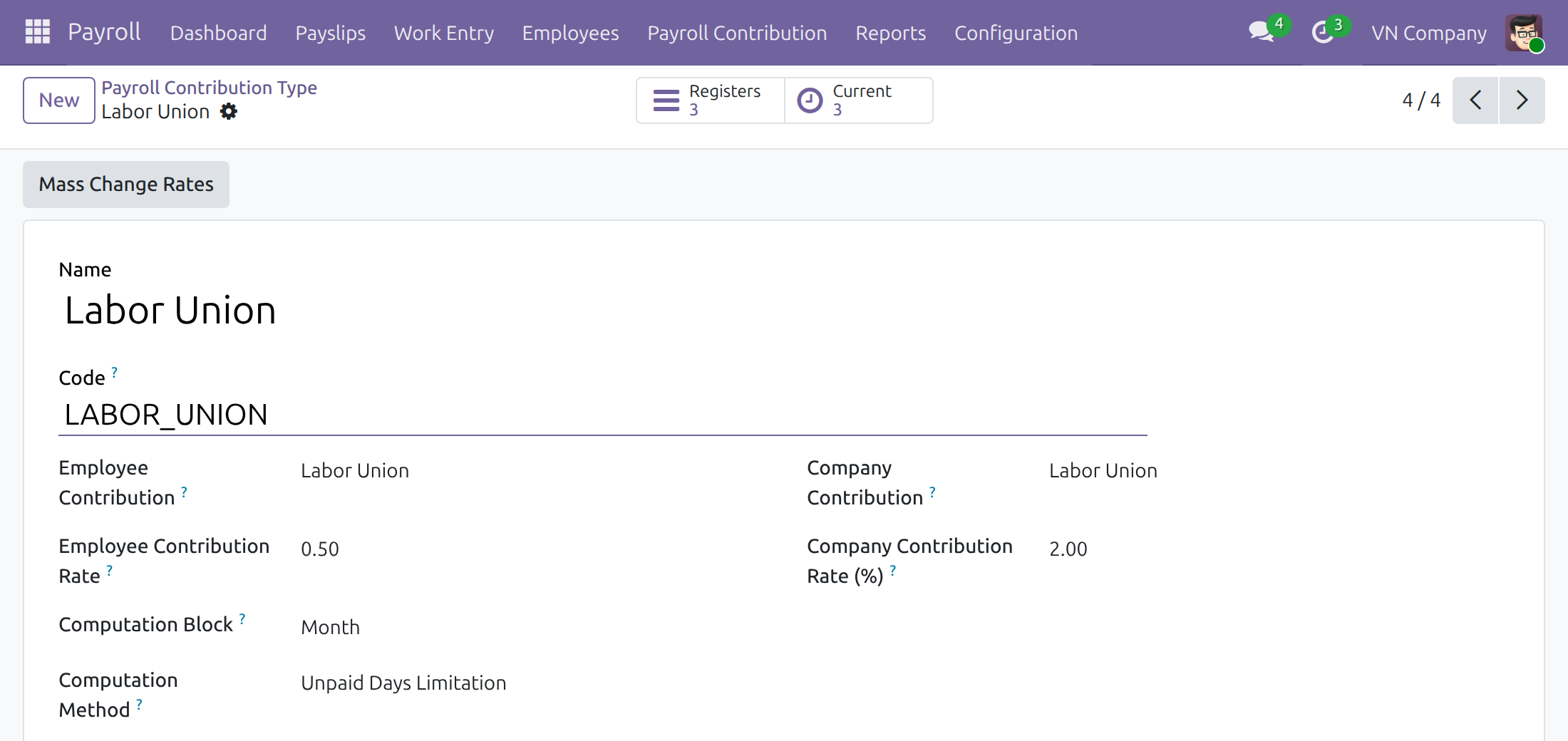
Apply a changed contribution rate to all employees (Mass Change Rates)
Installing or updating the module never changes the rates of a company that already works: a rate you did not choose yourself never moves. When the law changes a contribution rate (for example the employee's share of the union fee), the Payroll Administrator applies it, once, for all employees. Mass Change Rates is available to the Payroll Administrator only: a Payroll Officer does not see the button and reads the contribution types without being able to change them.
Go to Payroll ‣ Payroll Contribution ‣ Payroll Contribution Type and open the type, for example Labor Union.
Press Mass Change Rates. A message explains what is going to happen; confirm it.
In the window Change Contribution Rates, enter the Date the new rate starts, the new Employee Contribution Rate and the new Company Contribution Rate. Add a note if you wish.
Press Process.
Result:
- every open register of this type that follows the default rates of the type (draft, confirmed, suspended or resumed) gets the new rates from the date you entered;
- the new rates become the default of the type, so the registers created afterwards start with them;
- a message names the registers that were left out: those that carry their own rates (for example an employee exempted by law), and draft registers that start before the date. If they must follow the change too, the Payroll Officer or the Payroll Administrator changes them one by one (see Change the rates of one register below).
The contribution registers of Vietnamese companies created after the change get the default rates of the shipped template. A register that covers earlier periods with a different rate is changed with Change Rates on the register, using the date of the change (see Change the rates of one register below).
Note
The software does not decide which rate or which decree applies. Rates, dates and exceptions are data that the Payroll Administrator maintains.
Personal tax rules
Go to Payroll ‣ Configuration ‣ Payroll Entry ‣ Personal Tax Rules and filter on the country Vietnam. Personal tax rules are data that the Payroll Administrator updates when the law changes; a Payroll Officer can read them and cannot change them.
- The progressive tax table applies to most employees. Its deductions and brackets carry start and end dates, so a payslip of any month uses the figures in force for that month.
- A flat rate rule applies to special cases, for example non-resident individuals or workers without a labour contract.
- A rule whose Withholding Regime is Detached Payment applies to income paid to a resident individual after the labour contract has ended. It is separate from the Standard Payroll rules. Its rate and threshold are data of the rule.
- A flat rate rule can carry dated rates: each line has a rate, a validity period and a threshold per payment. The threshold is compared with the amount paid before tax on one payment date (every payslip of the same employee paid that day is added together). If another payslip paid the same day is cancelled or changed, compute the remaining draft payslips again.
When the law changes, end the current deduction lines, brackets or dated rates the day before the change and add the new ones with their start date. See the Payroll documentation for how to override the tax rule on a contract, for the withholding commitment workflow and for the withholding reason shown on the payslip.
Statutory amounts
Go to Payroll ‣ Payroll Contribution ‣ Statutory Amounts. Each line is an amount with a code, a country, a start date and, when it was replaced, an end date: the maximum base for social insurance, for health insurance, for the union fund, and the maximum union fee per employee. The statutory amounts are data that the Payroll Administrator updates when the law changes; a Payroll Officer can read them and cannot change them.
When an amount changes, set the end date of the current line to the day before the change and add a new line with the new amount from the date of the change. Payslips use the amount in force for their month.
Contract types and the personal tax policy
Go to Payroll ‣ Configuration ‣ Work Entry ‣ Contract Type. Besides the usual types, Vietnam adds two with a flat rate personal tax policy and their tax rule already selected: Non-resident and Short-term under 3 months / no labour contract.
The pay terms of a running contract stay as agreed. If you move a running contract to or from one of these two types, the system warns you: set the personal tax policy and the tax rule of the contract yourself.
Salary rules of the personal income tax
Go to Payroll ‣ Configuration ‣ Payroll Entry ‣ Salary Rules. The Personal Tax Base rule adds the income subject to personal income tax and subtracts the tax base deductions when the tax rule asks for them.
The phone allowance is left out of the income subject to personal income tax under every tax policy of a company that was Vietnamese when the module was installed. A company switched to Vietnam afterwards does not get this automatically: if its policy treats the phone allowance as tax exempt, add the line result = max(result - categories.PHONE, 0.0) at the end of the formula of its Personal Tax Base rule.
What you enter is kept: the module never puts back a rate, an amount or a salary rule formula that you changed.
Payroll Officer: follow the compliance figures
Open Payroll ‣ Dashboard. For a Vietnamese company the officer sees the section Vietnam statutory compliance with the period totals read from the payslips:
- Total tax payable (TNCN) - personal income tax withheld;
- Insurance - employee (NLĐ) and Insurance - employer (NSDLĐ) - the insurance contributions of each side;
- Union fund (KPCĐ) - the union fund paid by the company.
Under the totals, Filing deadlines lists the monthly personal income tax declaration and the payment of the compulsory insurance and union fund, with the date derived from the payroll period and a status such as Overdue. These dates are an aid for the payroll team, not a filing record.
Every employee who has a Vietnamese payslip in the period also sees, in the personal part of the dashboard, their own personal income tax, employee insurance, personal and dependent relief and year-to-date tax. The company totals above are shown to Payroll Officers only.
Change the rates of one register
A contribution register follows one employee and one contribution type. When one employee's rate differs from the default (for example an employee exempted by law), or when a register was left out of a Mass Change Rates, the Payroll Officer changes that register alone:
- Go to Payroll ‣ Payroll Contribution ‣ Payroll Contribution Register and open the register.
- While the register is in Draft, edit the Employee Contribution Rate and the Company Contribution Rate directly on the register.
- For a Confirmed or Resumed register, press Change Rates. In the window Change Contribution Rates, enter the Date the new rate starts and the new rates, then press Process.
The earlier rates stay in the register's history for the periods before the date. The default rates of the contribution type are not changed by this: only the Payroll Administrator changes them, with the type form or with Mass Change Rates.
Troubleshooting
- The Mass Change Rates message says no register follows the default rates. Every open register of the type already carries its own rates. The Payroll Administrator changes the default rates on the type form; the Payroll Officer or the Payroll Administrator changes the rates of each register with Change Rates on the register.
- The Mass Change Rates button, or the New button of Statutory Amounts, Personal Tax Rules or Contribution Types, is not shown. These screens are for the Payroll Administrator. A Payroll Officer asks the Payroll Administrator for the change, or uses Change Rates on a single register.
- The Vietnam section does not appear on the dashboard. The company country must be Vietnam, and the company totals are shown to users with the Payroll Officer access right only.
- A payslip uses an old amount. Check the start and end dates of the statutory amount, tax rule line or contribution rate for the month of the payslip.
This software and associated files (the "Software") may only be used (executed, modified, executed after modifications) if you have purchased a valid license from the authors, typically via Odoo Apps, or if you have received a written agreement from the authors of the Software (see the COPYRIGHT file).
You may develop Odoo modules that use the Software as a library (typically by depending on it, importing it and using its resources), but without copying any source code or material from the Software. You may distribute those modules under the license of your choice, provided that this license is compatible with the terms of the Odoo Proprietary License (For example: LGPL, MIT, or proprietary licenses similar to this one).
It is forbidden to publish, distribute, sublicense, or sell copies of the Software or modified copies of the Software.
The above copyright notice and this permission notice must be included in all copies or substantial portions of the Software.
THE SOFTWARE IS PROVIDED "AS IS", WITHOUT WARRANTY OF ANY KIND, EXPRESS OR IMPLIED, INCLUDING BUT NOT LIMITED TO THE WARRANTIES OF MERCHANTABILITY, FITNESS FOR A PARTICULAR PURPOSE AND NONINFRINGEMENT. IN NO EVENT SHALL THE AUTHORS OR COPYRIGHT HOLDERS BE LIABLE FOR ANY CLAIM, DAMAGES OR OTHER LIABILITY, WHETHER IN AN ACTION OF CONTRACT, TORT OR OTHERWISE, ARISING FROM, OUT OF OR IN CONNECTION WITH THE SOFTWARE OR THE USE OR OTHER DEALINGS IN THE SOFTWARE.