
Vietnam Payroll - Accounting Integration
| Lines of Code | 1150 |
| Technical name | l10n_vn_viin_hr_payroll_account |
| License | OPL-1 |
| Website | https://viindoo.com/apps/modules/19.0/l10n_vn_viin_hr_payroll_account |
| Read description for | v 10.0 v 11.0 v 12.0 v 13.0 v 14.0 v 15.0 v 16.0 v 17.0 v 18.0 |
| Required Apps | Time Off (hr_holidays) Invoicing (account) Discuss (mail) Employees (hr) Calendar (calendar) |
| Included Dependencies | Payroll HR Payroll Accounting Vietnam - Payroll Employee Relatives Viindoo Base Vietnam Chart of Accounts - Circular 99 and 133 Accounting Foundation Advanced HR Management HR Contracts (Viindoo) Work Entry Viin Time-Off Work Entry - Contract HR Accounting Vietnam - HR Accounting Viin - Holiday Work Entry Base Addendum Viindoo Holiday & WorkDay Manager Safe IR Metadata Proxies |
| Extensions | Vietnam - Payroll for Meal Orders with Accounting |

Payroll that posts itself to the right Vietnamese accounts
For Vietnamese companies - finance, accounting and HR teams
Automate payroll accounting entries with Vietnamese Accounting Standards
Is this you?
Every payroll run ends with hours of choosing accounts for salary, insurance, union fund and income tax lines.
Journal entries differ from one payslip to the next, and nobody is sure the accounts are right.
The amounts withheld for the authorities are tracked in spreadsheets, so late or missing payments are noticed too late.
Costs cannot be followed department by department without extra re-work at month end.
What changes
Hours spent picking accounts for every payroll run
→ Start with every Vietnamese salary rule already tied to the right accounts of your chart
Entries that differ from one payslip to the next
→ Get consistent journal entries from every payslip or payslip batch
Withheld amounts tracked in spreadsheets
→ See what is payable, paid and outstanding for each obligation on the Payroll Dashboard
Late payments noticed too late
→ Watch the deadline status of each obligation before it becomes overdue
How it works
Set up
The Payroll Administrator reviews the default accounts of the salary rules once; the accounts follow the company chart.
Validate
The Payroll Officer validates the payslips or the payslip batch; journal entries are generated and posted.
Review
The Accountant reviews the salary entries on the Vietnamese payable accounts.
Reconcile
The payroll accountant follows each statutory obligation on the dashboard until it is paid and reconciled.
Key Features
Ready-made accounts on every salary rule
Gross pay, social, health and unemployment insurance, trade union fund, income tax and harmful-work subsidies post to the right payable accounts with no manual mapping.
Works with your chart of accounts
Accounts are found in your own Vietnamese chart by their leading digits, and the Payroll Administrator can change any of them. Departments of a Vietnamese-chart company carry account 642 by default.
Both sides of every contribution
Amounts paid by the employee reduce the net pay payable; amounts paid by the company are booked to the expense account of the contract or the department, or to account 642 when neither names one.
Vietnam statutory reconciliation
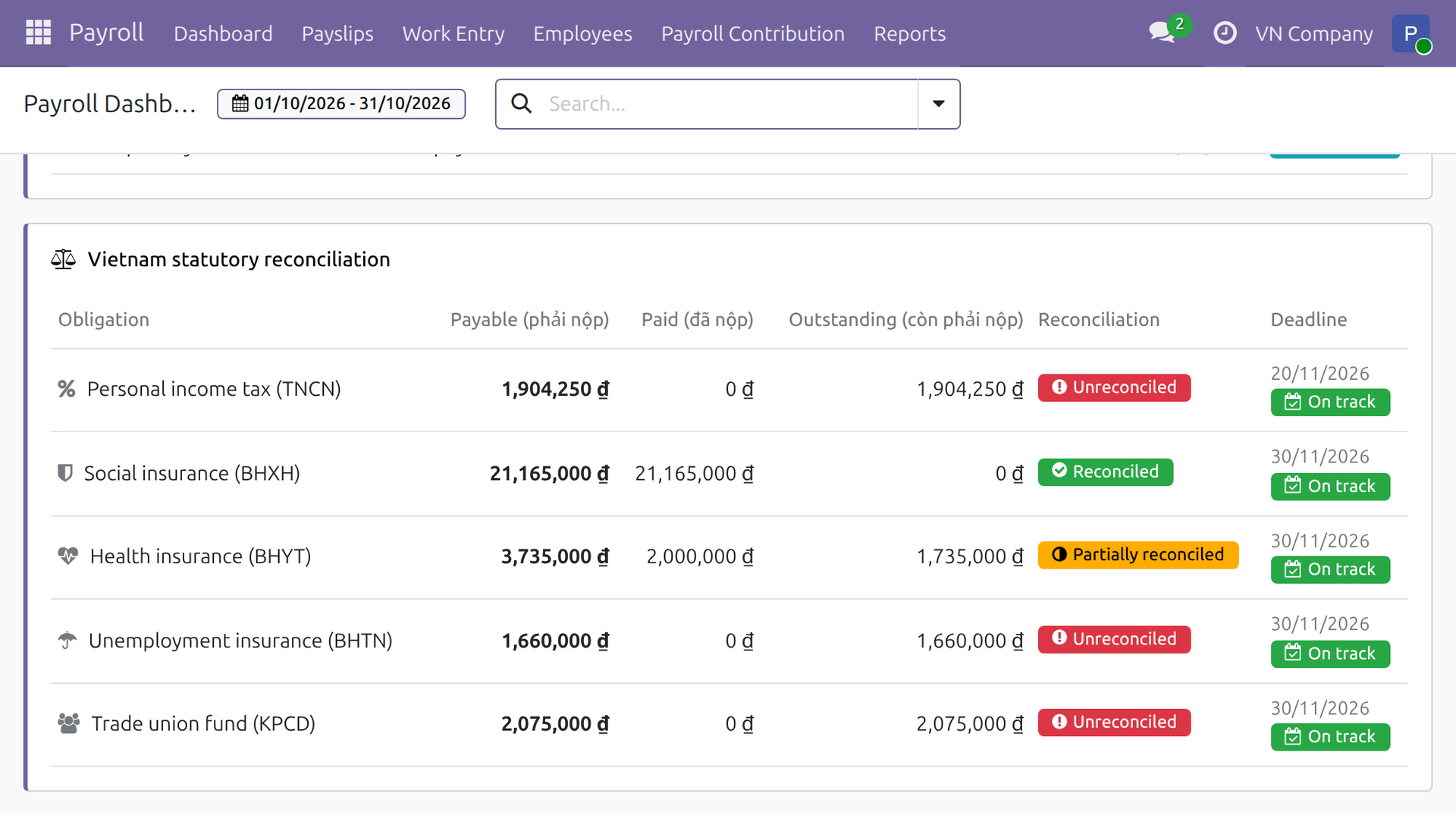
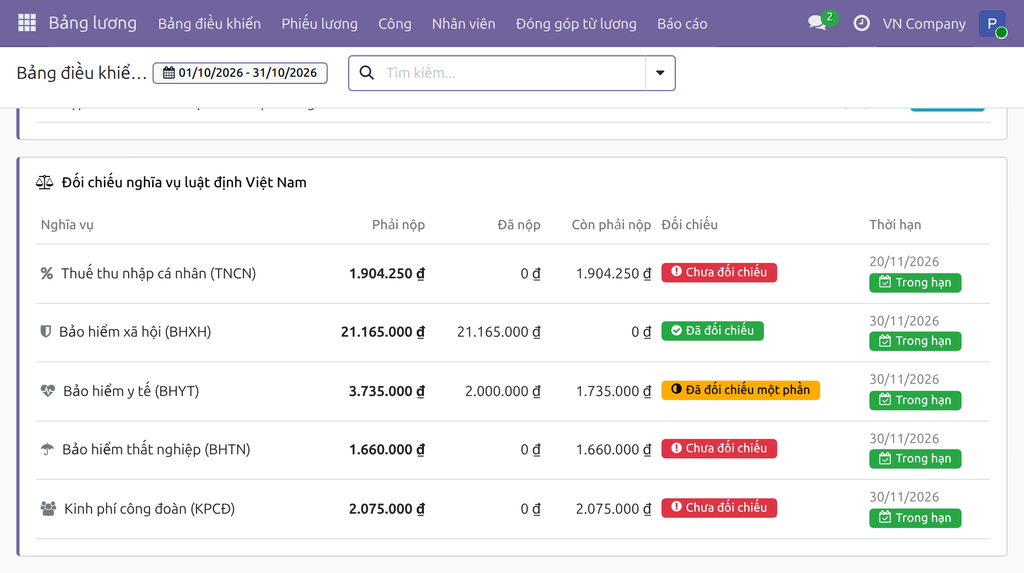
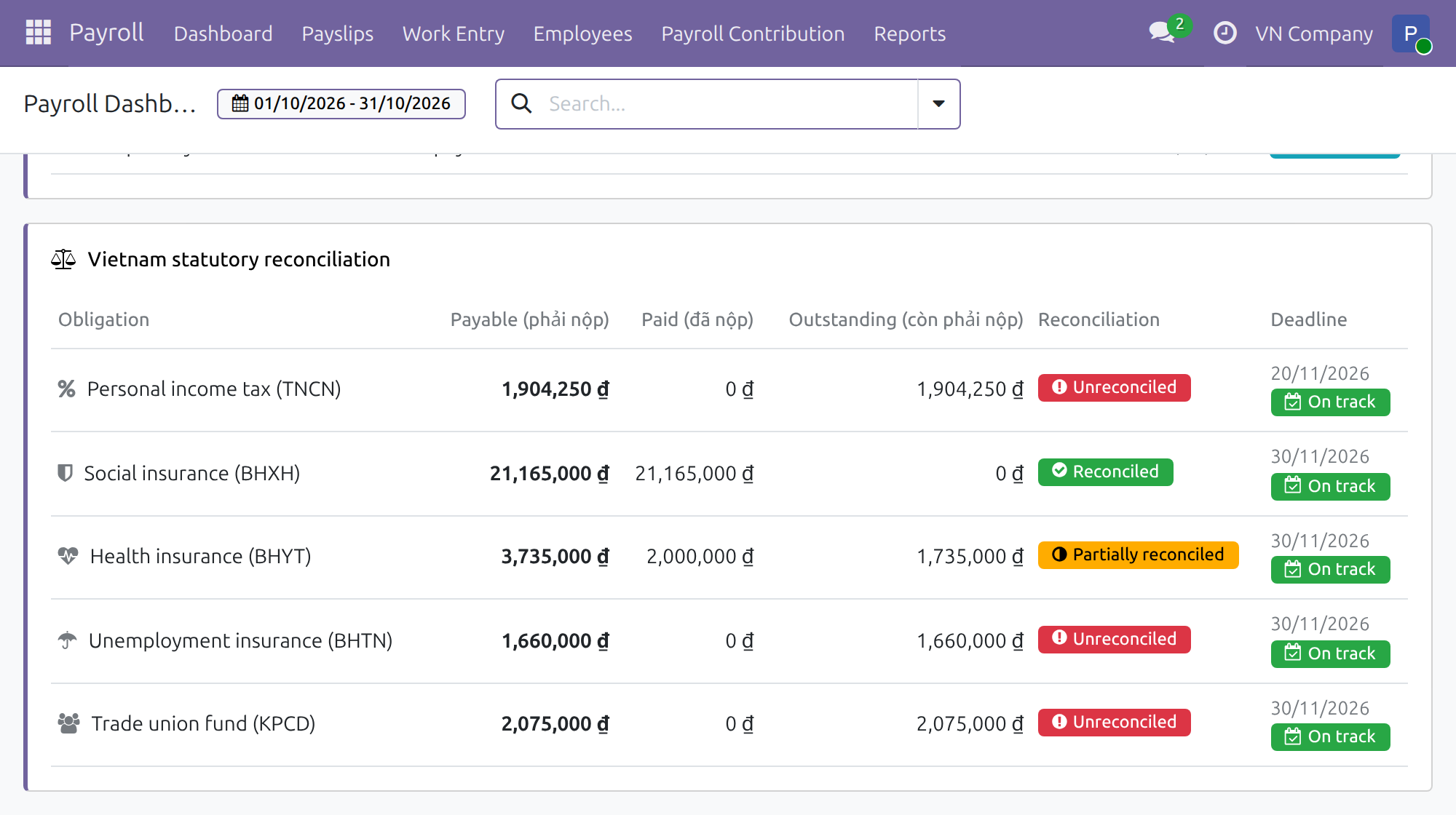
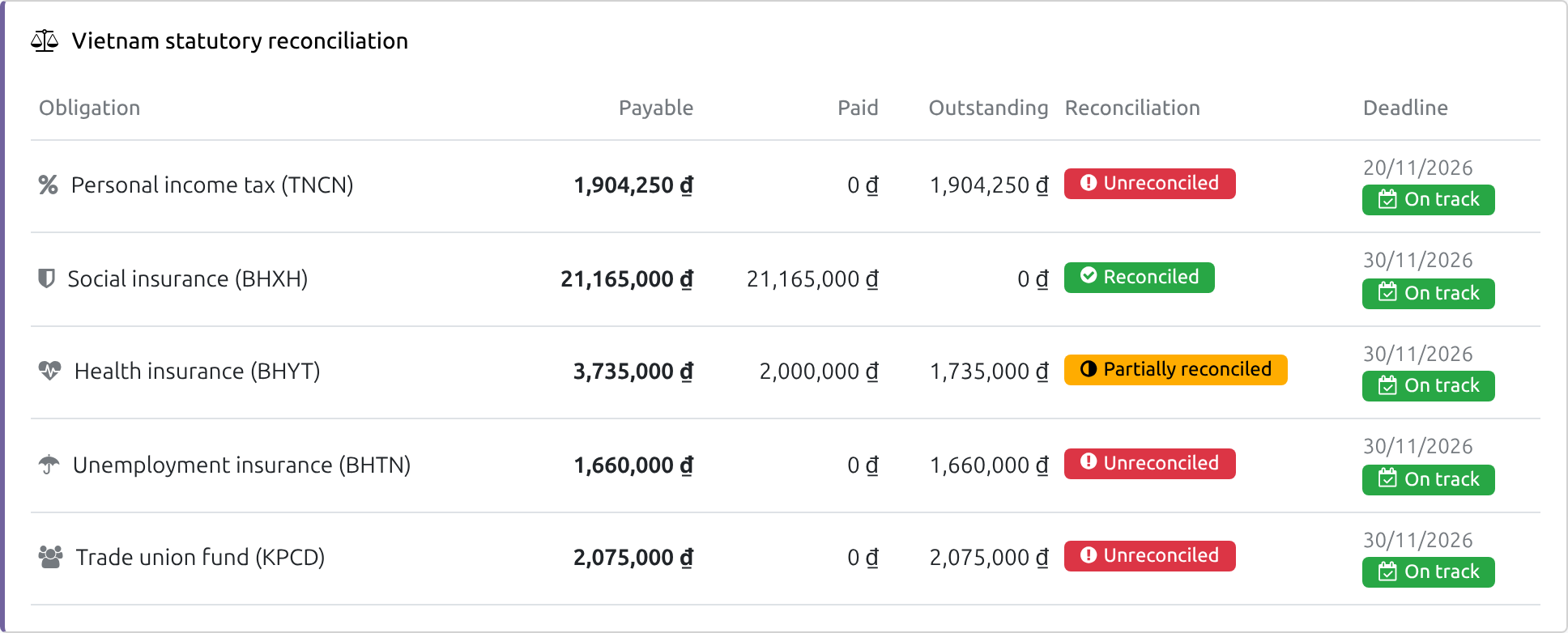
A Payroll Dashboard block, shown to the payroll accountant (a payroll user who also has full accounting features), gives payable, paid and outstanding amounts for income tax, insurance and trade union fund of the period.
Reconciliation status and deadline
Each obligation is Unreconciled, Partially reconciled or Reconciled, with an On track, Due soon or Overdue deadline status.
Applied from day one
Existing Vietnamese companies are set up on install, and companies that load a Vietnamese chart later get the same accounts.
Who it is for
Chief Accountant
Needs payroll entries and statutory payables to be right and traceable. Gains correct entries to review; the payroll accountant, who also holds a payroll right, gains a live view of what is still owed to the authorities.
Payroll Officer
Needs to close the month without accounting questions. Gains validated payslips that post themselves.
Payroll Administrator
Needs the set-up to be simple and auditable. Gains default accounts to review instead of to build.
Finance Director
Needs reliable payroll cost. Gains consistent entries and early warning on obligations.
Best for: Vietnamese companies of any size running payroll and accounting in Odoo.
See every statutory obligation at a glance
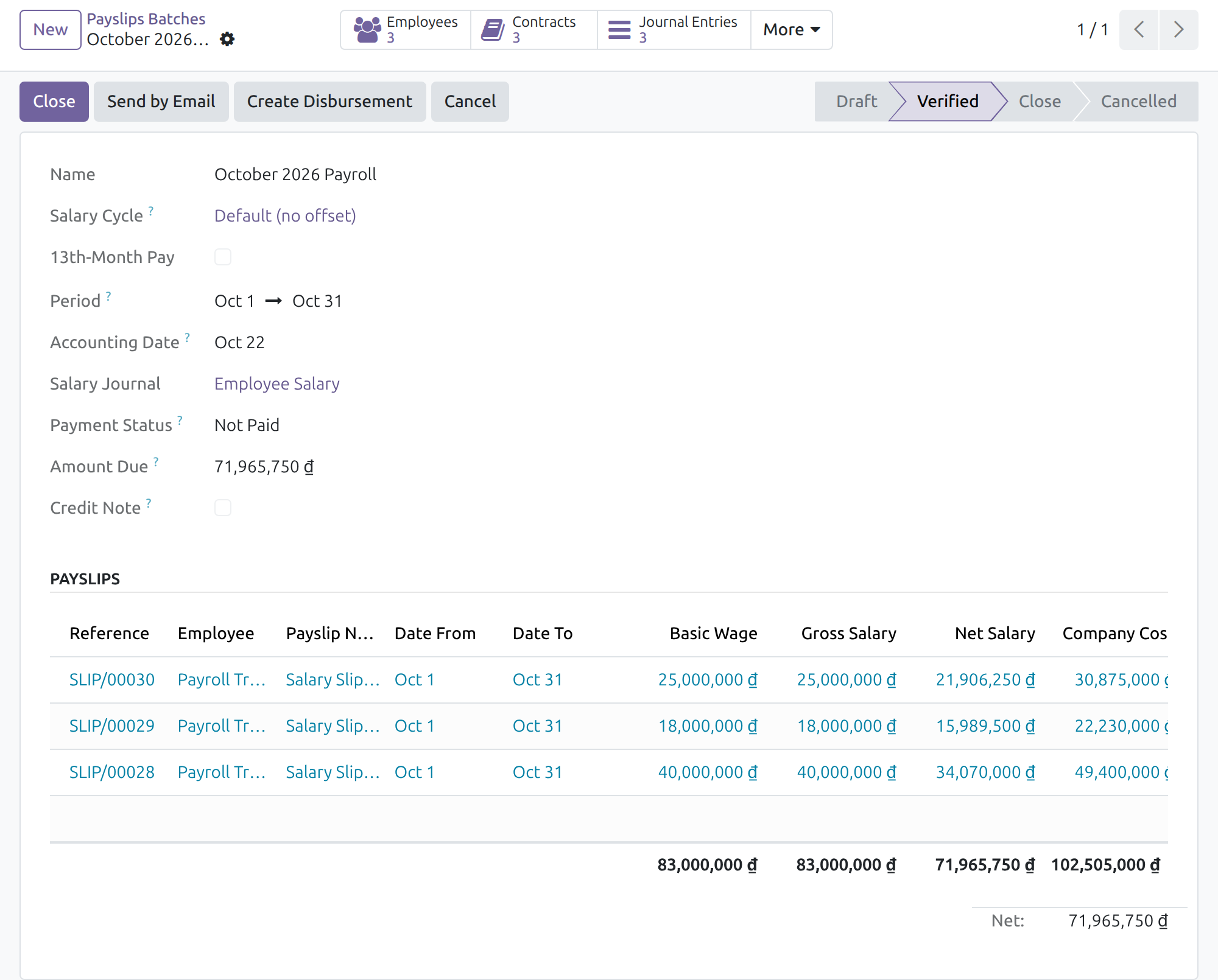
Validate a payslip batch and get its journal entries
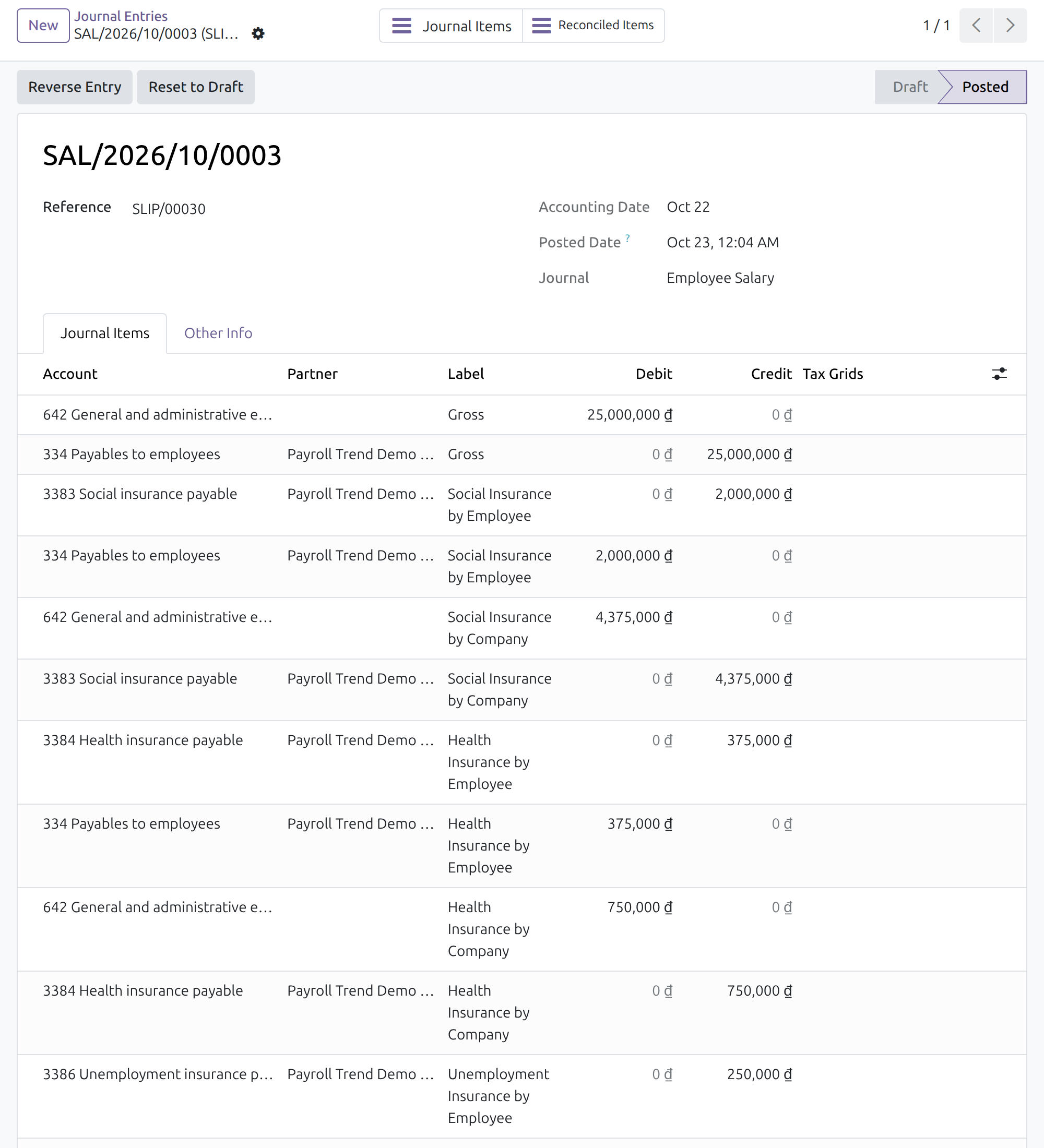
Review the salary journal entry
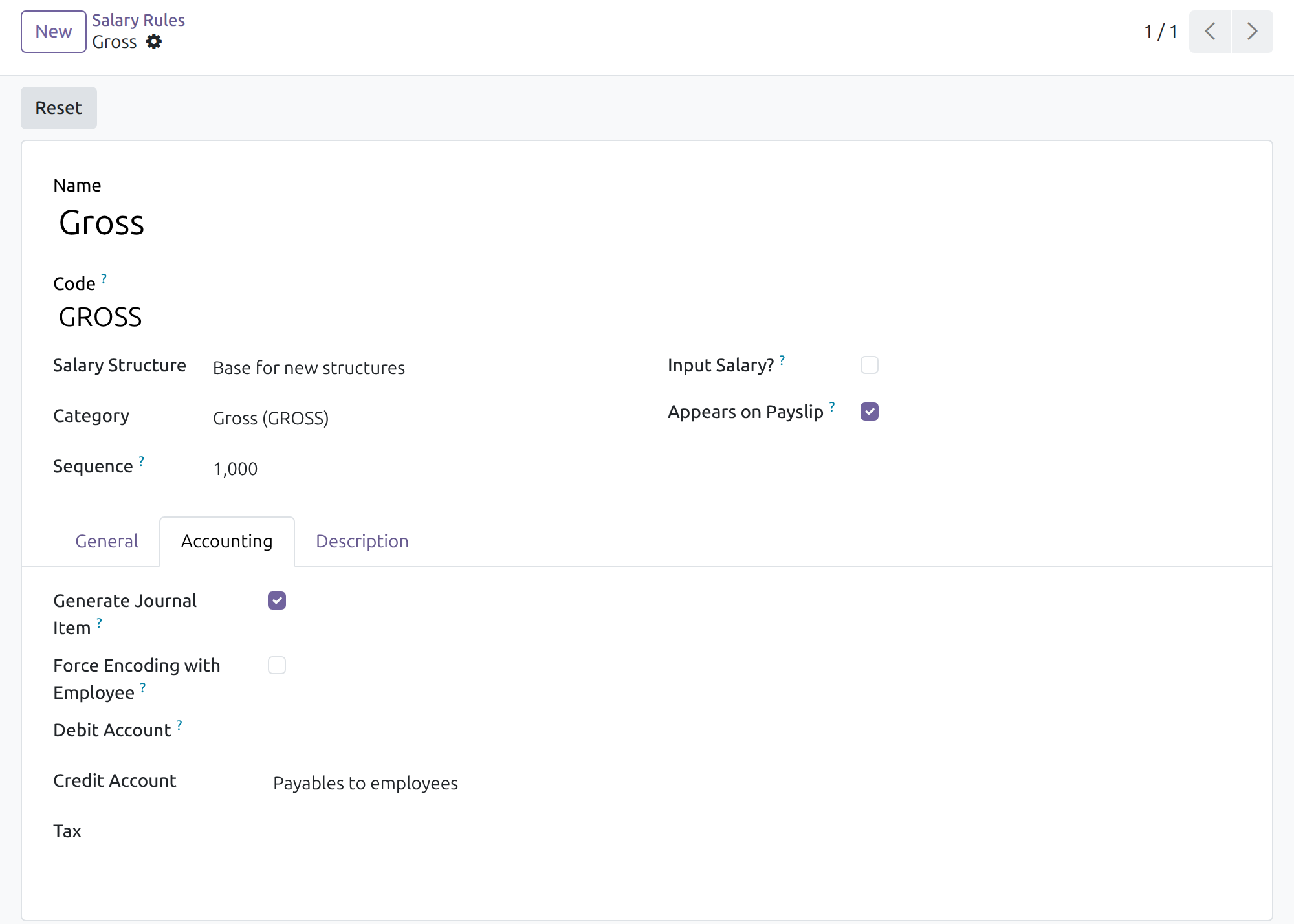
Accounts ready on every salary rule
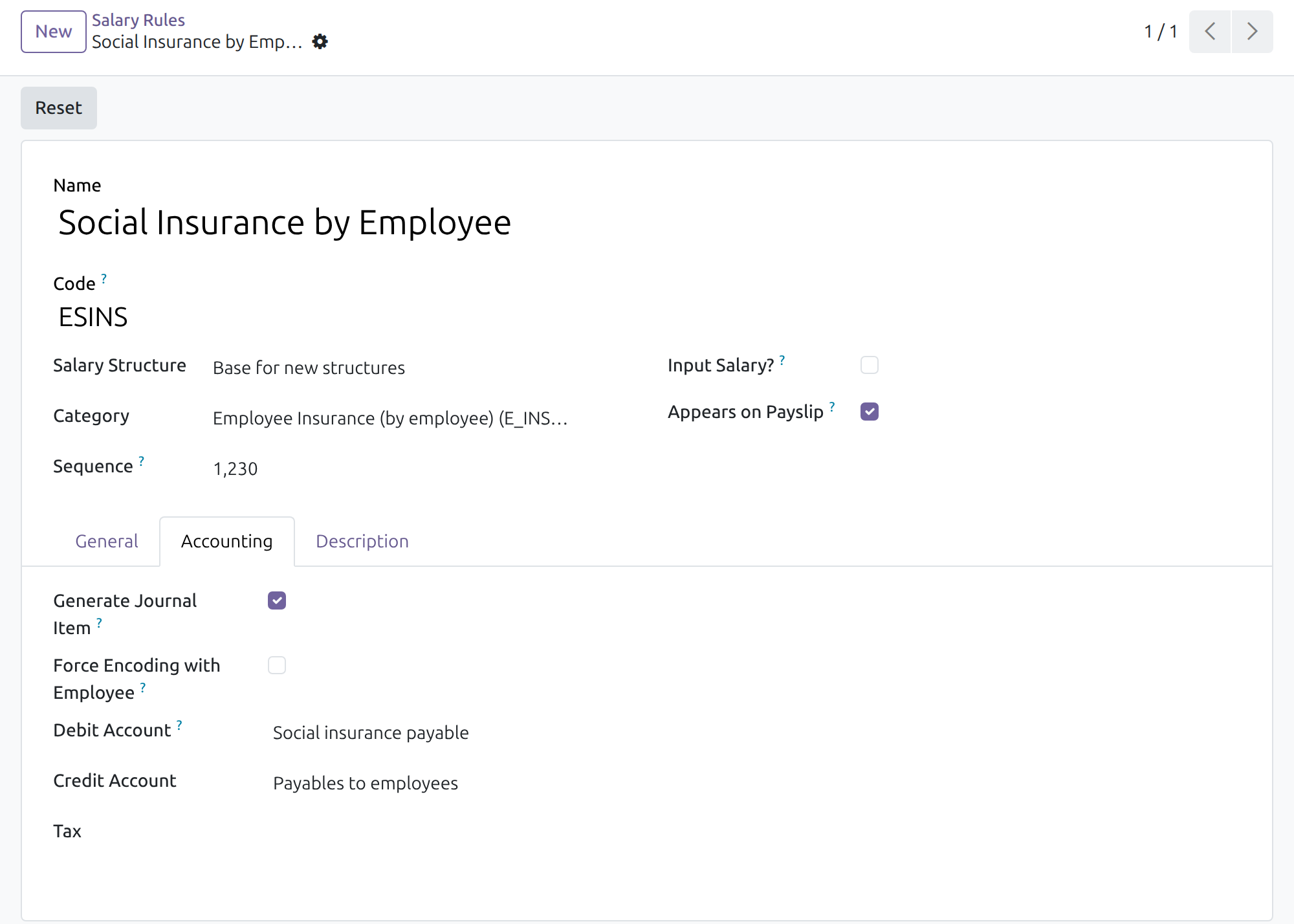
Employee contributions booked on the payable side
See it in action
Watch how payroll entries and statutory obligations are handled in a working environment.
Vietnam Payroll - Accounting Integration
v19demo-int.viindoo.com
Frequently asked questions
Do I have to map accounts myself?
No. Every Vietnamese salary rule comes with default accounts found in your company chart. The Payroll Administrator can still change any of them.
Are rates and contribution ceilings fixed by the software?
No. Rates, bases and ceilings are data kept by the Payroll Administrator in the payroll app; this module only decides where the amounts are posted.
Who sees the reconciliation block?
The people who pay salaries: users who hold both the Payroll Officer access right and an accounting access right with full accounting features (Bookkeeper or Administrator, which come with the optional Accounting & Finance app), in companies that use a Vietnamese chart of accounts. Payroll users without an accounting right and accountants without a payroll right do not see it.
Which account is charged for salaries?
The expense account of the employee's contract, else the one of the department, else account 642 of the company's Vietnamese chart. Departments of a company that uses a Vietnamese chart carry account 642 by default; the payroll accountant can choose another account on the department or the contract.
Is the deadline shown a legal due date?
It is an indicative date counted from the end of the period, to help planning. The accountant confirms the real due date with the applicable regulations.
One entry per payslip or per batch?
Both are possible: choose Per Employee or Aggregate in the payroll accounting settings. In Aggregate mode the consolidated payable line uses the summary partner Phải trả lương nhân viên, created automatically for each company on a Vietnamese chart.
Need help with Vietnam Payroll - Accounting Integration?
For questions, implementation support or consulting, contact Viindoo.
Pre-Sales & Partnership
Contact the sales team- Odoo/Viindoo version and edition.
- Number of users and business scope.
- Other modules in use.
Technical Support
Open a support ticket- Order number or app reference.
- Odoo/Viindoo version and edition.
- Steps to reproduce the issue.
- Screenshots or logs if available.
Technical Requirement
Vietnam Payroll - Accounting Integration
Who this guide is for: the Payroll Administrator who sets the accounting of salary rules up, the Payroll Officer who runs payslip batches, the Accountant who reviews the resulting journal entries, and the payroll accountant who pays salaries and follows the statutory obligations (insurance, trade union fund, personal income tax) withheld from them.
Note
Extends Payroll accounting - see its documentation for the generic payslip accounting flow.
Note
Extends Vietnam Payroll - see its documentation for the Vietnamese salary rules and contribution types.
Overview
Posting payroll to the books by hand is slow and error-prone: every salary rule has to be tied to the right accounts, and the amounts withheld for the authorities have to be followed until they are paid. This module does both for companies using a Vietnamese chart of accounts:
- every Vietnamese salary rule comes with default accounting accounts, so payslips and payslip batches generate correct journal entries without any set-up work;
- the Payroll Dashboard gets a Vietnam statutory reconciliation block that shows, for each withheld obligation, what is payable, what has been paid, what is still outstanding and how close the deadline is.
The process runs in four steps:
- The Payroll Administrator checks the default accounts of the salary rules and the payroll accounting settings (once, at set-up).
- The Payroll Officer verifies the payslips or the payslip batch of the period; the journal entries are generated and posted.
- The Accountant reviews the journal entries.
- The payroll accountant follows the statutory obligations on the dashboard until each one is paid and reconciled.
| Role | What they do | Access right to assign |
|---|---|---|
| Payroll Administrator | Reviews and, if needed, changes the accounts of the salary rules and the payroll accounting settings | Payroll / Administrator; to open the Payroll settings, also Role / Administrator |
| Payroll Officer | Computes and verifies payslips and payslip batches, so that journal entries are generated | Payroll / Officer |
| Accountant | Reviews the journal entries of payroll | Accounting / Bookkeeper (or Accounting / Administrator) |
| Payroll accountant | Pays salaries, follows the statutory reconciliation and sets the expense account of departments | Payroll / Officer together with Accounting / Bookkeeper (or Accounting / Administrator) |
Payroll and accounting stay apart: payroll users do not see accounting, and accountants do not see salaries. The person who pays salaries and follows the reconciliation therefore holds both a payroll access right and an accounting access right.
Note
The accounting access rights Bookkeeper and Administrator give full accounting features. They come with the optional app Accounting & Finance; this module does not require it. Without full accounting features nobody sees the statutory reconciliation block.
Setup (for the Administrator)
Installation
- Open Apps.
- Search for Vietnam Payroll - Accounting Integration.
- Click Install.
The module is installed automatically when a Vietnamese chart of accounts is in use together with payroll accounting. It requires the Vietnam payroll and payroll accounting apps; they are installed with it.
The accounts the salary rules use are the ones of the company's own chart of accounts, found by the leading digits of the account code. Nothing has to be mapped by hand.
Accounting settings
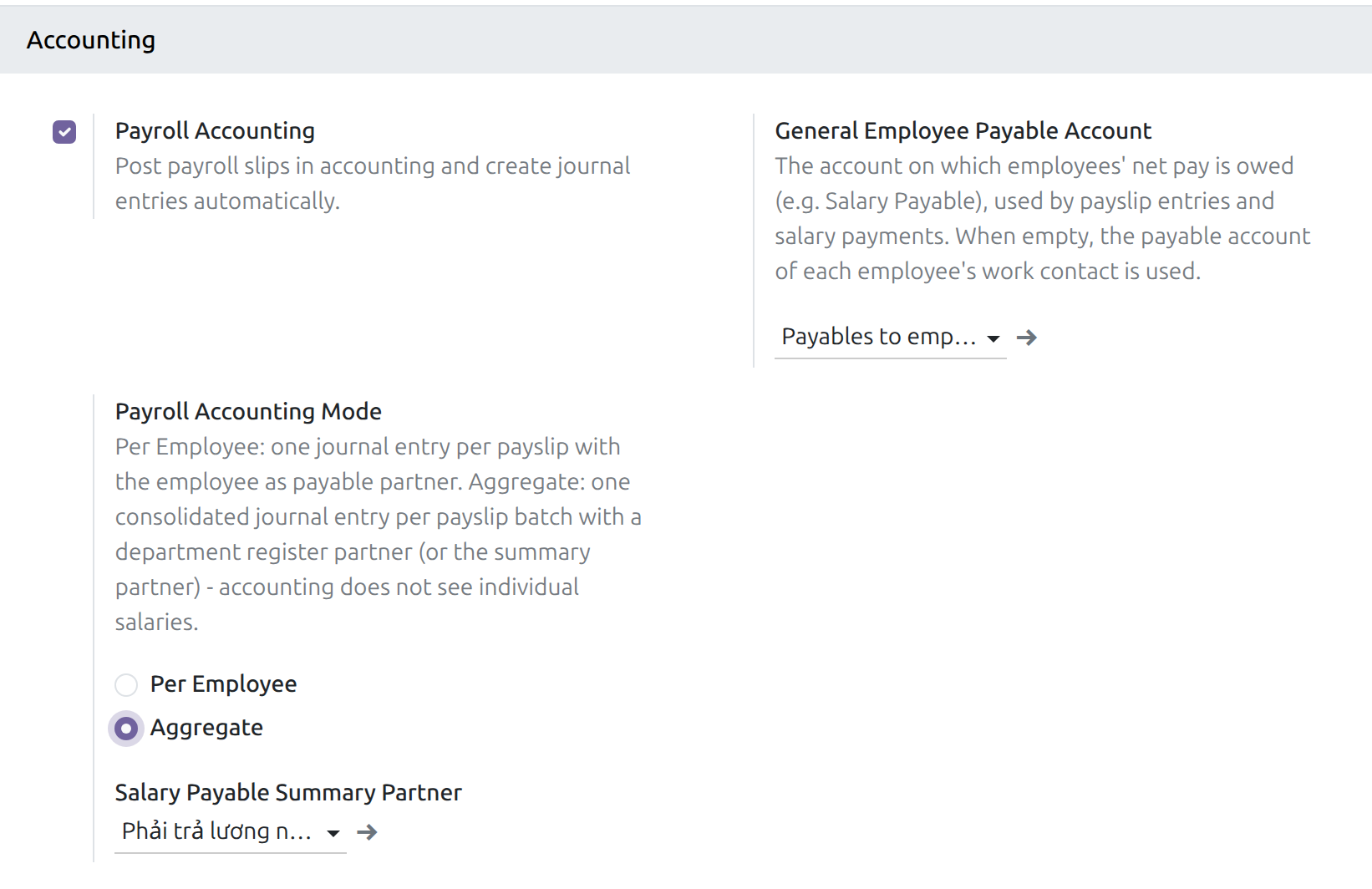
Open Payroll > Configuration > Settings, section Accounting. The settings open for a user who holds the Role / Administrator access right; a Payroll Administrator without it asks that person to make the change. Tick Payroll Accounting to post payslips in accounting, then:
- General Employee Payable Account: the account on which the net pay owed to employees is recorded. When it is empty, the payable account of each employee's work contact is used.
- Payroll Accounting Mode: Per Employee creates one journal entry per payslip with the employee as partner; Aggregate creates one consolidated journal entry per payslip batch.
- Salary Payable Summary Partner (shown in Aggregate mode): the partner of the consolidated payable line when no department register partner applies. Each company that uses a Vietnamese chart gets a partner named Phải trả lương nhân viên automatically; the name is the same in every language.
Expense account of salaries
Gross pay, harmful-work subsidies and the amounts paid by the company are debited to an expense account. The account is taken in this order:
- the Expense Account of the employee's contract, in its Salary Accounting tab;
- the Expense Account of the employee's department;
- for a company that uses a Vietnamese chart, account 642 (General and administrative expenses): the active account whose code starts with 642, the one with the shortest code when several match.
Departments of a company that uses a Vietnamese chart already carry account 642, new departments included, so nothing has to be set up for a payslip to be accounted; a department whose account has been chosen keeps it. To charge another account, the payroll accountant (Payroll / Officer together with Accounting / Bookkeeper) changes it:
- for a department: open Employees > Departments, open the department and pick the account in the Expense Account field of the Accounting section;
- for one employee: open Payroll > Employees > Employee Records, open the employee and pick the account in the Expense Account field of the Salary Accounting tab.
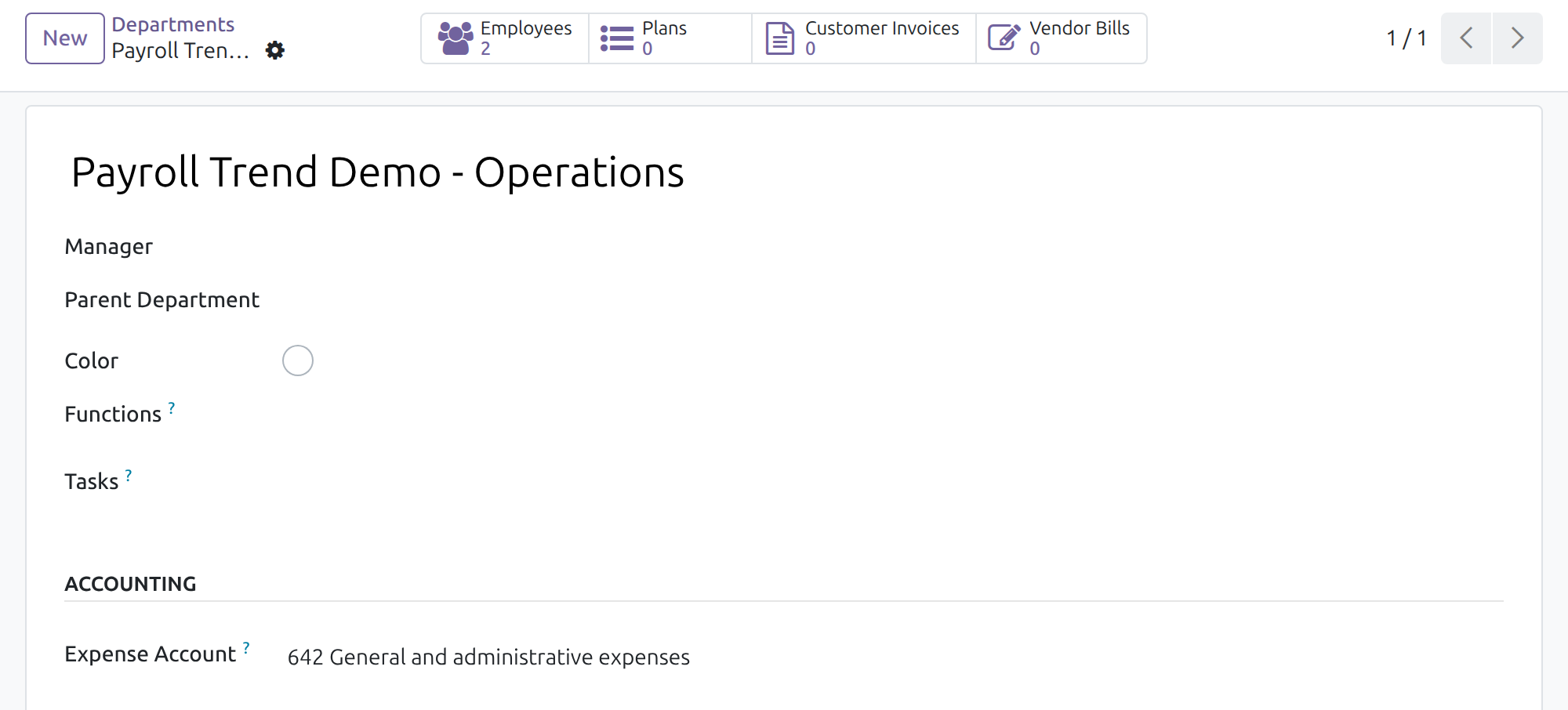
An accountant without a payroll access right sees the department's expense account but cannot change it, and cannot open contracts.
When no expense account can be found at all (the company chart has no active account starting with 642 and neither the contract nor the department names one), verifying the payslips is refused with a message saying that the journal entry cannot be balanced; the batch stays in draft and nothing is posted. To go on:
- set the expense account on the department or on the contract, as above; or
- ask the Payroll Administrator to set the Debit Account of the salary rule named in the message (see Payroll Administrator: check the accounts of the salary rules);
- click Verify Payslips again.
Once payslips of a period are confirmed, the accounting fields of the contract can no longer be changed. To apply a change to them, cancel the batch (see Payroll Officer: verify the batch and generate the entries), make the change, then compute and verify the batch again.
Giving people access
In Settings > Users & Companies > Users, give each person the access right of the table in the Overview. What each person sees depends on the rights held:
| Person holds | Payroll Dashboard | Journal Entries button of a batch | Statutory reconciliation block |
|---|---|---|---|
| Payroll / Officer only | Shown, without the block | Not shown | Not shown |
| Payroll / Administrator only | Shown, without the block | Not shown | Not shown |
| Accounting / Bookkeeper only | A preview with sample figures; no payslip, payslip batch or contract opens | Not applicable: entries open from Accounting > Journal Entries | Not shown |
| Payroll / Officer and Accounting / Bookkeeper | Shown, with the block | Shown | Shown |
To let a payroll user follow the reconciliation, add Accounting / Bookkeeper to the user; to let an accountant follow it, add Payroll / Officer, which also opens payslips and salaries. The company decides who gets both.
Note
The block appears only for companies that use a Vietnamese chart of accounts.
Payroll Administrator: check the accounts of the salary rules
Salary rules are data of the company. The module fills in the accounts by the leading digits of the account code of the company's chart; the Payroll Administrator can open any rule and change them.
- Open Payroll > Configuration > Payroll Entry > Salary Rules.
- Remove the default filter and open a rule, for example Gross.
- Open the Accounting tab. Generate Journal Item is ticked and the Debit Account and Credit Account fields show the accounts used.
Default accounts by account code prefix:
| Salary rule | Debit account | Credit account |
|---|---|---|
| Gross | Expense account of the employee's contract | Employee payable (334) |
| Social insurance by employee / by company | Employee side: social insurance payable (3383) | Social insurance payable (3383); employee side also employee payable (334) |
| Health insurance by employee / by company | Employee side: health insurance payable (3384) | Health insurance payable (3384); employee side also employee payable (334) |
| Unemployment insurance by employee / by company | Employee side: unemployment insurance payable (3386; 3385 on the C133 chart) | The same account; employee side also employee payable (334) |
| Labor union fee by employee / by company | Employee side: trade union fund payable (3382) | The same account; employee side also employee payable (334) |
| Personal income tax | Personal income tax payable (3335) | Employee payable (334) |
| Harmful subsidies | Expense account of the employee's contract | Employee payable (334) |
The accounts are found by the leading digits of the code in the company's own chart; the account names and longer codes can differ from one chart to another.
Rules for amounts paid by the employee carry a negative amount: the entry therefore reduces the employee payable and increases the statutory payable. A rule for an amount paid by the company has no debit account of its own; the cost is booked on the expense account of the employee's contract.
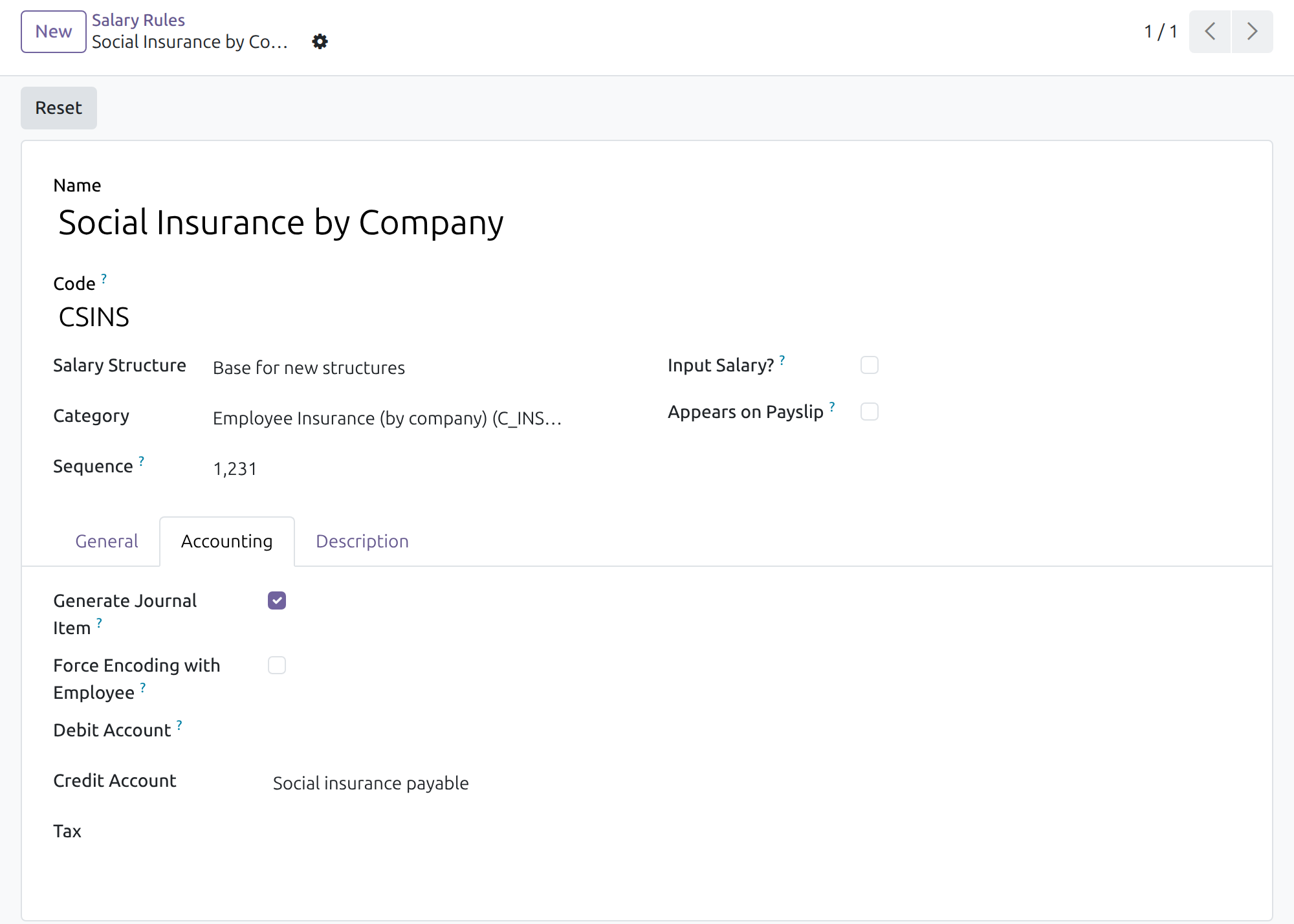
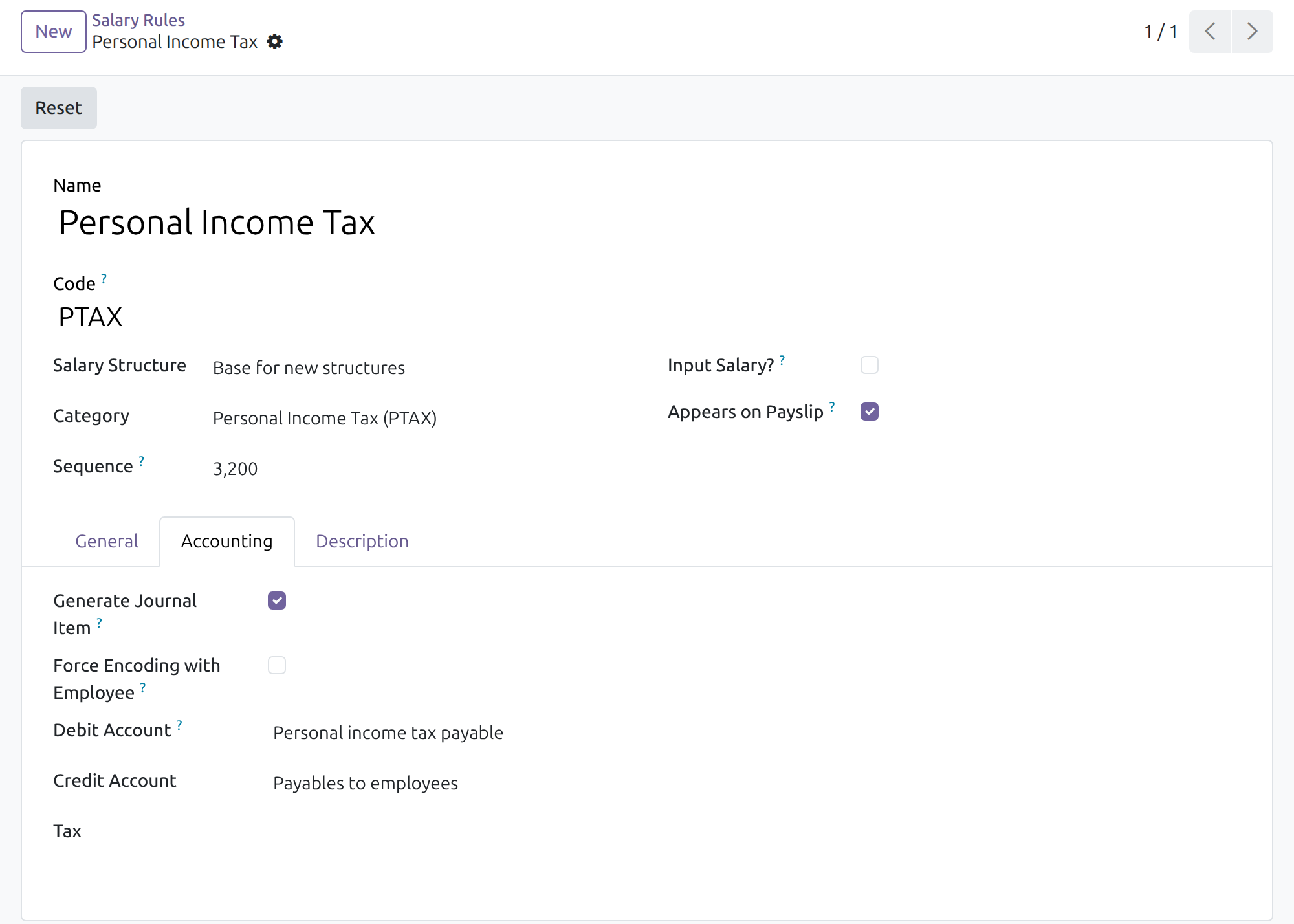
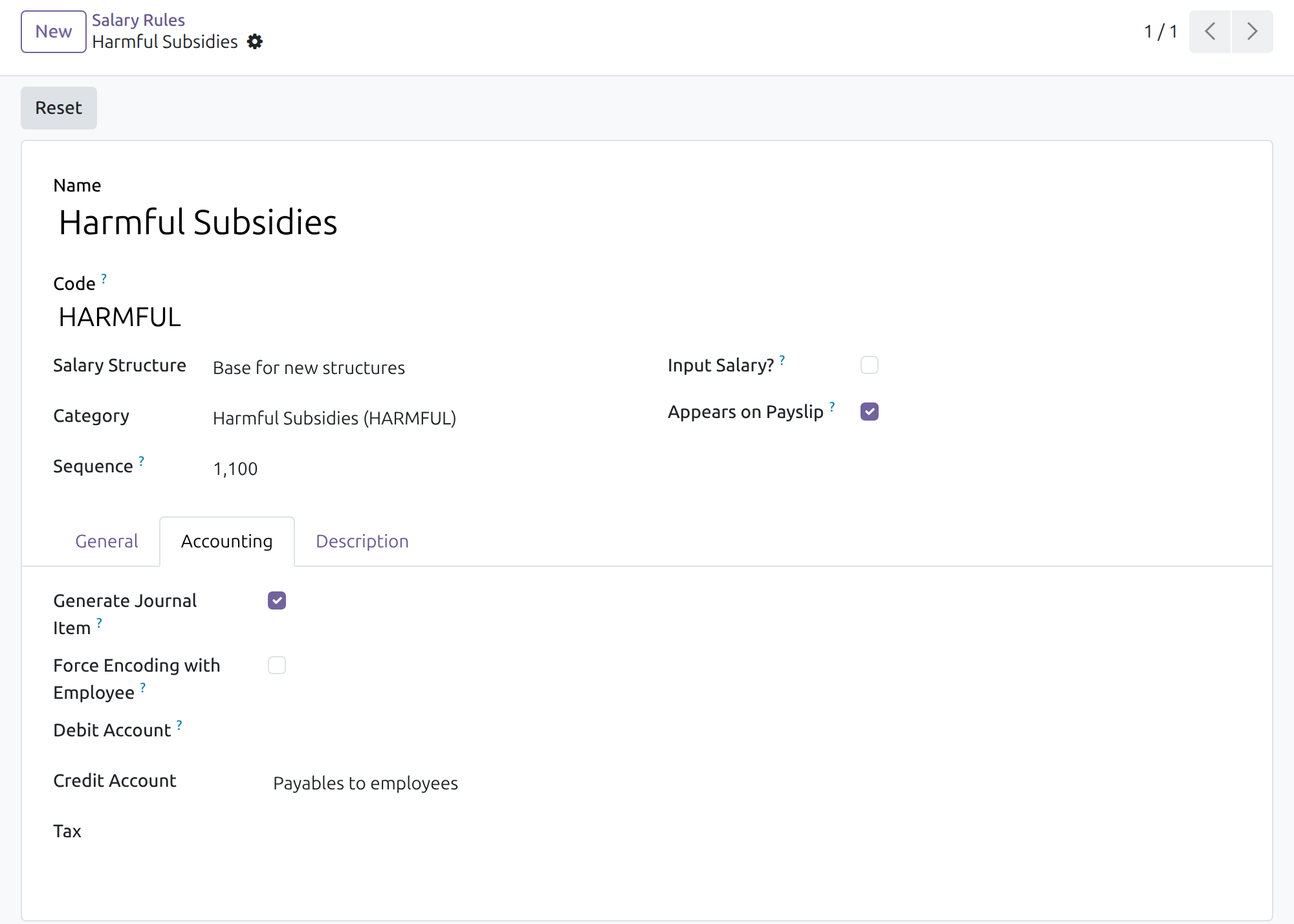
Rates, bases and ceilings of the contributions are not set here: they are data kept by the Payroll Administrator in the contribution types of the Vietnam payroll app.
Payroll Officer: verify the batch and generate the entries
- Open Payroll > Payslips > Payslips Batches and open the batch of the period.
- Click Compute Payslip Batch, then Verify Payslips. Optionally set the Accounting Date of the batch first; it is the date the entries carry.
- The entries are generated and posted. The Journal Entries button of the batch shows how many were generated; only a user who also holds an accounting access right sees this button.
In Per Employee mode there is one entry per payslip; in Aggregate mode one entry for the whole batch. The entry is posted on the accounting date; an entry dated later than today stays in draft and is posted automatically on its date.
To redo a batch, click Cancel (entries already posted are reversed by posted counter-entries), then Set to Draft, correct what is wrong, and compute and verify it again.
Accountant: review the journal entries
- Open Accounting > Journal Entries (the payroll accountant can also use the Journal Entries button of the batch).
- Open an entry of the salary journal. The journal items show the cost, the employee payable and each statutory payable on the accounts described above.
Payroll accountant: follow the statutory reconciliation
The block is shown to a user who holds Payroll / Officer together with Accounting / Bookkeeper (or Accounting / Administrator), in a company that uses a Vietnamese chart. A payroll user without an accounting right, and an accountant without a payroll right, do not see it.
- Open Payroll > Dashboard and choose the period in the control panel.
- In the Company zone, find Vietnam statutory reconciliation.
For each obligation (personal income tax, social insurance, health insurance, unemployment insurance, trade union fund) the block gives:
- Payable: the total withheld and accrued by the posted salary entries of the period;
- Paid: the part already settled;
- Outstanding: what remains to be paid to the authority;
- Reconciliation: Unreconciled (nothing settled), Partially reconciled or Reconciled (fully settled);
- Deadline: an indicative date counted from the end of the period, with the status On track, Due soon or Overdue. A settled obligation is always on track.
An obligation is settled when its payment is recorded against the payable lines of the salary entries (a payment journal entry reconciled with them). The block updates the next time the dashboard opens and counts posted entries only.
Note
The deadline is an indication to help planning. The payroll accountant confirms the real due date with the regulations that apply to the company.
Note
Until the period has a posted salary entry, the block shows illustrative sample figures so the layout can be seen. Real figures replace them as soon as payslips are accounted.
This software and associated files (the "Software") may only be used (executed, modified, executed after modifications) if you have purchased a valid license from the authors, typically via Odoo Apps, or if you have received a written agreement from the authors of the Software (see the COPYRIGHT file).
You may develop Odoo modules that use the Software as a library (typically by depending on it, importing it and using its resources), but without copying any source code or material from the Software. You may distribute those modules under the license of your choice, provided that this license is compatible with the terms of the Odoo Proprietary License (For example: LGPL, MIT, or proprietary licenses similar to this one).
It is forbidden to publish, distribute, sublicense, or sell copies of the Software or modified copies of the Software.
The above copyright notice and this permission notice must be included in all copies or substantial portions of the Software.
THE SOFTWARE IS PROVIDED "AS IS", WITHOUT WARRANTY OF ANY KIND, EXPRESS OR IMPLIED, INCLUDING BUT NOT LIMITED TO THE WARRANTIES OF MERCHANTABILITY, FITNESS FOR A PARTICULAR PURPOSE AND NONINFRINGEMENT. IN NO EVENT SHALL THE AUTHORS OR COPYRIGHT HOLDERS BE LIABLE FOR ANY CLAIM, DAMAGES OR OTHER LIABILITY, WHETHER IN AN ACTION OF CONTRACT, TORT OR OTHERWISE, ARISING FROM, OUT OF OR IN CONNECTION WITH THE SOFTWARE OR THE USE OR OTHER DEALINGS IN THE SOFTWARE.